

Niche Tech Tools & Services (eShopAid, PixelDrain, RepairShopr)
Retail stores, freelancers and repair businesses use different digital tools to handle everyday work. A retailer needs accurate sales and stock records. A freelancer may need a simple way to send large files. A repair shop needs to track customer details, repair jobs, parts and payments.
This guide to Niche Tech Tools & Services (eShopAid, PixelDrain, RepairShopr) looks at three services built for different tasks. eShopAid is retail management and point of sale software from Wondersoft. PixelDrain is an online file hosting and sharing service. RepairShopr is repair shop management software operated by Syncro Technologies, Inc.
These products are not direct substitutes. The right choice depends on whether you need to run a retail operation, share files online or manage a repair business. The sections below explain what each service does, who may benefit from it and what to check before signing up.
Quick Overview of the Three Tools
| Tool | Category | Main use | Potential users |
| eShopAid | Retail POS and management software | Billing, inventory and store operations | Retailers and store managers |
| PixelDrain | File hosting and sharing | Upload files and share links | Students, freelancers and digital creators |
| RepairShopr | Repair shop management software | Customer records, repair tickets and billing | Computer, phone and electronics repair shops |
The products solve separate problems. Comparing them as if they were competing apps would be misleading. A more useful comparison is to look at the task each one is designed to handle.
What Is eShopAid?
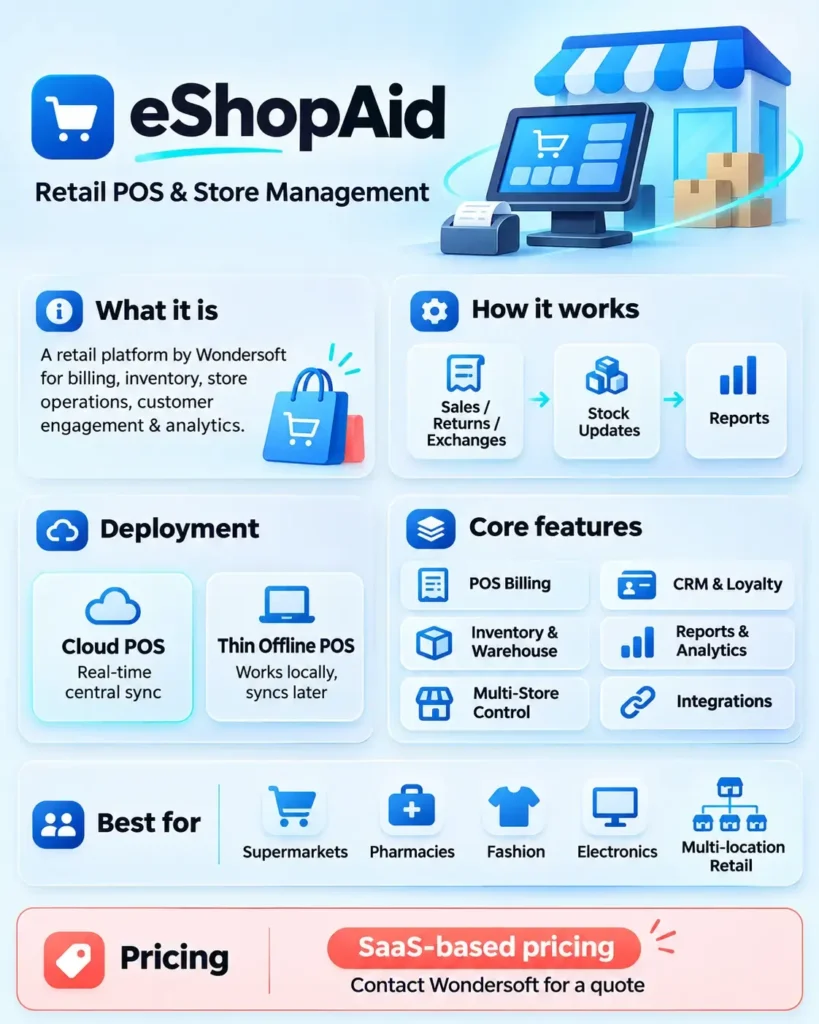
eShopAid is a retail point of sale and management platform developed by Wondersoft. The company describes it as a connected system for billing, inventory, store operations, customer engagement and analytics. Its product information lists support for single stores and retail chains, along with cloud and thin offline deployment options.
How Does eShopAid Work?
A retailer can use eShopAid at the checkout counter to record sales, returns and exchanges. Stock information can then be used to monitor product availability across stores and warehouses. Managers can review sales and inventory reports instead of collecting figures from separate systems.
Wondersoft describes two deployment models. With its online cloud POS, transactions are saved to a central server in real time, so store operations depend on an internet connection. With thin offline POS, selected store functions run locally and sync with the central system when connectivity returns. Retailers should discuss the best setup with the vendor based on store volume and internet reliability.
Key eShopAid Features
POS Billing and Store Transactions
The POS module supports everyday checkout work, including sales, returns and exchanges. A retailer should confirm that the system supports its payment methods, receipt printers, barcode scanners and other checkout devices.
Inventory and Warehouse Management
Inventory tools help teams check stock levels, record stock movement and manage transfers between locations. The wider Wondersoft inventory offering also describes warehouse workflows such as goods receipt, picking, dispatch, inter store transfers and stock alerts. Confirm which functions are included in the eShopAid configuration being considered.
Multi Store Management
Retail chains can use centralized information to monitor sales and stock across branches. This can help head office teams compare store activity and coordinate stock movement. Ask how user roles, branch permissions and consolidated reporting will work for your organization.
Customer Management and Loyalty
eShopAid lists CRM and loyalty capabilities for customer profiles, purchase history and loyalty programs. Retailers can use this information to understand customer activity and plan relevant offers. The exact campaign and loyalty functions should be checked during a product demonstration.
Reports, Analytics and Integrations
The platform lists sales, inventory and customer reporting. Wondersoft also names integrations with ERP systems such as SAP, Oracle and Microsoft Dynamics, and commerce platforms such as Shopify and Magento. Integration availability can depend on the connector, project scope and configuration, so confirm the required data flow before purchase.
Who Should Consider eShopAid?
eShopAid may be worth evaluating for supermarkets, pharmacies, fashion retailers, electronics stores, footwear businesses and other retailers with one or more locations. Wondersoft also describes support for specialty retail, health and beauty, food and beverage, home décor and pet supplies.
Benefits and Things to Check
- A connected view of billing, inventory and store operations.
- Options for online and thin offline store deployment.
- Tools for multi store visibility and stock movement.
- Customer records, loyalty functions and business reports.
- Confirm implementation, hardware, training and integration costs with Wondersoft.
- Ask for a demonstration using your own retail workflows and sample data.
eShopAid Pricing
Wondersoft does not publish a standard price on its eShopAid FAQ. The company says eShopAid is offered on a software as a service basis and asks retailers to contact its sales team for pricing. Request a quote that explains licensing, setup, hardware, support, integrations and any recurring charges.
What Is PixelDrain?
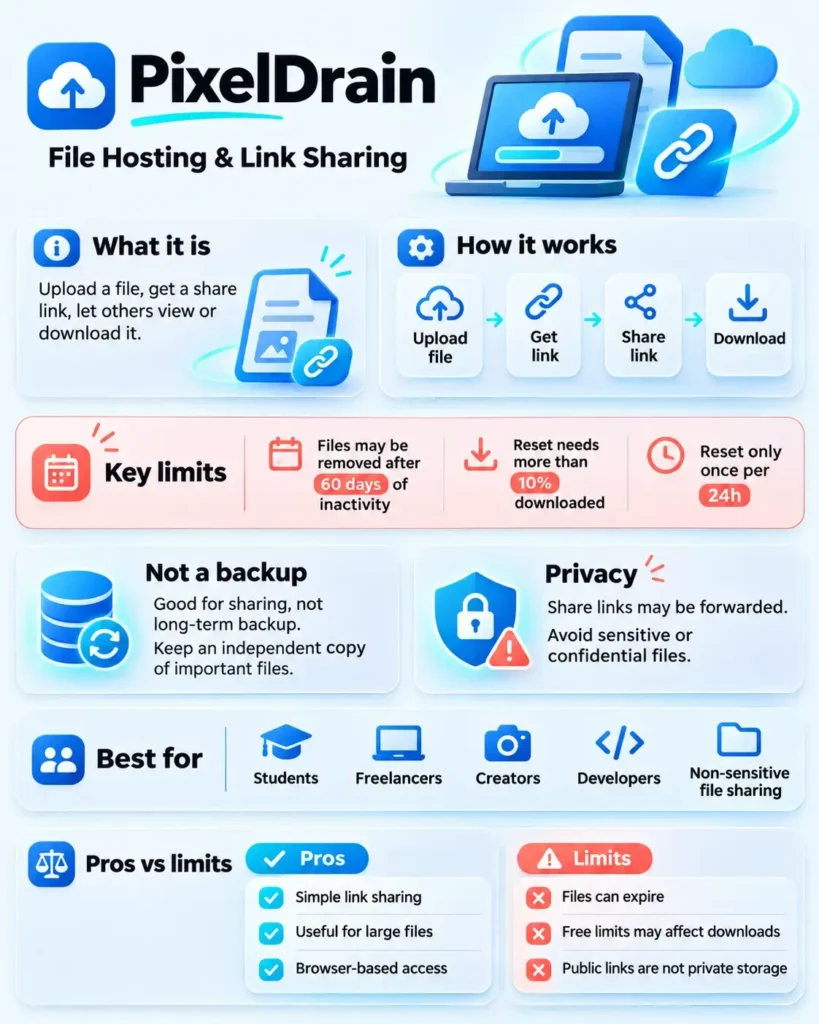
PixelDrain is an online file hosting and sharing service. Users upload a file and share a link so another person can view or download it. This can be useful when an attachment is too large for email or when a file needs to be shared through a simple web link.
How Does PixelDrain Work?
- Open the PixelDrain website.
- Choose a file from your device and start the upload.
- Wait for the upload to finish.
- Copy the link provided for the file.
- Send the link to the person who needs the file.
The recipient can use the link while the file remains available and within the service rules. Before sharing, check whether the link exposes information that should remain private.
PixelDrain File Retention and Download Limits
PixelDrain’s official Q&A says regular files are removed if they have not been accessed for 60 days. The timer is reset only when more than 10 percent of the file is downloaded in a single request. The timer cannot be extended more than once within a 24 hour period. Simply opening a page or making a very small partial download may not qualify.
This rule matters if you share a file that people may need months later. Do not assume that a link will remain available forever. Keep another copy of important files and check the service’s current limits before using it for a public download.
File Sharing Is Not the Same as Backup
A file hosting link makes a file available online. A backup plan is meant to protect data if the original is lost, damaged or deleted. Those are different jobs. PixelDrain’s own FAQ says the free file sharing service is intended for public sharing, not long term backup, and points users who need storage toward its Filesystem option.
Even when using a storage feature, keep a separate copy of important data. For business files, use a backup process that includes more than one copy and test that files can be restored.
Privacy and Safe Sharing
Treat a share link as something that may be forwarded. Do not upload confidential customer records, identity documents or sensitive business files unless you have reviewed the service’s current privacy terms and are satisfied with the controls. Use a service designed for protected business storage when access controls, audit records or contractual privacy terms are required.
Who May Find PixelDrain Useful?
- Students sharing class materials or project files.
- Freelancers sending work files to clients.
- Creators sharing images, audio or video.
- Developers transferring files between collaborators.
- People who need a straightforward file link for non sensitive content.
PixelDrain Benefits and Limitations
| Potential benefits | Limitations to consider |
| Link based file sharing | Files may expire after inactivity |
| Useful for sending digital files | Free transfer limits can affect downloads |
| Recipients can access an available file through a browser | A public link should not be treated as private storage |
| A separate Filesystem option is described for storage use | Keep an independent backup of important files |
What Is RepairShopr?
RepairShopr is cloud based repair shop management software operated by Syncro Technologies, Inc. The company’s privacy policy and service agreement identify Syncro Technologies, Inc. as the organization operating the RepairShopr service.
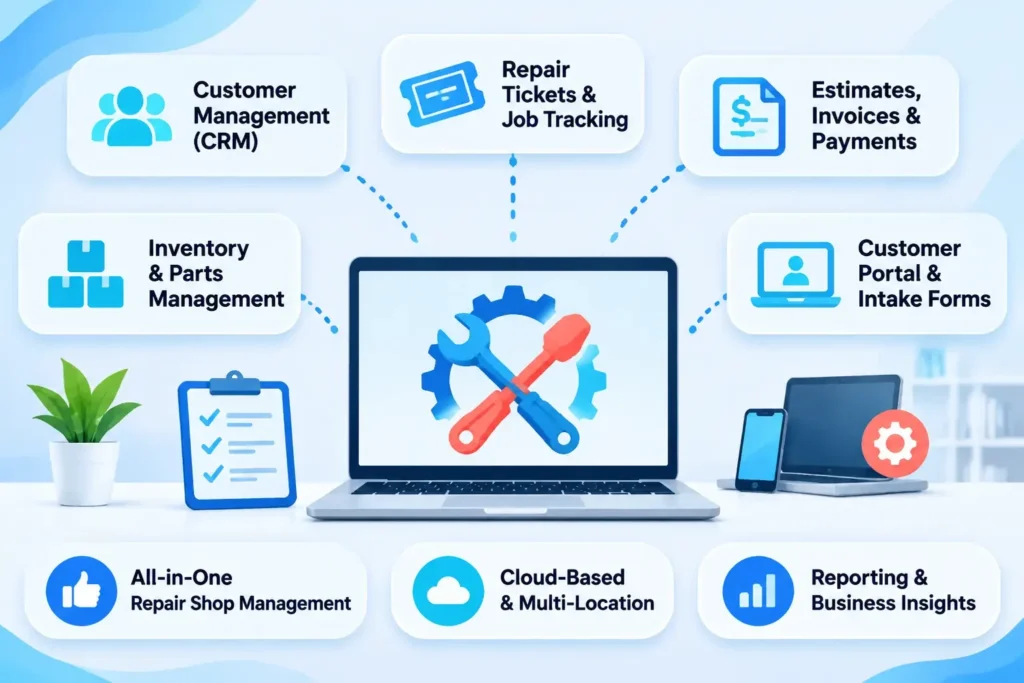
The platform is designed to help repair businesses manage customer information, repair tickets, estimates, invoices, inventory and point of sale activity. It can bring several parts of a repair job into one workflow.
How Does RepairShopr Work?
Imagine a customer brings a laptop to a repair shop because it shuts down without warning. Staff can create a customer record, open a ticket, describe the fault, assign the job to a technician, record progress, prepare an estimate and issue an invoice when the work is finished.
Keeping the job details together helps staff see what has happened and what still needs attention. The exact workflow depends on how the shop configures ticket statuses, forms and staff permissions.
Key RepairShopr Features
Customer Management and CRM
The CRM stores customer details, notes and contact history. Repair Shopr’s feature page also describes links between customers, estimates, invoices and tickets, along with email and SMS communication.
Repair Ticket Management
Tickets organize incoming repair jobs. Staff can filter them by status, problem type, customer or assigned technician. The platform also describes progress updates, time tracking, ticket notes, file attachments and links between parts orders and repair jobs.
Customer Portal and Intake Forms
The customer portal can show repair status, invoice history and estimates for approval. Custom intake forms and digital signatures can help document the condition of a device and the customer’s agreement when a repair is checked in.
Estimates, Invoices and Payments
RepairShopr supports estimates that customers can approve or decline, and approved work can be converted into an invoice. Its feature page lists payment links, recurring invoicing, payment types and checkout tools. Check supported payment processors and fees for your location before relying on a particular payment method.
Inventory, Parts and Point of Sale
Repair shops use inventory tools to track replacement parts, stock levels, purchase orders and reorder needs. RepairShopr also describes barcode labels, stock reports, parts orders linked to tickets and a POS system for walk in sales. These features may help a shop that sells accessories as well as repair services.
Marketing, Integrations and Reporting
The platform lists automated customer follow ups, campaign tools, integrations and reports covering sales, inventory, customers and tickets. Its feature page names integrations such as QuickBooks, Stripe, PayPal, Authorize.net and Google Calendar. Check current availability and any extra fees before selecting a plan.
Who Should Consider Repair Shopr?
RepairShopr may suit computer and laptop repair shops, mobile phone repair businesses, electronics repair stores and some IT service providers. Businesses should check whether its ticketing and retail workflows match the way they accept devices, order parts, bill customers and manage technicians.
RepairShopr Pricing
The official US pricing page currently lists three plans. The prices below are the monthly equivalent shown for annual billing and the month to month price. Pricing can change, so confirm the live page before subscribing.
| Plan | Annual billing | Monthly billing | Published allowance |
| Starter | $59.99 per month | $69.99 per month | 1 user, 1 location, 75 tickets and invoices per month |
| Repair Shop | $129.99 per month | $139.99 per month | 10 users, 1 location, unlimited tickets and invoices |
| Big Chain | $139.99 per month | $149.99 per month | 10 users, 2 or more locations, unlimited tickets and invoices |
The pricing page notes that SMS allowances vary by plan. US postal mail is an additional paid service that requires stamp credits. Payment processing charges may also apply through the selected processor. Review the plan details and ask the vendor about any extra costs that matter to your shop.
RepairShopr Benefits and Limitations
| Potential benefits | Things to check |
| Customer records and repair tickets in one system | Staff need to learn and maintain the workflow |
| Estimates, invoices and payment links | Payment processing fees may apply |
| Inventory and parts order tracking | Confirm inventory features fit your parts process |
| Customer portal and communication tools | SMS allowances and extra charges vary |
| POS and multi location options | Check the user and location limits of each plan |
RepairShopr Alternatives: RepairDesk and Syncro
RepairDesk is another repair shop platform. Its official feature and pricing pages describe repair ticket management, POS, inventory, appointments, customer communication and plans aimed at single store and growing repair businesses. It is worth comparing with RepairShopr if your main need is managing a phone, computer or other repair store.
Syncro serves a different but related need. Its current platform focuses on managed service providers and IT teams, combining remote monitoring and management with professional services automation, help desk ticketing, billing and endpoint tools. It may be a better fit for an MSP that manages client IT systems, rather than a retail repair counter that mainly needs device intake and parts sales.
| Product | Consider it when | Compare carefully |
| RepairShopr | You need repair tickets, customer records, estimates, invoicing and shop inventory | Plan limits, payment costs, integrations and daily ticket workflow |
| RepairDesk | You need repair shop POS, ticketing, inventory and appointment tools | Per store pricing, user allowances, add ons and integrations |
| Syncro | You run an MSP or IT team that needs RMM and PSA functions | Per technician pricing, endpoint management, automation and service desk needs |
These products overlap in some service management features, but they are not identical. Compare them using your actual workflow rather than choosing by feature count alone.
How to Choose the Right Tool
Start with the task you need to handle. A retailer should focus on checkout, inventory, store locations and reporting. Someone sharing files should look at transfer limits, retention and privacy. A repair shop should focus on ticket flow, customer records, parts, estimates and billing.
- List the tasks the software must handle every day.
- Check which features are included in the plan you can afford.
- Compare the full cost, including setup, hardware, add ons and payment fees.
- Review privacy terms, account controls and data handling practices.
- Check whether the software connects with the tools you already use.
- Ask for a product demonstration using a realistic example from your business.
- Plan how staff will be trained and how existing records will be moved.
For a business that collects payments from customers, comparing suitable payment management software can also help clarify transaction fees, supported payment methods and payment records.
Common Mistakes to Avoid
Treating file hosting as a backup: A share link is not a tested backup. Keep separate copies of important files.
Ignoring plan limits: Check user counts, locations, ticket allowances and transfer limits before subscribing.
Buying features you will not use: Choose the functions that solve a real problem in your daily work.
Overlooking privacy: Review how a service handles files and customer information before uploading sensitive data.
Skipping a workflow test: Use a trial or demonstration to test the tasks your team performs most often.
Frequently Asked Questions
How much does RepairShopr cost?
The official US pricing page lists Starter at $69.99 per month with monthly billing or $59.99 per month with annual billing. Repair Shop is $139.99 monthly or $129.99 with annual billing. Big Chain is $149.99 monthly or $139.99 with annual billing. Confirm current prices and plan allowances on the official pricing page.
Who owns RepairShopr?
RepairShopr’s privacy policy and service agreement identify Syncro Technologies, Inc. as the company operating the service. The safest description is that RepairShopr is operated by Syncro Technologies, Inc.
What is the best billing software for repair shops?
The right option depends on the shop’s workflow. RepairShopr and RepairDesk both offer repair focused tools that connect billing with service operations. A shop that mainly needs accounting may also compare accounting products such as QuickBooks Online. Check payment methods, invoice features, tax support and processing fees.
What is the best computer repair software?
There is no single best option for every shop. RepairShopr may suit businesses that need tickets, customer records, estimates and invoicing. RepairDesk is another repair shop option. Syncro is more relevant to MSPs that need RMM and PSA tools. Compare each product against your services, team size and workflow.
What is eShopAid used for?
eShopAid is retail POS and management software from Wondersoft. Its listed functions include billing, inventory, multi store operations, customer engagement and reporting.
Does eShopAid work without an internet connection?
Wondersoft describes a thin offline POS model in which selected store functions run locally and sync with the central server when connectivity returns. Ask the vendor which functions work offline in your planned setup.
How much does eShopAid cost?
Wondersoft does not publish a standard eShopAid price in its FAQ. It says the product is offered on a software as a service basis and asks retailers to contact its sales team for a quote.
Is PixelDrain free to use?
PixelDrain offers free file sharing with transfer limits. Check its current pricing and Q&A pages for the latest allowance and account restrictions.
How long do PixelDrain files stay available?
PixelDrain’s official Q&A says files are removed after 60 days without qualifying access. A download must exceed 10 percent of the file in one request to reset the expiry timer, subject to a 24 hour update limit.
Can PixelDrain be used for long term backups?
PixelDrain says its free file sharing service is intended for public sharing rather than long term backup. Keep independent copies of important data and review the current Filesystem documentation if you are considering its storage option.
Conclusion
eShopAid, PixelDrain and RepairShopr serve different needs. eShopAid helps retailers manage billing, inventory and store operations. PixelDrain provides file hosting and sharing, but its free file service has an inactivity based expiry rule and should not be treated as a permanent backup. RepairShopr gives repair businesses tools for customer records, tickets, estimates, invoicing and inventory.
Choose based on the work you need to manage, the limits of each plan and the way your team operates. Review current product documentation and pricing before making a purchase.


