

Smart Switches and Smart Controls: A Practical Buying Guide for US Homes
A lamp beside the couch and a row of ceiling lights need different smart controls. One plugs into an outlet. The others connect to your home’s wiring. Buying the same device for both can leave you with extra costs or features you cannot use.
Smart switches and smart controls let you manage lighting through wall buttons, apps, schedules, and supported voice assistants. The right choice depends on your wiring, bulbs, and how you want to control them.
This guide explains the options for US homes, including smart plugs, dimmers, wireless buttons and control panels. Start with compatibility, then compare convenience and cost.
Understanding Smart Switches and Smart Controls
A smart switch controls power to a wired light or another supported load. It replaces a wall switch or uses a relay module installed behind it. Most models also provide a physical way to operate the lights.
A smart control is a broader term. A wireless button can tell a smart bulb to turn on without switching its electrical supply. A scene controller can trigger several devices at once. A wall panel can provide one screen for lights and other supported equipment.
For example, a bedtime button might turn off the living room lights and reduce bedroom brightness. A scene combines several actions into one command.
How to Choose the Right Smart Lighting Device
| Lighting Goal | Recommended Device Type | Key Compatibility Check |
| Control wired ceiling lights | Smart wall switch | Wiring, circuit type and load rating |
| Adjust brightness | Smart dimmer | Dimmable bulbs and approved load types |
| Control a plug-in lamp | Smart plug | Lamp behavior after power returns |
| Keep an existing wall switch | Smart relay module | Wall box space and installation requirements |
| Trigger scenes without new wiring | Wireless button | Required hub and supported actions |
| Add permanent outlet control | Smart outlet | Which receptacles are controlled |
| Manage several device types | Control panel | Integrations and system dependencies |
Choose smart bulbs when you want features such as color changes, where supported. Choose a compatible smart switch when you want to control existing wired lights from the wall.
Smart Wall Switches, Dimmers, and Relay Modules
An on/off switch controls whether a light receives power. A dimmer changes brightness with compatible bulbs. A relay module can add smart functions while keeping the existing wall switch, if the model and wiring allow it.
Shelly’s smart switches and dimmers collection includes modules with different channels, load ratings, and power monitoring options. A module’s small size does not mean every wall box has enough room for it. Check the exact product and installation requirements.
Smart Plugs and Lamp Dimmers
A smart plug fits between a lamp’s cord and the outlet. It controls power without changing wall wiring.
Test your lamp first. Turn it on, unplug it, then reconnect it. If it lights up again, a basic smart plug may suit simple on/off control. A lamp with an electronic touch button may stay off until someone presses it.
If you want a smart lamp switch that adjusts brightness, look for a lamp dimmer rated for the bulb and load. A standard smart plug does not add dimming.
A compatible wireless button can provide physical control of a smart plug, useful when you want to keep your phone out of the routine.
Smart Outlets and Home Control Panels
An in-wall smart outlet replaces the receptacle rather than covering it with a plug. Confirm whether one or both sockets have smart control, and whether energy monitoring is included.
Control panels provide a central interface for supported devices. According to Brilliant’s installation requirements, its Smart Dimmer Switch needs a neutral wire and at least one installed Brilliant Smart Home Control. Include that control in the system budget.
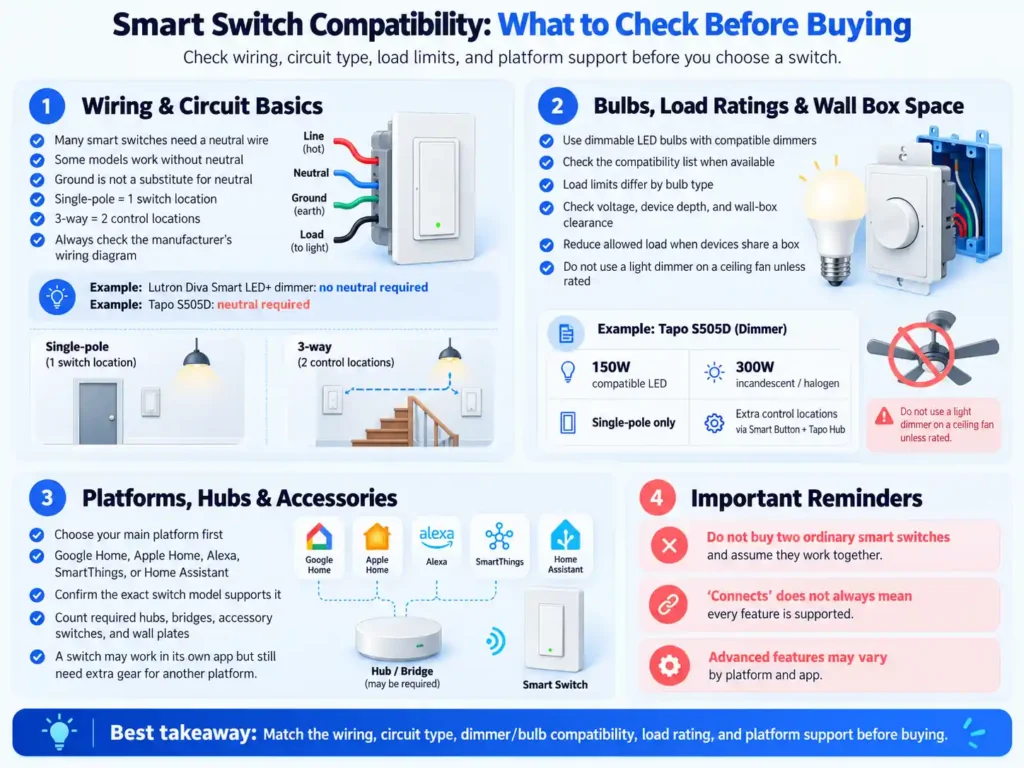
Smart Switch Compatibility: What to Check Before Buying
Neutral Wire Requirements and Circuit Types
Many smart switches need a neutral wire to power their electronics. Some models work without one. The ground wire is not a substitute for neutral.
Lutron’s Diva Smart LED+ dimmer does not require neutral. The Tapo S505D uses a neutral connection. These are model requirements, not rules that apply to every product from either brand.
A single-pole circuit has one switch controlling the light. A 3-way circuit has two control locations. Multiple locations may require a matching accessory switch, remote, or a specific wiring arrangement.
Do not buy two ordinary smart switches and assume they form a compatible pair. Check the manufacturer’s diagram for your circuit.
Bulb Compatibility, Load Ratings, and Wall Box Space
LED bulbs must be labeled dimmable to work with an appropriate dimmer. Even then, check the manufacturer’s compatibility list when available.
Load limits can differ by bulb type. Tapo’s US specifications rate the S505D for 150 watts of compatible LED lighting or 300 watts of incandescent and halogen lighting. It supports single-pole wiring, not conventional 3-way wiring. Tapo offers additional control locations through its Smart Button, which requires a Tapo Hub.
Check voltage, device depth, and installation clearances. Follow any instructions that reduce the allowed load when devices share a wall box. A light dimmer must not control a ceiling fan motor unless it is specifically rated for that use.
Smart Home Platforms, Hubs, and Accessories
Choose the platform you plan to use, such as Google Home, Apple Home, Amazon Alexa, Samsung SmartThings or Home Assistant. Then confirm the exact switch model supports it.
Count required hubs, bridges, accessory switches, and wall plates. A product that works through its own app may need additional equipment to work through another platform.
Wi-Fi, Zigbee, Z-Wave, Thread, and Matter Explained
These terms describe different parts of a smart home connection. Matter is a shared communication standard managed by the Connectivity Standards Alliance. It can run over Wi-Fi, Ethernet or Thread. It is not another wireless network alongside them.
| Technology | Primary Role | What to Verify |
| Wi-Fi | Connects devices to your home network | Supported band, coverage and local versus cloud functions |
| Zigbee | Connects supported devices through a mesh network | Compatible coordinator or hub |
| Z-Wave | Connects supported devices through a mesh network | Controller and correct US radio version |
| Thread | Provides an IP based mesh network | Suitable border router for the intended setup |
| Matter | Lets supported devices work across platforms | Controller support and available features |
A Thread border router connects a Thread network to the wider home IP network; a Matter controller manages Matter devices. These are separate roles, even when one hub performs both. See Google’s Matter primer for the network architecture and Thread Group’s overview for Thread’s IP-based mesh design.
Matter can make platform choice easier. However, a manufacturer’s app may offer settings that another platform does not expose. Check support for the functions you want, including dimming, scenes, and energy reporting.
Smart Switch and Control Options Compared
These examples illustrate different buying needs. The comparison uses linked manufacturer information; it does not represent hands-on testing or a ranked list.
| Product or System | Why Consider It | Key Requirement |
| Tapo S505D | Wi-Fi dimming with Matter support | Neutral wire and single-pole circuit |
| Lutron Diva Smart LED+ | Dimming without neutral | Smart Hub for app and voice functions |
| Shelly relay modules | Keep existing controls where suitable | Exact module, wiring and available space |
| SwitchBot Bot | Operate a compatible existing button or rocker without rewiring | Physical fit; compatible hub for remote and voice control |
| Brilliant controls | Central screen for supported devices | Panel compatibility and dependent accessories |
For a whole-home project, compare device limits, network coverage, replacement availability, and service support before committing to one system.
How Smart Switches Work During Internet and Power Outages
An internet outage, a failed router, and a power outage are different events.
If electricity remains available, many wired smart switches still operate from the wall. Local app control or automations may also work, depending on the device, controller and network. Cloud services and remote access may stop.
If the router loses power, Wi-Fi communication may fail even when the switch has power. A separate hub system may behave differently. During a power outage, a normal wired switch cannot power its lights.
Before buying, check what happens after electricity returns. Some products let you select the previous state, on or off. After setup, test an internet interruption and confirm that family members can still operate the lights.
Designing a Smart Lighting Setup for Everyday Use
Choose controls that make sense at the wall. Guests should not need your phone to turn on a bathroom light.
Use clear names such as “Kitchen ceiling” and “Reading lamp.” Similar device names can cause confusion in apps and voice commands.
Your choice of smart home apps, interfaces and voice control affects daily use as much as the switch itself. Check shared access, readable controls and whether common actions take only a few taps.
For a practical starter project, automate one room. Add a bedtime schedule or a compatible motion sensor, then use the setup for a week before buying more devices.
In a hallway, check how every control location behaves. In a bedroom, confirm the dimmer reaches a comfortable low brightness without flickering. Renters can compare plugs and wireless buttons before making permanent changes.
Smart Lighting Costs and Potential Energy Savings
Add the switch, required controller, accessories, installation and any optional service fees. Existing wiring problems can change the installation price, so request a quote based on your home.
Avoid comparing a basic plug’s price with a complete lighting system as though they provide the same functions.
Use this checklist to compare the complete cost of each setup.
| Setup Scope | Costs to Include |
| One plug-in lamp | Smart plug and any required controller |
| One wired lighting circuit | Switch, accessories and installation |
| Multiple rooms | Devices, controllers, accessories and installation |
For example, a two-room upgrade may need two switches, an accessory control for a hallway circuit, a controller and installation. Compare that full list with a second system before choosing. Device prices alone can hide important differences.
Schedules and occupancy control can reduce unnecessary lighting time. Savings depend on the bulb’s power use and how often it would otherwise stay on.
For example, switching off a 10-watt LED two hours earlier each day avoids about 0.6 kilowatt-hours of use over 30 days. Multiply that figure by your electricity rate. This simple calculation excludes the smart device’s own power use.
Convenience may matter more than energy savings when the lights already use little electricity.
Installation, Setup, and Common Mistakes
Have wiring and circuit compatibility checked before installation. Follow the exact manual and local requirements. If you cannot safely identify the circuit and verify that power is off, use a qualified electrician.
Once installed, pair the device with its app or controller. Install available updates, assign a room and test each control method. Keep setup codes somewhere safe.
Use a unique account password and enable additional account protection when available. Review who has access, and remove devices and accounts you no longer use.
Keeping Smart Bulbs Powered and Accessible
A wall switch that cuts power makes a smart bulb unavailable to its app. If you want both smart bulbs and physical controls, compare compatible wireless buttons or switches with a supported smart bulb mode.
Do not assume a conventional dimmer works with a smart bulb. Follow the bulb manufacturer’s instructions.
Troubleshooting Common Smart Lighting Problems
| Common Problem | Checks to Perform |
| Device will not pair | Required Wi-Fi band, setup mode and controller support |
| Device goes offline | Signal coverage, router changes and power supply |
| LED flickers | Bulb compatibility, minimum load and dimmer settings |
| Second switch behaves incorrectly | Approved wiring and accessory configuration |
| Voice command fails | Device name, linked account and supported integration |
Stop using equipment that shows damage or abnormal heat, and contact the manufacturer or electrician. Repeatedly resetting a device does not fix an electrical fault.
Frequently Asked Questions About Smart Switches
How Do I Compare Smart Switch Reviews?
Useful smart switch and control reviews identify the exact model, wiring, bulbs and platform tested. Look for manual control, dimming behavior, connection stability and outage tests. A star rating alone does not establish compatibility with your home.
Are Wireless Smart Switches Available?
Yes. Wireless buttons and remotes can trigger compatible lights, plugs or scenes without new wall wiring. Some require a hub. A wired smart switch may also use wireless communication, so check whether “wireless” describes installation or networking.
What Are the Best Smart Switches for My Home?
Use the device-selection table to shortlist the right category, then match a specific model to your installation. Whole-home buyers should also consider expansion limits and replacement availability.
Which App Controls Smart Switches?
There is no universal app for all smart switches and controls. Devices may use Tapo, Shelly Smart Control, Cync, Lutron or another manufacturer app. Compatible products may also work through Google Home, Apple Home, Alexa or SmartThings.
Are Wi-Fi Smart Switches for Home Use Hub Free?
Some connect directly to a router and use their own app without a separate hub. That does not mean every integration is hub-free. Check controller requirements for Matter and the platform you want to use.
Can a Wi-Fi Smart Light Switch Dim Regular Bulbs?
Only a dimmer model can adjust brightness. Existing bulbs must be dimmable and compatible with that model; an on/off switch cannot add dimming.
What Is a Smart Light Switch Flipper?
A smart light switch flipper physically operates an existing switch or button. SwitchBot Bot is one example: it supports local app control within Bluetooth range, with a compatible SwitchBot Hub adding remote and voice functions. Check the switch shape and available mounting space before buying.
How Do I Connect a Smart Light Switch to Google Home?
Check Google Home support for the exact model. Follow its instructions to link a supported manufacturer account or add a Matter device. The required controller and network equipment depend on the product and connection method.
Final Buying Checklist: Start With Compatibility
Before ordering, answer these five questions:
- Does this device suit the light or appliance I want to control?
- Does the exact model fit my wiring, circuit and bulbs?
- Have I included every required hub, accessory and installation cost?
- Can everyone operate it from a familiar physical control?
- Is its outage behavior suitable for my household?


