

Smart Home Devices & Technology: Types, Uses, and Setup
Smart home devices let you control lights, locks, cameras, thermostats, and appliances with an app, a voice command, or an automatic routine. The best setup is not the one with the most gadgets. It is the one that solves everyday problems, works with your other devices, and fits your budget.
This guide explains the types of smart devices, how they connect, what to check before buying, and how to build a useful system step by step. It is for US homeowners and renters, including first-time buyers and people ready to connect devices they already own.
What Is Smart Home Technology?
Smart home technology connects household devices to a network so you can monitor or control them. A thermostat may let you change the temperature from your phone. A door sensor can send an alert when an entry opens. A routine can turn off lights when everyone leaves.
Some products connect directly to Wi Fi. Others use a hub and a low-power wireless network. You may control them through an app, speaker, display, or voice assistant. The word smart does not mean every product makes decisions on its own. Many follow a schedule you create or respond to a sensor, your phone location, or another device.
The main smart home components
Most systems have four parts: devices that do a task, a network that carries messages, a controller such as an app or hub, and automations that set rules. A simple home may need only one smart plug. A larger system can connect many device types through a compatible controller.
Common network names include Wi Fi, Thread, Zigbee, and Z-Wave. Wi Fi is common for cameras and appliances. Zigbee and Z-Wave often connect bulbs and sensors through a hub. Thread is a low-power mesh network. Matter is a standard that helps compatible products work with supported ecosystems. A Matter label does not promise that every feature appears in every app, so confirm model and feature support.
Types of Smart Home Devices
This smart home devices list also works as a list of smart devices for home shoppers. Start with the job you want done, then compare products in that category.
| Device type | Common use | What to check |
| Lights, switches, and plugs | Schedules, dimming, remote control | Wiring, power limits, and platform support |
| Speakers, hubs, and displays | Voice control and device management | Assistant, protocols, privacy, and accounts |
| Locks, cameras, and sensors | Entry alerts, monitoring, and safety notices | Door fit, storage, alerts, and fees |
| Thermostats and energy monitors | Heating control and energy tracking | HVAC fit, electrical setup, and data support |
| Appliances, vacuums, blinds, and outdoor devices | Cleaning, cooking, shade, and yard routines | App support, installation, and ongoing service |
Lighting, switches, and smart plugs
Smart bulbs can dim, change color, follow a schedule, or respond to a voice command. Smart switches control wired lights at the wall. A smart plug adds app or schedule control to many ordinary lamps and small appliances.
Check the power rating and manufacturer instructions before plugging in a heater, coffee maker, or other high-draw appliance. Also check how the device behaves when someone uses a physical switch. A smart bulb cannot respond if its wall switch cuts power.
Speakers, hubs, and smart home displays
A smart speaker accepts voice commands and can play audio. A hub connects devices that use a supported protocol. A smart home display adds a screen for camera feeds, timers, doorbell alerts, and home controls.
The Echo Show 11, introduced in Amazon’s 2025 device lineup, includes a smart home hub with support for Zigbee, Matter, and Thread. It is a useful example for Alexa households, but check whether your particular device and desired feature are supported before buying.
A display can be handy in a kitchen or shared room, but it is not essential. Review camera and microphone controls, account requirements, and whether your preferred devices appear in its control panel.
Security, safety, and sensors
Cameras, video doorbells, smart locks, and alarm systems can help you check on a home while away. Leak sensors can alert you near a washing machine or water heater. Some smoke and carbon monoxide alarms send phone alerts, depending on the model. Connected products do not replace required alarms or basic safety steps. Check alert delivery, backup power, video storage, and monitoring fees.
Climate, appliances, and outdoor devices
Smart thermostats, fans, air quality monitors, robot vacuums, connected kitchen appliances, irrigation controls, and garage devices serve different needs. ENERGY STAR says certified smart thermostats save an average of about 8 percent on heating and cooling bills, or about $50 a year. Actual savings vary with climate, HVAC equipment, occupancy, and comfort settings. Treat that figure as an estimate, not a promise.
Most Popular and Essential Smart Home Devices
The most popular smart home devices include lights, plugs, speakers, cameras, doorbells, and thermostats. Popularity does not make a product essential. For many beginners, one smart plug or a few bulbs are enough to learn an app and test routines. A thermostat may be useful if it matches your HVAC system. A camera or doorbell may help if you want remote alerts and have reviewed its privacy and storage terms.
Before you buy, ask whether the product solves a regular problem, works with a platform you already use, needs a hub or subscription, still offers basic controls during an internet outage, and receives software updates. Those questions help separate useful devices from novelty purchases.
Smart Home Device Examples for 2026
The products below are examples to help you compare categories, not universal winners. This is a research-based shortlist, not a claim of hands-on testing by this article’s author. Selection checks include platform compatibility, setup needs, privacy and storage, subscription costs, installation, and documented support.
The examples use manufacturer specifications and support pages to explain likely use and key limits. Product features, prices, app support, and availability can change. Check the exact model before purchase.
| Example product | May suit | Check before buying |
| Amazon Echo Show 11, 2025 release | Alexa households that want a screen and a hub for compatible devices | Confirm protocol and device support for the features you need. Review microphone and camera privacy settings. [4] |
| Google Nest Learning Thermostat, 4th gen | Homes using Google Home that want a programmable thermostat with Matter support | Google says it works with about 85 percent of systems. Some HVAC setups need a C wire or Nest Power Connector. Check compatibility first. [5] |
| TP Link Kasa KP125M smart plug | People who want remote control plus energy use tracking | It supports Matter, but TP-Link notes that energy monitoring support can vary across Matter apps. Check the ecosystem feature table. |
| Yale Assure Lock 2 | Households comparing app-controlled entry and access codes | The exact module matters. Remote access and ecosystem connections vary by configuration, and door fit must be checked. |
| eufyCam S4 camera and HomeBase kits | Shoppers comparing a camera system with local storage options | Storage depends on the camera and kit. Confirm what is included, expansion limits, firmware needs for features such as 24/7 recording, and current subscription terms. |
For a fair comparison, independent review sites such as Consumer Reports describe lab testing, while product pages explain compatibility and requirements. Read the methods, not just a “best” label. A useful review should say what was tested, which app and platform were used, what features required a subscription, and where the product fell short.
How Smart Home Devices Connect
Wi Fi works well for products that need a steady internet connection or move lots of data, such as cameras. Zigbee and Z-Wave use less power and often rely on a compatible hub. Thread creates a low-power mesh network. Matter helps devices communicate across supported platforms, but the platform still needs a compatible controller and may expose only some features.
Matter 1.5, announced by the Connectivity Standards Alliance in November 2025, added support for cameras, closures such as blinds and garage doors, soil sensors, and expanded energy management. Support depends on product makers and platform updates. A new standard feature is not automatically available on every device with a Matter logo.
Which smart home platform should you choose?
| Platform | May suit | Check |
| Amazon Alexa | People already using Echo speakers or displays | Device support, privacy settings, and paid features |
| Google Home | Android users and households with Nest devices | Model-specific controls and assistant support |
| Apple Home | Households using iPhone, iPad, or HomePod | Supported devices and whether a home hub is needed |
| Samsung SmartThings | People combining devices across several brands | Hub and product requirements |
| Home Assistant | Experienced users who want detailed local control | Setup time, compatible hardware, and maintenance |
Pick the platform that fits devices you already own and the people who share your home. Do not select an ecosystem only because one product has an attractive feature. Check whether it can control the devices you plan to add.
Smart Devices for Apartments and Rentals
Smart devices for apartments should be easy to install, remove, and take with you. Bulbs, plugs, speakers, leak sensors, and battery-powered door sensors can work without changing wiring. Renters may also benefit from small smart home gadgets and accessories that improve a setup without permanent changes.
Before installing a lock, thermostat, camera, or wired switch, check your lease and ask the landlord if needed. Shared hallways and building entrances may have privacy rules. Keep original mounting parts and note which accounts or hubs control each device so you can reset or remove it when you move.
Latest Smart Home Devices and New Technology
Latest smart home devices often add better sensors, easier setup, improved platform support, or new automation options. A recent release is not automatically a better purchase. Look for practical gains: local video storage, HVAC compatibility, a sensor that works during an internet outage, or a clear software update policy.
Some unique smart home devices include air quality monitors, water shutoff valves, robot lawn mowers, connected blinds, and energy monitors. These modern home technologies can solve specific problems but may need extra equipment or installation. Cool home technology is most useful when it prevents a real hassle, such as an unnoticed leak or lights left on every night.
How to Choose the Right Devices
Set a budget that includes ongoing costs
Add the device price, hub, installation, batteries, and subscriptions. A camera may require a plan for longer video history or advanced alerts. Compare total cost over a year, not only the checkout price.
Check compatibility by exact model
Do not rely only on a brand name or a “works with” logo. Search the exact model number and supported functions. A product may pair with an ecosystem but lack some features in its app. This is especially important for Matter devices and smart locks with optional modules.
Protect privacy and account security
Connected household technology can reveal activity inside your home. Read what data the product collects and where recordings are stored. Use a unique password for each account, turn on two-factor authentication when available, install updates, and disable features you do not use. The Federal Trade Commission also recommends securing the router, changing default logins, using Wi Fi encryption, and removing devices you no longer use.
Plan for outages and manual control
Check whether a lock has a key or keypad, a light can still be turned on at the wall, and an alarm has battery or cellular backup. Cloud-based products may lose remote features when the internet is down. Keep basic household functions available without a phone.
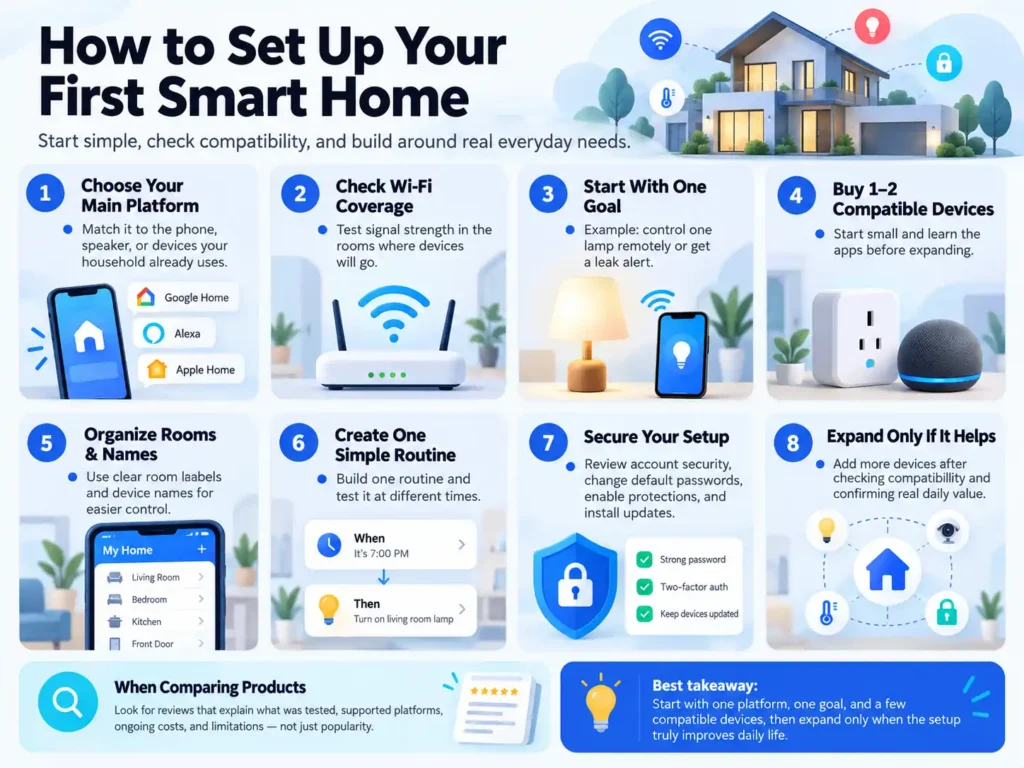
How to Set Up Your First Smart Home
- Choose a main platform that matches the phone, speaker, or devices your household already uses.
- Check your Wi Fi coverage in the rooms where you plan to install devices.
- Pick one clear goal, such as controlling a lamp remotely or receiving a leak alert.
- Buy one or two compatible devices and learn their apps before expanding.
- Set up rooms and use clear device names so people and voice assistants can find them.
- Create one simple routine, then test it at different times to make sure it works as expected.
- Review account security, change default passwords, enable available protections, and install updates.
- Add more devices only after checking compatibility and confirming they improve daily life.
When comparing products, look for smart home devices and technology reviews that explain what was tested, supported platforms, ongoing costs, and limitations. A list based only on popularity will not tell you whether a device fits your home.
Common Smart Home Mistakes
- Buying devices before choosing a platform.
- Assuming every Matter device supports every feature in every app.
- Ignoring subscriptions, installation, or replacement costs.
- Reusing passwords across device accounts.
- Buying a wired switch or lock without checking wiring and physical fit.
- Automating too much before testing each routine.
- Treating a connected device as a replacement for a required safety product.
Frequently Asked Questions
Smart home devices and technology reviews: what should I check?
Look for the exact model, test method, platform support, setup experience, subscription fees, privacy controls, and update policy. A strong review names both strengths and limits and explains who should skip the product. For expensive devices, compare an independent test with the manufacturer’s current compatibility details.
What belongs on a list of smart devices for home?
A practical list can include smart lights, switches, plugs, speakers, displays, thermostats, locks, cameras, sensors, appliances, vacuums, and energy monitors. You do not need every category. Pick the devices that solve a problem in your home.
What is the best smart home brand?
The best brand depends on your ecosystem and priorities. Amazon has a broad Alexa range, Google suits households using Google Home and Nest, Apple Home appeals to people already using Apple devices, and Samsung SmartThings can coordinate many brands.
Home Assistant suits people comfortable with setup and maintenance. Compare the exact product, support period, privacy terms, and total cost rather than choosing by logo.
What are the best smart devices for beginners?
Start with a smart bulb, a properly rated smart plug, or a speaker from a platform you already use. These usually take less planning than wired switches, thermostats, or locks. Add one device, test it for a week, and decide whether it makes a routine easier.
What are common smart home applications?
Common smart home applications include lighting schedules, thermostat control, door and leak alerts, camera viewing, voice control, appliance monitoring, and routines that connect several devices. Keep automations simple enough that everyone at home understands what will happen.
Are smart home devices safe and private?
They can be used more safely when you buy supported products, update them, use unique passwords, enable account protections, and review camera and microphone settings. No connected device removes all risk. Avoid placing cameras where household members or guests expect privacy.
Conclusion
Smart home technology can make lighting, climate, security, and everyday tasks easier to manage. The right system starts with a clear need, works with the devices you already own, and stays within your budget. Check compatibility, privacy, subscriptions, and outage behavior before buying. Start small, test each device, and expand only when it provides a clear benefit.


