

Smart Home Essentials Guide: What to Buy and How to Start
A useful smart home does not need a room full of gadgets. A few well-chosen devices can automate a daily task, make it easier to check on your home, or help you manage lights and temperature. The best setup depends on what you want to improve, what devices you already own, and how much time you want to spend managing technology.
This Smart Home Essentials Guide gives you a practical way to choose your first devices, check compatibility, plan a budget, and expand at a pace that works for your household. You will also find options for renters, a list of common smart home gadgets, and answers to questions people ask before buying.
What are smart home essentials?
Smart home essentials are connected devices that solve a real household need. You control them through an app, voice assistant, schedule, sensor, or automation. A smart plug can turn a lamp on at sunset. A leak sensor can alert you when water collects under a sink. A smart lock can give a guest a temporary access code.
The word “essential” depends on the home. A video doorbell may help someone who receives frequent deliveries. It may add little value to a household without a suitable doorbell location or reliable internet. Start with the task you want to make easier. Choose a device only when it addresses that task.
A smart home usually has four parts: devices, a control method, a network, and routines. Some products connect directly to WiFi. Others use Thread, Zigbee, or Z-Wave and may need a compatible hub or bridge. The control method may be a phone app, smart speaker, display, wall switch, or automation that runs on its own.
What should you buy first?
For many beginners, a smart speaker or a phone app, one smart bulb or plug, and a simple routine are enough to learn how the system works. You do not have to buy a hub first. Many WiFi devices connect directly to a router and can be controlled through their own app or a compatible smart home platform.
Before you shop, write down one or two goals. For example, you might want to turn off several lights at bedtime, see who is at the door while you are away, or receive an alert about a water leak. This keeps your first purchases focused and reduces the chance of buying devices that sit unused.
Top 10 smart home devices to consider
There is no single set of ten devices every home needs. These categories cover common needs and give you a starting point.
- Smart speaker or display for voice control and a central screen.
- Smart bulb for app control, dimming, and schedules.
- Smart plug for a compatible lamp or small appliance.
- Smart switch for controlling a built-in light from its wall switch.
- Motion or contact sensor for lights, doors, and room routines.
- Smart thermostat for remote temperature control and schedules.
- Video doorbell for visitor alerts and two-way communication.
- Indoor or outdoor camera for a specific monitoring need.
- Smart lock for remote locking or temporary entry codes.
- Water leak or smoke and carbon monoxide alert device for home monitoring.
Check each product’s electrical rating, installation needs, platform support, and subscription terms. Do not use a smart plug with an appliance unless the plug is rated for that load and the manufacturer permits that use.
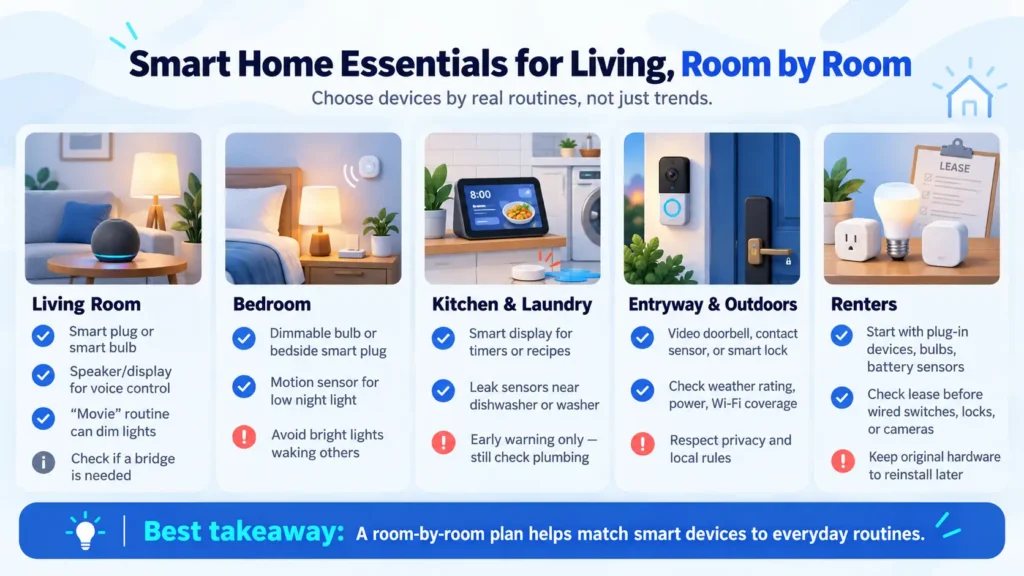
Smart home essentials for living, room by room
The phrase “smart home essentials for living” can mean different things in different homes. A room-by-room plan helps connect devices to actual routines rather than trends.
Living room
Start with a smart plug for a floor lamp or a compatible smart bulb. Add a speaker or display if you want voice control or a shared dashboard. A simple “movie” routine could dim selected lights and turn off a lamp. Check whether the lighting system needs a bridge for features such as remote access or grouped scenes.
Bedroom
A dimmable bulb, bedside smart plug, or motion sensor may help with a bedtime routine. A sensor can turn on a low-level night light when someone gets out of bed. Make sure the routine will not switch on bright lights when another person is sleeping.
Kitchen and laundry area
A smart display can show timers, recipes, or camera feeds, depending on the model and services you use. Leak sensors can be placed near a dishwasher, refrigerator water line, or washing machine. Use them as early warning tools, not as a replacement for checking hoses and plumbing.
Entryway and outdoors
A video doorbell, contact sensor, or smart lock may suit an entryway. Outdoor cameras and lights need the right weather rating, power source, WiFi coverage, and view of the area. Review local rules and household privacy needs before recording shared spaces.
Renters
Renters can begin with plug-in devices, bulbs, battery sensors, and removable accessories. Before installing a wired switch, camera, or lock, check the lease and ask the property owner when needed. Keep original hardware so the home can be returned to its prior condition.
Choose an ecosystem before adding many devices
An ecosystem is the platform that helps you manage devices and routines. Common options include Amazon Alexa, Google Home, Apple Home, Samsung SmartThings, and Home Assistant. Their setup, device support, automation tools, and need for dedicated hardware differ. Choose based on the phone, speakers, and devices your household already uses, then check the exact product model for compatibility.
Matter is an open smart home standard developed by the Connectivity Standards Alliance. It is designed to help supported devices work across compatible platforms. Matter devices use WiFi, Ethernet, or Thread for communication, and Bluetooth Low Energy may be used during setup. Bridges can connect some existing Zigbee or Z-Wave devices to a Matter system. Matter support does not mean every feature appears in every app, so check the manufacturer’s compatibility notes and the platform’s supported device list.
Thread is a low-power network used by some smart home devices. A Thread device may need a compatible Thread border router to join the home network. For example, Apple says Thread-based accessories in Apple Home require a Thread-enabled home hub or compatible border router. Check the platform requirements before buying rather than assuming that a Matter label means no extra hardware is needed.
Do you need a smart home hub?
Not always. A hub is useful when devices use a radio protocol that your router or phone cannot manage, when you need one place for cross-brand automations, or when a product requires a bridge. Some platforms also use a hub for remote access or particular routines.
A hub may be unnecessary if you have only a few WiFi devices that work with the same app or speaker. A hub can make sense for a larger setup, local control, or devices that rely on Zigbee or Z-Wave. Read the product requirements carefully. The terms “hub,” “bridge,” “controller,” and “Thread border router” describe related but different jobs.
Three product examples: setup, storage, and fees
These examples show why two devices in the same category can have different setup and ongoing costs. Product details can change, so verify the exact model and current manufacturer instructions before ordering.
| Example | Compatibility and setup | Storage or ongoing cost |
| TP-Link Tapo P125M Matter smart plug | Matter certified and listed for Apple Home, Alexa, Google Assistant, and SmartThings. It uses 2.4 GHz WiFi. Some third-party app setups need a Matter controller, which may already be built into a speaker, display, or router. | No camera storage plan applies. Check the plug’s load rating and your platform requirements before connecting an appliance. |
| Philips Hue White and Color Ambiance starter kit with two bulbs | The selected U.S. kit includes two bulbs and a Hue Bridge. The bridge is already part of this bundle, so do not count it again as a separate purchase. | The cited kit page does not list a required subscription. Check the exact kit contents because Hue sells bundles with different bridges and bulb counts. |
| eufy Indoor Cam E220 | Indoor only, connects to 2.4 GHz WiFi, and does not need a separate hub. It works with Apple HomeKit, Alexa, and Google Assistant, though supported features can vary by platform. | Local microSD recording does not require a monthly subscription, but the card is sold separately. Optional cloud features may have a fee. |
A different camera billing model is Ring: Ring says Live View is available without a subscription, while reviewing recorded video requires a Ring subscription. Compare recording and playback needs before choosing a camera.
How much does a smart home cost?
Smart home costs depend on the number of rooms, device type, installation, and optional services. The figures below are rough U.S. hardware planning estimates, not current quotes. They exclude sales tax, professional installation, monthly plans, network upgrades, and optional hubs or bridges unless a bundle includes one. Retail prices change, so check current product requirements and prices before buying.
| Setup | What the estimate includes | Rough hardware estimate |
| Starter | One basic bulb and one plug. Assumes you reuse a phone or compatible speaker for control. | $50 to $200 |
| Everyday comfort | Three to five bulbs or plugs plus one motion or contact sensor. Add a hub or bridge only if the selected devices require one. | $150 to $500 |
| Security focused | One video doorbell or camera, one smart lock, and one or two entry or leak sensors. Mounting, wiring, and video storage plans are extra. | $350 to $1,000 or more |
The same device can cost more if it needs a hub, professional installation, or a paid video plan. Add the cost of batteries and any required accessories. Compare what works without a subscription with what becomes available only after paying monthly or yearly.
For example, a renter could begin with one smart bulb, a smart plug, and an existing phone assistant. A homeowner planning a camera system may need to budget for outdoor power, stronger WiFi coverage, local storage, or cloud recording. The right comparison is the total cost for the features you will use, not just the product’s sale price.
How to set up your first smart home
- Pick a task you want to improve, such as turning off lights at bedtime.
- Check your router, phone, and current smart speakers or displays.
- Choose an ecosystem and verify the exact device model works with it.
- Read the installation and network requirements before purchasing.
- Install one device, update its software, and test app and manual control.
- Create one simple schedule or automation, then see how it works for a week.
- Add more devices only when the first routine is reliable.
Keep a record of device names, apps, accounts, and reset instructions. Give devices clear names such as “Kitchen ceiling light” instead of “Light 3.” If an automation controls several devices, test what happens when one device is offline, or someone uses the physical switch.
Privacy, security, and reliability
Connected devices add accounts and network connections to your home. Use a unique password for each account, turn on multifactor authentication when available, and install software updates. Change the default administrator password on your router and use its current security settings. CISA recommends strong passwords, software updates, and securing the home wireless router as basic steps for protecting a digital home.
Review what a camera or speaker records, where recordings are stored, who can access them, and whether a subscription is required. Place cameras only where they serve a clear purpose. Use account sharing controls when household members need access, and remove access when it is no longer needed.
Think about what should happen if the internet goes down. Some routines may run locally through a hub, while remote viewing and voice services may depend on internet access. A smart lock should still have a clear backup entry method. A smoke alarm should remain a certified safety alarm even if its app features stop working.
A smart thermostat can make scheduling easier, but energy savings depend on the home, equipment, settings, and behavior. Confirm that the thermostat is compatible with your heating and cooling system before installation. Do not rely on a general savings claim as a guarantee for your home.
Common mistakes to avoid
- Buying devices before checking compatibility with your chosen platform.
- Assuming that every Matter feature works in every ecosystem.
- Installing a wired switch without checking wiring and safety requirements.
- Buying cameras without checking storage fees, power, and WiFi coverage.
- Automating too many routines before testing a simple one.
- Treating a connected detector as a substitute for a certified safety alarm.
- Forgetting about guest access, account recovery, and software updates.
Smart home gift ideas
Useful smart home gift ideas depend on what the recipient already owns. A Matter-certified smart plug or bulb may be a practical gift if it matches the person’s platform and electrical setup. A motion sensor, smart speaker, or display can also work, but check compatibility first. If you do not know their ecosystem, consider a gift card or a device with a clear return policy rather than guessing.
For a first-time user, choose something easy to install and useful on its own. A plug-in device is often simpler than a wired switch. Avoid gifting a camera or smart lock without considering privacy, installation, and who controls the account.
Frequently asked questions
What are the top 10 smart home devices?
Common choices include a smart speaker or display, smart bulb, smart plug, smart switch, motion or contact sensor, thermostat, video doorbell, camera, smart lock, and water leak or smoke and carbon monoxide alert device. Which ten matter depends on your home and goals.
What is the list of smart devices for home use?
A list of smart devices for home use can include speakers, displays, bulbs, switches, plugs, sensors, cameras, doorbells, locks, thermostats, leak detectors, smoke alarms, appliances, and robot vacuums. Start with the category that solves a real problem rather than buying one of everything.
What are smart home essentials for living?
They are the connected devices that support your daily routines. For one household, that may mean smart lights and a speaker. For another, it may mean a leak sensor, thermostat, or doorbell camera. Choose by need, budget, compatibility, and installation limits.
What are useful smart gadgets for the home and kitchen?
Useful options may include a smart display for timers, a smart plug for a compatible lamp or small appliance, leak sensors near water lines, and smart lighting. Check each device’s electrical rating and manufacturer instructions before connecting an appliance.
What does a full smart home system include?
A full smart home system may include a platform or controller, network, lights, sensors, climate controls, security devices, and automations. It does not need every category. A complete system is one that works reliably for the routines and safety needs of the people who live there.
Do smart home devices work without internet?
Some functions may work locally, but it depends on the device and platform. Schedules or sensor routines may continue through a local hub, while remote access, cloud recording, or voice features may stop. Check offline behavior in the product documentation before buying.
Conclusion
A useful smart home starts with a clear need, a compatible platform, and a few devices that work reliably. Begin with one room or routine. Check costs, privacy, installation, and offline behavior before you expand. The best setup is not the one with the most gadgets. It is the one your household can use and maintain with confidence.
As you plan your setup, it can also help to understand the wider smart home benefits so you can decide which upgrades deserve a place in your budget.


