

Smart Home Gadgets & Accessories for Every Room in 2026
Smart home gadgets can make everyday tasks easier, help you monitor your home, and give you more control over energy use. For most people, a smart speaker, plug, light, or sensor is a simpler place to start than a full security system or a house full of connected devices. Before you buy, check that each product works with your phone, smart home platform, and network.
The 10 Most Useful Smart Home Gadgets
The right choice depends on your home and your goals. These ten categories cover common needs, from simple lighting controls to home security. Product examples are drawn from current 2026 buying guides, not from hands-on testing for this article. Check the exact model, compatibility, price, and support details before ordering.
Smart speaker or display
A speaker can answer voice commands and control compatible devices. A display can also show camera feeds, timers, and controls. Examples in current guides include the Amazon Echo Studio, Google Home Speaker, and Apple HomePod mini.
Smart plug
Plug one into a wall outlet to control a lamp or another compatible device with an app or schedule. The TP-Link Kasa Smart Plug Mini is one example listed in CNET’s 2026 roundup.
Smart bulb or lamp
Change brightness, set schedules, or control lighting by voice. Some models also change color. Examples include the GE Cync Dynamic Effects bulb and IKEA Varmblixt Smart Lamp.
Smart thermostat
Adjust heating or cooling from an app and set schedules around your routine. Nest Learning Thermostat Gen 4 and Ecobee Thermostat Premium are examples to compare.
Video doorbell
See who is at the door and receive motion alerts. Before buying, check whether your doorbell wiring supports the model and whether video storage requires a subscription.
Security camera
Indoor and outdoor cameras can show live video and send alerts. Compare the field of view, night vision, storage options, privacy controls, and subscription costs.
Smart lock
Lock or unlock a compatible door with a code, key, app, or supported phone feature. Check door fit, backup entry methods, and what happens if the battery or internet connection fails.
Smart sensor
Door, motion, temperature, and water leak sensors can send alerts or trigger routines. Some sensors need a hub or a compatible controller.
Robot vacuum
A robot vacuum can clean on a schedule. Compare its mapping, room controls, obstacle handling, replacement parts, and any paid features.
Air quality monitor
A monitor can report readings such as temperature, humidity, or carbon dioxide. Check which readings the model actually provides and whether it works without an app or subscription.
These are useful starting points, not a universal ranking. A renter may get more value from bulbs and plugs, while a homeowner focused on security may start with a doorbell and entry sensors.
Cool Smart Home Gadgets That Solve Real Problems
Some cool smart home gadgets are fun to use, but the most useful ones solve a clear problem. A smart plug can set a lamp to turn on before you get home. A motion sensor can switch on a hallway light at night. A leak sensor near a washing machine can alert you if it detects water.
The same test applies to cool home gadgets, modern home gadgets, and amazing home gadgets: What task will the device handle, and what does it cost to keep using it? A product may look impressive but still be a poor fit if it needs a costly hub, a paid plan, or a platform you do not use.
For simple upgrades, start with gadgets for home that need little installation. Smart bulbs, plugs, and battery-powered sensors can suit renters because they usually do not require changes to wiring. Before buying a plug or switch, check the device’s power rating and the appliance you plan to control. A smart plug is not meant for every high-power device.
Useful home gadgets should save time, improve comfort, or provide information you can act on. That is a better measure than the number of features on the box. The best home gadgets that make life easier are often small products that fit into an existing routine.
What to Check Before You Buy
Check your smart home platform
Look at the platform you already use. A household with Alexa devices may prefer products that support Alexa. Apple users may want to check Apple Home compatibility. Google Home users should confirm that the device appears in the Google Home app and supports the controls they need.
A compatibility label can have limits. A product may connect to a platform but still keep some advanced settings in the maker’s app. Check the exact functions you expect to use, such as live video, automation, energy reports, or voice control.
Understand Matter, Thread, and wireless networks
Matter is a smart home standard created by the Connectivity Standards Alliance. It helps certified devices work with supported smart home platforms. Matter devices use a compatible home network, such as wireless internet, Ethernet, or Thread. Bluetooth Low Energy can help with device setup.
Matter support can make device choice easier, but it does not mean every feature works in every app. Check the product’s certified features and whether your home needs a Matter controller or Thread border router. Some Matter devices also need an internet-connected controller for control when you are away from home.
If you want a wider explanation of how apps, hubs, standards, and products fit together, this is a natural place to link a future guide to smart home devices and technology.
Add up the full cost
The price on the product page may not be the whole cost. Include the hub, bridge, installation, storage plan, or monitoring service if the device requires one. A security camera with a low purchase price may cost more over time if useful features need a monthly plan. A smart shade may need a separate hub. A thermostat may need professional installation in some homes.
Before buying, compare the initial price and any regular fee. Also check whether core features still work if you cancel the subscription.
Check installation and home fit
Smart locks must fit your door. Thermostats must work with your heating and cooling system. Outdoor cameras and plugs need to be rated for outdoor use. A smart switch may require a neutral wire or other wiring your home does not have.
If you rent, look for products that can be removed without permanent changes. If installation involves household wiring, follow the manufacturer’s instructions and use a qualified electrician when needed.
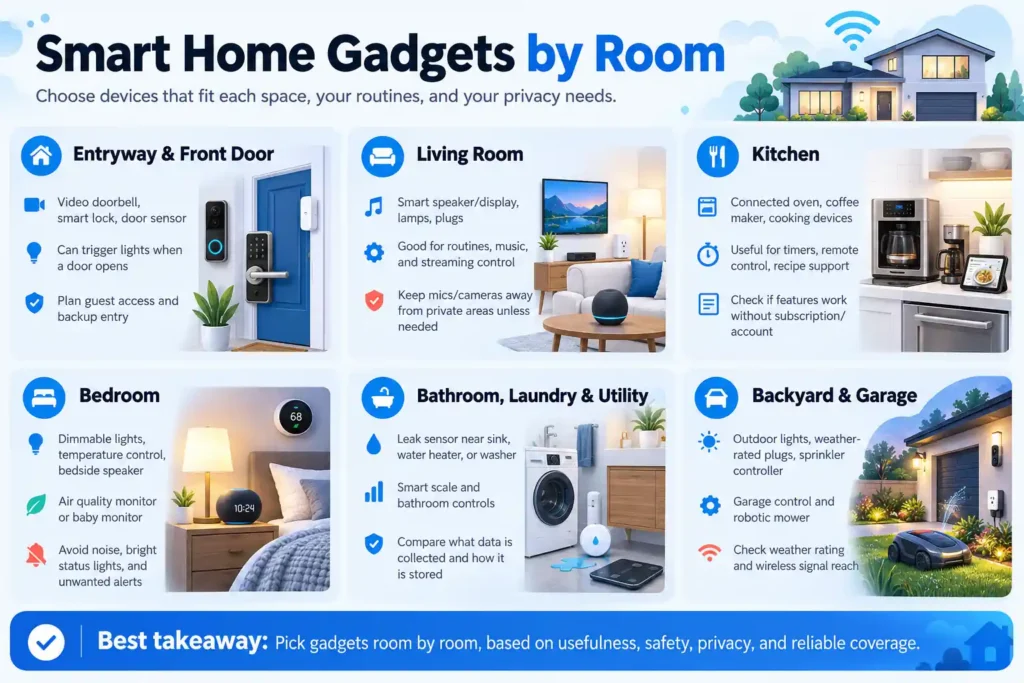
Smart Home Gadgets by Room
Entryway and front door
A video doorbell, smart lock, or door sensor can help you see activity at the entrance. Some systems can trigger a light when a door opens. Think about who needs access, how guests will enter, and how you will get in if the device loses power.
Living room
Smart speakers, displays, lamps, plugs, and streaming controls can make a living room easier to manage. A speaker may control music and routines. A smart plug can schedule a floor lamp. Keep microphones and cameras away from private areas unless you need those functions.
Kitchen
Connected ovens, coffee makers, and cooking devices can offer remote controls, timers, or recipe support. Before buying, check whether the smart features work without an account or subscription. Do not use an app as a reason to ignore the appliance’s basic safety instructions.
Bedroom
Smart bedroom gadgets can include dimmable lights, temperature controls, bedside speakers, air quality monitors, and baby monitors. Choose products that make the room more comfortable without adding noise, bright status lights, or unwanted alerts.
Bathroom, laundry, and utility areas
A water leak sensor near a sink, water heater, or washing machine can send an early alert. Smart scales and bathroom controls are also available, but compare the data each device collects and how the maker stores it.
Backyard and garage
Outdoor lights, weather-rated plugs, sprinkler controllers, garage door controls, and robotic mowers can help manage outdoor tasks. Confirm that each product is built for the local weather and that its wireless signal reaches the installation area.
Privacy and Security Matter
Smart home products may collect voice recordings, video, motion events, device activity, or information about when people are home. The amount and type of data varies by product. The FTC recommends using device security features and reviewing settings for connected products. For cameras, it advises securing accounts and checking that video feeds are protected.
Use these steps when setting up a new product:
- Change the default password and use a unique password for the account.
- Turn on two-step verification when the service offers it.
- Review microphone, camera, location, and sharing permissions.
- Install security updates through the maker’s app.
- Check whether recordings are stored locally or in the cloud.
- Remove access for old users and reset devices before selling or giving them away.
Privacy is a real buying concern. A 2025 NIST survey of 401 U.S. smart home users covered voice assistants, thermostats, security devices, sensors, and lighting. Participants reported different security and privacy views across device types, which supports checking each product category rather than assuming all smart devices handle data the same way.
Common Buying Mistakes
Buying before checking compatibility
A device may work with one platform but not another. Check the product’s supported platforms and features before placing an order.
Ignoring extra costs
Remember hubs, installation, cloud storage, and monitoring plans. A low price does not always mean a low total cost.
Buying too many devices at once
Start with one or two products that solve a real problem. Learn how their apps and routines work, then add more if they fit your home.
Treating every smart plug as the same
Plugs have different power ratings, shapes, networks, and platform support. Match the product to the appliance and outlet.
Trusting “smart” as a sign of quality
A connected feature does not prove that a device is reliable, secure, or worth its price. Look for a clear support policy, useful controls, and a return policy.
Frequently Asked Questions
What are the top 10 smart home gadgets?
Useful choices include a smart speaker or display, smart plug, smart bulb, thermostat, video doorbell, security camera, smart lock, sensor, robot vacuum, and air quality monitor. The right ten depend on your budget and the tasks you want to handle.
What are the best gadgets for a smart home?
For a new setup, a speaker or controller, a smart plug, and a light are easy places to begin. Add a thermostat, camera, lock, or sensors when they meet a specific need.
What are some good smart gadgets for home use?
Smart plugs, bulbs, door sensors, leak sensors, thermostats, and video doorbells are common choices. Check compatibility, installation needs, and subscription costs before buying.
What is the best smart device for your home?
There is no single best device for every home. A smart plug may be a good first purchase for someone who wants simple schedules. A video doorbell may be more useful for someone who wants to monitor the front door.
What are the best home gadgets for 2026?
The most useful home gadgets for 2026 include products that work with your current platform and solve a daily need. Current buying guides cover smart speakers, plugs, lighting, thermostats, locks, cameras, sensors, and connected appliances. Product versions and prices change, so confirm details with the manufacturer before you buy.
Which device is commonly used in a smart home?
Smart speakers and phone apps are common ways to control smart home products. Plugs, lights, cameras, and sensors are also widely used. A hub or controller may be needed for some devices and features.
Choose Gadgets That Fit Your Home
The best Smart Home Gadgets & Accessories are the ones that work with your home, fit your budget, and solve a clear problem. Start small. Check the platform, network, installation, privacy settings, and full cost. Then add other household gadgets when they make daily life easier.


