
Smart Home Hubs & Controllers Explained
A smart home hub connects and coordinates compatible devices. A controller sends commands and may run automations. You need additional hardware only when your devices or chosen platform require functions your existing equipment cannot provide.
That equipment might already be inside a speaker, display, streaming device, or router.
This guide explains the roles, compatibility checks, and setup choices that matter before you spend money.
What Is a Smart Home Hub?
A smart home hub is hardware or software that brings supported devices into a shared control system.
It can receive a sensor reading, check a rule, and tell another device what to do.
For example, a door sensor reports that the door opened. The system checks whether it is after sunset, then turns on the entry light.
Your Smart Home Control Center
A hub can provide one control center for devices from several brands.
Depending on its capabilities, it may:
- Show device status.
- Group devices by room.
- Run schedules and sensor rules.
- Connect equipment using different protocols.
- Send alerts.
- Support control while you are away.
Compatibility is the limit. A hub cannot control a product simply because both are called smart devices.
Hubs, Controllers, Bridges, and Border Routers
These terms describe different jobs. One product can handle several jobs, which explains much of the confusion.
| Component | Main job | What it does not establish |
| Hub | Combines control and connectivity functions | Support for every brand |
| Controller | Sends commands to supported devices | Built-in radios for every protocol |
| Bridge | Makes supported devices available to another system | Access to every native feature |
| Thread border router | Connects a Thread network to the home IP network | Automation or voice control |
| App or panel | Provides buttons and device information | Independent control hardware |
Smart Home Controllers
Smart home controllers manage supported devices. The term can describe a dedicated product or software running on a computer.
A Matter controller controls Matter devices. An automation platform may also manage rules, schedules, and other integrations.
Controller support and radio support are separate checks.
Bridges
A bridge connects supported devices to another system.
For example, a lighting bridge may manage its own lights and expose selected functions through Matter.
Home Assistant’s documentation notes that Matter bridging can expose fewer features than a native integration. Basic control may work while specialized lighting features remain in the original app.
Thread Border Routers
A Thread border router passes traffic between a Thread network and the wider home network.
It does not translate protocols.
This function can be built into other equipment, so it does not always require a separate purchase.
Do You Need Additional Hub Hardware?
Start with the task you want to perform.
Two plugs controlled through their manufacturer’s app have different needs from a house full of sensors, locks, and shared routines.
| Your setup | Likely requirement |
| A few app-controlled Wi-Fi products | May work without a separate hub |
| Matter devices using Wi-Fi | Check your platform’s Matter controller requirements |
| Matter devices using Thread | Controller support plus a Thread border router |
| Zigbee sensors | Compatible Zigbee hardware and device support |
| Z-Wave devices | Compatible regional radio and integration |
| Complex cross-brand rules | A platform that supports the devices and rule logic |
When a Basic Setup May Be Enough
If your existing devices work reliably and provide the functions you need, there may be no reason to add hardware.
Wi-Fi does not automatically mean cloud control.
Some Wi-Fi products use remote servers. Others support local communication. Check the connection method rather than judging by the radio alone.
Check Equipment You Already Own
Find the model number and generation of your speaker, display, or streaming device.
Then check its documentation for:
- Matter controller support.
- Thread border router support.
- Zigbee or Z-Wave radios.
- Supported device categories.
Matter, Thread, and Other Connection Types
Protocols determine how devices communicate. Platforms determine how you manage them.
Apple Home, Google Home, Alexa, and SmartThings are platforms. Matter, Thread, Zigbee, and Z-Wave describe different communication functions.
Matter and Thread Are Different
Matter is a shared application standard maintained by the Connectivity Standards Alliance.
It defines how supported devices communicate commands and status.
Thread is a low-power network technology. Matter can operate over Thread, Wi-Fi, or Ethernet.
A Matter device does not necessarily use Thread. A Thread device does not necessarily support Matter.
Home Assistant documents these distinctions and explains that it uses Bluetooth during Matter setup rather than as its normal control network.
Compare the Main Technologies
| Technology | Common purpose | Purchase check |
| Matter | Shared device control standard | Platform category and feature support |
| Thread | Low power mesh networking | Border router requirements |
| Zigbee | Sensors, lights, switches | Compatible coordinator and integration |
| Z-Wave | Sensors, locks, switches | US radio region and device support |
| Wi-Fi | Network access for many products | Local or cloud connection |
| Bluetooth | Nearby communication and setup | Range and gateway needs |
| Infrared | Commands for remotes and appliances | Placement and supported codes |
For US buyers, verify the regional version of Z-Wave equipment.
Also check power requirements and load ratings for plugs and switches. A communication match does not establish electrical suitability.
Check Smart Hub Devices for Compatibility
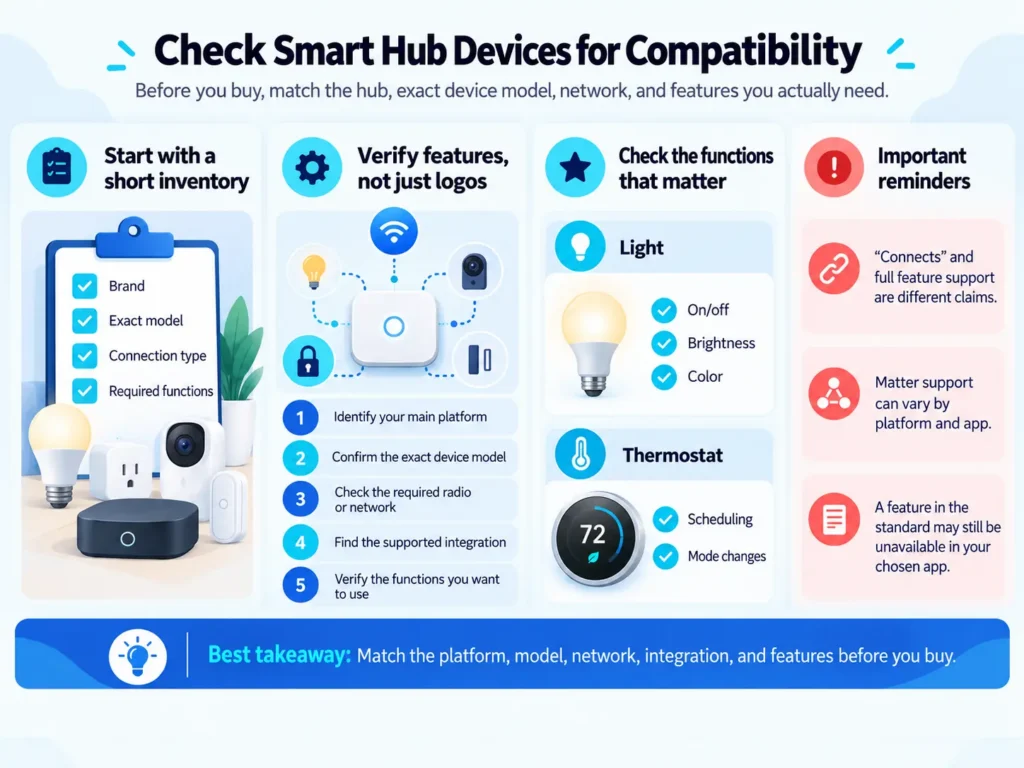
Before buying smart hub devices, make a short inventory.
Record each product’s brand, exact model, connection type, and required functions.
Verify Features, Not Just Logos
Use this sequence:
- Identify your main platform.
- Confirm the exact device model.
- Check the required radio or network.
- Find the supported integration.
- Verify the functions you want to use.
For a light, that might mean brightness and color. For a thermostat, it could mean scheduling and mode changes.
“Connects” and “supports every feature” are different claims.
Google notes that platforms adopt Matter device categories at different times. A feature in the standard may still be unavailable in your chosen app.
A Compatibility Worksheet Before You Buy
Use this worksheet for one planned routine. Record the exact model, documentation link, and date checked for each component. An unresolved requirement means the shopping list is not ready.
| Check | Evidence to record | What must be confirmed |
| Sensor connection | Model and protocol in its specifications | The controller can receive its event through a supported integration. |
| Target device | Model, supported functions, and load rating | The required command is available, and the device suits the connected load. |
| Controller and radios | Controller model plus adapter or border-router details | Every connection in the routine has the necessary hardware. |
| Automation rule | Platform documentation for trigger, condition, and action | Motion, after-sunset conditions, and the desired off-timer behavior are supported. |
| Offline requirement | Local or cloud dependencies for every step | The complete routine can run locally if internet-independent operation is required. |
After installation, record the firmware versions and actual results of manual control, sensor triggering, repeated motion, and an internet-disconnected test. This creates evidence for your own setup rather than assuming a compatibility logo proves the whole routine.
Sharing Devices Across Platforms
Matter supports sharing compatible devices with multiple platforms through its multi-admin feature.
That does not automatically copy rooms, schedules, or rules between apps.
Choose one main place for automation. Two systems adjusting the same light or thermostat can create conflicting behavior.
Local vs Cloud Control
Local control happens inside your home. Cloud control relies on a service outside it.
A local connection can avoid sending each command through a remote server. However, some functions may still need internet access.
| Function | During an internet outage |
| Local device command | May work if the controller and network remain active |
| Local sensor automation | May work if every step runs locally |
| Cloud-dependent routine | May fail |
| Voice request | Depends on the assistant and processing method |
| Control from another location | Normally needs a working connection |
| Remote push alert | Usually depends on outside services |
Internet Failure Is Not Power Failure
A local routine still needs powered equipment.
If the router, controller, or required bridge loses power, the connection may stop.
Battery backup can help selected equipment during a short outage. It does not keep every connected appliance running.
Ask What Runs Locally
Check the entire routine:
- Where does the sensor report?
- Where is the rule evaluated?
- How does the target receive its command?
A locally connected sensor does not make a cloud-dependent action local.
Choose a Platform Around Your Needs
Use the platform that supports your intended devices and fits the amount of maintenance you want.
| Setup | Useful starting point | Check carefully |
| Apple Home | Existing Apple household | Home hub and Thread requirements |
| Alexa | Existing compatible Echo | Exact model capabilities |
| Google Home | Existing Google equipment | Matter and Thread functions |
| SmartThings | Supported mixed device setup | Hub model and integrations |
| Home Assistant | Custom rules and broad integration needs | Hardware, radios, updates, and backups |
Apple Home
Apple’s documentation requires a home hub to add Matter accessories to the Home app.
For Thread accessories, it specifies a Thread-capable hub, such as HomePod mini or Apple TV 4K, third generation, Wi-Fi plus Ethernet, or a supported third-party border router.
An Apple Home hub also supports remote access and automation.
Alexa and Google Home
Amazon documents Matter support and Thread requirements for Alexa. Confirm that your Echo or eero model provides the functions your accessory needs.
Google lists Nest Hub, second generation, Nest Hub Max, Nest Wifi Pro, and Google TV Streamer among products supporting both Wi-Fi and Thread requirements.
Dedicated Hardware and Software
Aeotec offers hub hardware for SmartThings.
Home Assistant can run on suitable hardware and use added radio equipment where required.
Model Examples That Show Why Hardware Matters
These examples were checked against manufacturer documentation on October 4, 2026. They illustrate connection requirements rather than a hands-on product ranking.
| Exact model | Documented role | Practical implication |
| Apple TV 4K, 3rd generation, Wi-Fi + Ethernet | Apple home hub with Thread support | Apple identifies this specific variant for Thread accessories; do not treat every Apple TV 4K as identical. |
| Google Nest Hub, 2nd generation | Google Home hub for Matter over Wi-Fi and Thread | Google lists the 1st-generation Nest Hub for Wi-Fi only, so generation changes the purchase decision. |
| Home Assistant Green | Runs Home Assistant; Matter over Wi-Fi or Ethernet requires the Matter integration and server | Add a compatible Zigbee adapter for direct Zigbee connections. Matter over Thread also needs a suitable border router. |
For a Zigbee-based Home Assistant setup, Connect ZBT-2 is one official USB adapter option. It operates in either Zigbee or Thread mode, one protocol at a time. The cost example below uses Zigbee mode.
Control Panels, Apps, and Physical Buttons
Control panels provide a visible place to operate the home.
They can help guests adjust lights or temperature without installing an app.
A tablet dashboard may be only an interface. The actual controller may run elsewhere.
Think about smart home apps, interfaces, and voice control together. The household needs a way to use the system even when one method is inconvenient.
Physical smart switches and controls also matter.
A wall switch should remain understandable to someone who has never used your app. If a normal switch cuts power to a smart bulb, the bulb may become unavailable until power returns.
Compare the Real Cost of a Setup
The hub price is only part of the total. Count required radio adapters, sensors, target devices, optional services, installation, backup equipment, and maintenance.
Worked Budget for a Local Hallway Light
Budget prepared October 4, 2026, in US dollars. The example assumes an existing router, lamp, and a supported Home Assistant installation when reusing hardware. It uses a compatible Zigbee motion sensor and Zigbee plug; confirm their exact models before purchasing.
Home Assistant Green has a manufacturer-suggested retail price of $199, updated April 24, 2026. Connect ZBT-2 was announced at a $49 US MSRP on November 19, 2025. These are published manufacturer reference prices checked for this budget, not current retailer checkout quotes.
| Component or service | Reuse an existing Home Assistant system | Buy a new Green-based system |
| Controller | $0 additional hardware cost | $199 manufacturer reference price |
| Connect ZBT-2 in Zigbee mode | $49 reference MSRP | $49 reference MSRP |
| Compatible motion sensor | $25 illustrative allowance | $25 illustrative allowance |
| Compatible plug for the lamp | $20 illustrative allowance | $20 illustrative allowance |
| Estimated hardware subtotal | $94 | $293 |
| Optional Nabu Casa annual subscription | $65 | $65 |
| Estimated first year with annual subscription | $159 | $358 |
The $25 sensor and $20 plug amounts are planning assumptions, not verified product prices. Replace them with quotes for models supported by your selected integration. Reusing a suitable Zigbee adapter would reduce either subtotal by $49.
The local routine does not require the Nabu Casa subscription. The service offers hosted features such as remote access and Alexa or Google Home integration. Its published USD plans are $65 annually or $6.50 monthly before tax; twelve monthly payments total $78. Nabu Casa has announced the Home Assistant Cloud name will change to Home Assistant Link on December 2, 2026.
These estimates exclude tax, shipping, electricity, replacement batteries, paid setup help, and optional backup power. The example uses a plug-in lamp, so it does not budget for electrical installation. From the second year, the optional annual plan adds $65 at the checked rate, plus any maintenance costs.
Buy for One Useful Task First
Choose one routine and assemble its complete shopping list before expanding. If your existing setup already performs that task reliably, additional hardware may add cost without solving a problem.
For hardwired controls, confirm wiring, neutral requirements, load type, and US electrical ratings. Use a qualified electrician when the installation requires one.
Example: Turn On a Hallway Light After Dark
This example describes the required logic. It is not a claim of product testing.
You need:
- A supported motion sensor.
- A compatible light or plug.
- A controller that receives the sensor event.
- A platform supporting the required rule.
Build and Check the Rule
- Add each device separately.
- Confirm the sensor reports motion.
- Confirm the light responds manually.
- Name both devices clearly.
- Select motion as the trigger.
- Add an after sunset condition.
- Select the light as the action.
- Add a suitable timer for turning it off.
Walk through the hallway at different times.
Check whether repeated motion restarts the timer. Otherwise, the light could turn off while someone is still present.
Verify Offline Behavior
If offline operation matters, test without internet access while keeping the local network active.
Use the sensor rather than a voice request.
That checks the actual routine, not the assistant’s ability to understand speech.
Troubleshooting and Common Buying Mistakes
Check Connections in Order
When a device will not connect:
- Confirm model and category support.
- Update the app, controller, and device.
- Check power and batteries.
- Follow the pairing instructions.
- Confirm required network access.
- Move the device closer temporarily.
- Consult the manufacturer’s error guidance.
Matter depends on local network communication. Guest network isolation, blocked discovery traffic, or incorrect IPv6 settings can cause problems.
Home Assistant provides specific Matter network guidance. Check it before changing advanced router settings.
Avoid These Assumptions
- Every Echo has the same radios.
- Matter provides every native feature.
- One hub works with all devices.
- All Wi-Fi products require the cloud.
- Every routine on a local hub works offline.
- A new hub makes existing bridges unnecessary.
Protect Access
Use unique passwords and enable two-factor authentication where available.
Review household permissions, install supported updates, and keep recoverable backups.
Keep physical access methods and ordinary controls available where needed.
Frequently Asked Questions
What Is a Smart Home Hub for Alexa?
A compatible Echo can act as the Matter controller used to add and control supported Matter devices through Alexa. A Matter-over-Thread accessory also needs a Thread border router; a Wi-Fi accessory does not need that Thread function. Check your existing Echo or eero model before purchasing another hub.
Is There a Smart Home Hub for All Devices?
- No hub offers verified support for every device and feature.
- Support depends on radios, integrations, models, and platform capabilities.
- Build a list of your required devices and compare it with the hub’s documentation.
What Is an Aeotec Smart Home Hub?
- It is hub hardware that works with Samsung SmartThings.
- Aeotec’s US catalog lists both Smart Home Hub and Smart Home Hub 2.
- Compare its supported protocols, regional version, and integrations before choosing.
What Is an Apple Home Hub?
- It is a supported HomePod or Apple TV configured to provide home hub functions.
- It supports remote access and automation.
- Thread accessories need the appropriate network support in addition to controller support.
What Is the Best Smart Home Hub for My Setup?
Start with the platform you already use and the connection your next device requires. For Apple Home with Thread accessories, a HomePod mini or the Apple TV 4K variant listed above is a documented starting point. For Google Home, the Nest Hub 2nd generation) provides Wi-Fi and Thread support.
If custom rules and integration flexibility matter more than minimal maintenance, consider Home Assistant on suitable hardware. Green is one option, but direct Zigbee or Z-Wave connections require appropriate additional equipment. For SmartThings, compare the exact Aeotec hub model and its supported integrations. These are selection paths, not a claim that one product is best for every household.
Can I Remove My Existing Bridge After Buying a Hub?
Only if the new setup supports direct connections to the devices and preserves the functions you need, a Matter connection may still rely on the original bridge. In Home Assistant, Philips Hue’s native integration provides features that its Matter connection does not expose, so replacing a working connection can reduce functionality.
Do I Need a Smart Home Hub App?
- Most consumer hubs use an app for setup and daily control.
- Some platforms also provide browser dashboards.
- A single app may handle normal operation, while a manufacturer’s app remains necessary for specialized settings or updates.
Do I Need a Subscription for a Local Automation?
Not necessarily. The Home Assistant Zigbee routine budgeted above can run locally without the optional Nabu Casa service. Other platforms or integrations may use cloud services or paid features. Check the complete trigger-to-action path and any recurring charges rather than assuming every hub has the same subscription requirements.
Choose Around the Equipment You Need
- Inventory what you own, select one useful automation, and verify the required connections.
- Purchase additional hardware only when it supplies a missing function.
- That approach keeps costs easier to manage and makes future additions simpler to evaluate.


