

Smart Home Benefits, Features & Advantages
A smart home can turn off forgotten lights, adjust the temperature on a schedule, and warn you about a leak under the sink. You can start with one useful device. A complete remodel is not required.
The main smart home benefits are easier daily routines, better control over energy use, and more ways to check your home while away. Those gains depend on compatible devices, sound setup, and features you actually use.
For US households, the decision also involves installation costs, subscriptions, privacy, and what happens when the internet stops working. Here is how to weigh the benefits against those limits.
Smart Home Benefits at a Glance
- Convenience: automate repeated tasks such as switching off lights or starting a suitable cleaning routine.
- Energy management: use schedules and supported monitoring to manage heating, cooling, and electricity use.
- Remote awareness: check supported doorbells, locks, and sensors while away.
- Accessible controls: use voice commands or reachable buttons when they suit household members.
- Earlier problem alerts: receive supported warnings about leaks or other monitored conditions so someone can respond.
These advantages depend on compatibility, reliable setup, and the features your household actually needs.
What Is a Smart Home, and How Does It Work?
A smart home uses connected devices to monitor or control household tasks. These devices are part of the Internet of Things, or IoT, which means physical objects that can share data through a network.
Devices, Hubs and Controllers
A smart device performs a task. A bulb controls light; a sensor detects a change.
A controller sends commands and manages devices. A hub may connect devices that use a different wireless system. Some products combine these roles.
You might use Apple Home, Google Home, Amazon Alexa, or Samsung SmartThings to manage supported devices. Home Assistant is another option for people willing to handle more setup. Choose based on your needs and existing equipment.
Remote Control and Automation
Remote control means you take an action, such as opening an app to turn off a lamp.
Automation means a rule takes that action for you. A hallway sensor might turn on a light after sunset, then switch it off when no motion is detected.
The benefits of home automation become clearer when several devices follow one useful routine. A bedtime button could dim selected lights and adjust the thermostat without opening separate apps.
Local Control and Cloud Services
Local control keeps supported commands within your home network. Cloud control sends data or commands through a provider’s online service.
Google explains that supported Matter commands can travel over the home network instead of passing through a manufacturer’s cloud. Remote access and other services may still require internet access.
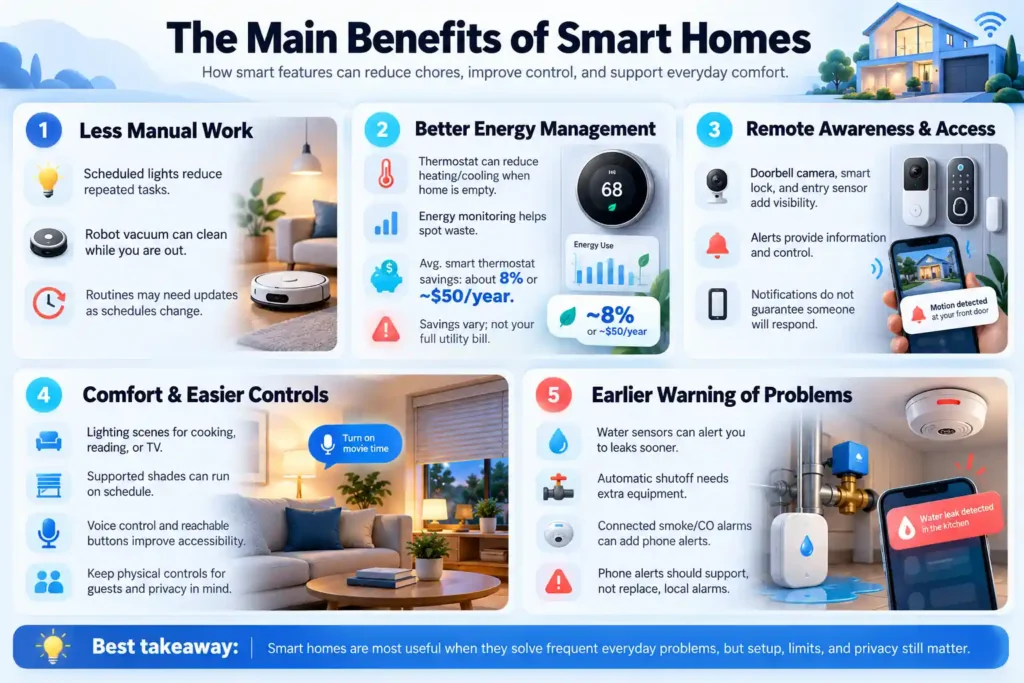
The Main Benefits of Smart Homes
Useful features solve small problems that happen often. Their value is easier to judge through daily examples than through a long list of promises.
Less Manual Work
Scheduled lights, a robot vacuum, or a simple bedtime routine can reduce repeated chores.
For example, a porch light can follow sunset times instead of staying on all afternoon. A vacuum can clean a clear floor while the household is out.
Setup still takes time. Routines also need changes when school hours, work schedules, or household needs change.
Better Energy Management
A thermostat can reduce heating or cooling when the house is empty. Energy monitoring can help you spot equipment that uses more electricity than expected.
ENERGY STAR’s published guidance estimates average savings of about 8% on heating and cooling bills, or roughly $50 annually, for certified smart thermostats. Actual results vary with climate, equipment, occupancy, and temperature choices. This is not an estimate for your entire utility bill. [2]
Smart controls do not fix poor insulation or an inefficient appliance. They help manage how equipment is used.
Check your utility’s rebate options before buying. Read any program terms that allow temperature adjustments during periods of high electricity demand.
Remote Awareness and Access Control
A doorbell camera can show a visitor. A compatible lock can provide a temporary guest code. An entry sensor can notify you when a door opens.
These features provide information and control. They do not guarantee that someone will notice an alert or prevent a break-in.
A phone notification also differs from professional monitoring. Confirm who responds, which events are covered, and whether a paid service is required.
Comfort and Easier Controls
You can set different lighting scenes for cooking, watching television, or reading. Supported shades can follow a schedule.
Voice controls and reachable buttons may help someone who finds small switches difficult to use. Keep physical controls available for guests and anyone who prefers them.
Ask household members before adding cameras or activity tracking. Helpful controls should respect their privacy.
Earlier Warning of Household Problems
A water sensor near a washing machine or under a sink can alert you when it detects moisture.
That warning gives you a chance to act sooner. A sensor alone does not stop water flow. Automatic shutoff requires suitable equipment and installation.
Connected smoke or carbon monoxide alarms may add notifications. Phone alerts should support, rather than replace, the alarm’s required local warning functions.
Smart Home Features and Their Practical Uses
These ten smart home features cover common household needs. You do not need all ten.
| Feature | Practical use | Check before buying |
| Smart lighting | Schedules, dimming and room scenes | Bulb fittings and switch compatibility |
| Smart plugs | Control suitable plug-connected equipment | Load limits and appliance instructions |
| Thermostats | Temperature schedules and remote adjustments | Heating system and wiring support |
| Motorized shades | Scheduled opening and closing | Window fit, power and controls |
| Smart locks | Access codes and entry control | Door fit and backup access |
| Video doorbells | Visitor viewing and conversation | Power, storage and subscriptions |
| Security cameras | Live viewing and event recordings | Privacy, coverage and recording costs |
| Entry and motion sensors | Alerts and routine triggers | Network, battery and hub needs |
| Leak and environmental sensors | Warnings about water or conditions | Placement and alert behavior |
| Connected appliances and entertainment | Cleaning schedules or shared controls | Useful functions and service requirements |
Product categories do not tell you exactly what a model supports. Some plugs measure energy; others only switch power. Some cameras detect people; others report general motion.
A brand name is not a compatibility check. Read the exact model’s documentation.
Advantages of Smart Homes Compared With Traditional Homes
The advantages of smart homes are most noticeable when you need schedules, shared routines, or remote information. Simple controls can still be the right choice for other tasks.
| Area | Traditional setup | Connected setup |
| Lighting | Manual switches or basic timers | Supported schedules, scenes, and sensor rules |
| Access | Keys and manual checks | Supported codes, status checks and alerts |
| Temperature | Manual settings or programmed schedules | Remote changes and added controls |
| Monitoring | Someone must notice many problems locally | Supported sensors can send notifications |
| Cost | Often lower purchase cost | May add hubs, installation and services |
| Upkeep | Mechanical care and battery changes | May also need software and account care |
A programmable thermostat can already follow a schedule. Replacing one with a connected model may offer limited savings if your settings are already sensible.
Compatibility: Matter, Thread and Your Platform
The benefits of smart home technology depend on devices working together. Check the platform, connection method, and functions separately.
What Matter Does
Matter is a device communication standard developed by the Connectivity Standards Alliance. It helps compatible devices from different brands work with supported platforms.
Matter does not mean every product function appears in every app. Google notes that platforms add support for device categories at different times. Check current support for your exact product and preferred platform.
How Thread Differs
Thread is a wireless mesh network designed for connected devices. Matter is the communication standard that can run over Thread, WiFi, or Ethernet.
A Thread border router links the Thread network to your home network. A Matter controller manages supported devices. One product may provide both functions, but the names do not mean the same thing.
Some devices instead use Zigbee and need a compatible hub or bridge. Others connect directly through WiFi. Check requirements before adding another device to your cart.
What to Check Before Buying
Confirm your chosen platform supports the functions you need. Check hub requirements, wireless coverage, installation instructions, and what remains available without a subscription.
For US homes, check the device’s electrical rating and required wiring. A thermostat may need a common wire, often called a C wire. Some wall switches require a neutral wire. Use the manufacturer’s compatibility guide.
Do not assume a smart plug is safe for any appliance. Match its rating to the load and follow both manufacturers’ instructions. Avoid remotely starting heaters or cooking equipment unless that use is expressly supported.
Smart Home Pros and Cons
A useful setup can save effort and improve awareness. It also adds costs and responsibilities.
Upfront Costs and Monthly Fees
Your budget may include devices, hubs, installation, storage, replacement batteries, and subscriptions.
A smart home does not automatically need a monthly plan. Fees depend on the equipment and services you choose.
For example, Ring says its cameras and doorbells can provide live video and immediate alerts without a subscription, while reviewing recorded video requires one. Professional monitoring has separate eligibility requirements.
An illustrative $10 monthly service costs $120 a year, or $360 over three years. This is a budgeting example, not a quoted plan price. Add recurring fees before comparing products.
Privacy and Account Security
Connected cameras and microphones can collect sensitive information. Review recording settings, data storage, and who can view or change controls.
The Federal Trade Commission recommends unique passwords, software updates, and available account verification features for cameras. It also advises securing the router and using encrypted wireless connections.
Use separate household permissions where offered. Give a visitor only the access they need.
A separate network can improve security, but it may interrupt device discovery or control if configured poorly. Follow the manufacturer’s networking advice.
Internet and Power Outages
An internet outage and a power outage are different problems.
During an internet outage, supported local controls may continue working if devices, the network, and any required controller still have power. Cloud commands, remote viewing, and notifications may stop.
During a power outage, mains-powered devices generally stop. Battery sensors may remain active, but alerts still need a working communication path.
Check backup access for locks and manual controls for lights. Battery or cellular backup works only for the equipment and functions it supports.
Maintenance and Support
Firmware is software inside a device. Updates can fix problems, but batteries, sensors, and routines also need attention.
Before buying, check the support policy and what happens if the provider stops a service. Keep a device list and store account recovery details securely.
Who Benefits Most From a Smart Home?
Homeowners can consider fixed switches, thermostats, or installed water controls when these solve a clear need.
Renters may prefer bulbs, plugs, and portable sensors. Get permission before replacing locks, changing wiring, or drilling into walls.
Busy families may value shared controls and reminders. People with limited mobility may prefer reachable buttons or voice commands. Test controls with the people who will use them.
New homebuyers should check ownership of existing devices. The FTC advises resetting transferred devices, removing the previous owner’s access, and reviewing support and privacy settings.
Is a Smart Home Worth It?
A smart home is worth it when useful functions justify the purchase cost, fees, and upkeep.
| Your need | Possible first step | Reason to pause |
| Forgotten lights | A compatible schedule or plug | A basic timer already solves the problem |
| Temperature changes while away | A compatible thermostat | Existing schedules meet your needs |
| Concern about leaks | A sensor near a likely leak | Nobody can respond to the warning |
| Visitor awareness | A video doorbell | Storage fees or camera placement do not suit you |
| Easier household controls | A button or voice routine | Other residents find it harder to use |
Start by counting how often the problem happens. A feature used daily may provide more value than an expensive device used twice a year.
Do not build the decision around a promised resale increase. Buyer interest varies, and you should not assume an upgrade will pay for itself through a higher sale price.
If you hope for an insurance discount, ask your insurer about the exact device or monitoring service before buying.
Common Mistakes to Avoid
Buying several brands before checking support can leave you with separate apps and limited shared control.
Adding too many rules at once makes faults harder to find. Test one routine, then add another.
Removing familiar switches can frustrate household members. Keep everyday controls simple.
Ignoring subscription terms can make a low purchase price misleading. Check what happens after a trial ends.
Treating every motion event as an emergency can lead to alert fatigue. Adjust zones and notifications, then test whether important events still reach you.
How to Start With One Useful Upgrade
Choose one problem, such as a dark hallway or a light often left on.
Check whether a basic timer, sensor switch, or connected device best fits the task. Select equipment that works with your existing setup.
Install it according to the instructions. Enable updates and account security. Test the routine, manual control, and expected behavior without internet access.
Try it for a week. Ask others in the home what works and what feels awkward. Expand only when the first setup proves useful.
A Practical Starter Setup for a Living Room
This illustrative setup shows how one connected device can solve a recurring problem. It is a planning example, not a firsthand product test.
Suppose a household regularly forgets to switch off a living room lamp at bedtime. Start with one smart plug that supports your chosen platform and is rated for the lamp. Check the lamp’s instructions and confirm that it resumes normal operation when power is restored.
Set a daily switch-off schedule for 11 p.m. Keep the plug’s physical button reachable, and show everyone how to override the schedule. Confirm whether the schedule runs on the plug, a local controller, or a cloud service.
Test the routine under normal conditions, then disconnect the internet connection while leaving the home network powered to check offline behavior. After reconnecting, confirm the schedule and manual controls still work. Observe the setup for a week before adding more devices.
Count the nights the routine prevents a forgotten light and note any unwanted switch-offs. If a basic timer would solve the same problem, compare that option too. For budgeting, add the plug price, any required controller, and any optional fees; do not assume this small lighting change will produce major electricity savings.
Frequently Asked Questions
What are 10 key features of a smart home?
Ten common features are smart lighting, plugs, thermostats, motorized shades, locks, video doorbells, cameras, entry and motion sensors, leak and environmental sensors, and connected appliances or entertainment. Availability varies by model and platform.
What is a smart home and what are its benefits?
A smart home uses connected devices to monitor or control household tasks. Benefits include useful routines, remote awareness, energy management, easier controls, and alerts about certain problems. The results depend on equipment and setup.
What are the benefits and drawbacks of a smart house?
Benefits include fewer manual tasks, flexible controls, and more information about your home. Drawbacks include purchase costs, possible subscriptions, privacy concerns, maintenance, and dependence on power or online services for some functions.
Can smart home devices work without the internet?
Some can. Supported local switches, buttons, and automations may continue working while devices, the home network, and any required controller have power. Cloud services, remote access, and phone notifications may stop. Check the exact model and test its offline behavior; Matter support alone does not guarantee every function works without internet access.
What are the downsides of having a smart home?
The main downsides are setup work, ongoing maintenance, possible fees, and privacy risks. Poorly planned routines can be annoying. Service interruptions can also affect features, so manual controls and clear backup options matter.
Is there a monthly fee for smart homes?
Not necessarily. Some devices offer useful functions without subscriptions. Cloud recording, professional monitoring, and certain advanced services may cost extra. Check the exact model and plan, including which features remain after a free trial ends.
Choose Features That Solve Real Problems
The best setup fits your household. Buy for a task you want to make easier, check the requirements, and keep controls everyone can use. A few dependable devices can be more useful than a house full of features you rarely touch.


