

What Is a Smart Home? A Complete Beginner’s Guide
A smart home uses connected devices to control or monitor household tasks. You can manage lights, locks, thermostats, and other equipment through an app, a physical control, voice commands, or automatic routines. Some functions work on your home network. Others need an internet connection.
You do not need to replace every appliance or buy a whole-house system. A single lamp controlled by a smart plug can be your starting point.
This guide explains what the equipment does, how the parts connect, what to check before buying, and how to make your home smart without adding needless cost or complexity.
What Is a Smart Home, and What Makes a Home Smart?
When people ask, “What does smart home mean?” they usually want to know what changes in daily life. The main difference is control. Connected equipment lets you check settings, operate devices, or respond to events beyond a regular switch.
A smart house and a smart home mean much the same thing. Neither term requires a luxury property, permanent wiring, or a large budget.
However, owning several connected products does not mean they all work together. A camera and a light may use separate apps until you connect them through a supported platform.
Home automation basics explain the next step: making a device act when a trigger occurs. Tapping an app to turn on a lamp is manual control. Having that lamp turn on at sunset is automation.
How Does a Smart Home Work?
Most setups have four parts: devices, a connection, a way to control them, and rules for automatic actions. The Internet of Things, or IoT, refers to physical equipment that exchanges data over networks.
Devices and Sensors
A device performs an action, such as dimming a bulb. A sensor detects a change, such as motion, water, or an open door. Some products do both.
Connections and Controllers
Devices communicate through technologies such as WiFi, Thread, Zigbee, or Z-Wave. A controller or hub may help manage them. Your platform, such as Apple Home or Google Home, provides controls and supported routines.
Triggers, Conditions, and Actions
Imagine a hallway light that turns on when someone walks past after dark:
- A motion sensor detects movement. This is the trigger.
- The system checks whether it is after sunset. This is the condition.
- A compatible bulb turns on. This is the action.
What Can Smart Home Devices Do?
Choose equipment around a task you want to improve. You can build a useful setup with only a few connected devices.
Smart home devices and buying checks
| Device category | Useful example | Check before buying |
| Bulbs, switches, and plugs | Schedule a lamp or control room lighting | Bulb base, wiring, electrical rating, and platform support |
| Thermostats | Adjust heating and cooling on a schedule | HVAC compatibility and power requirements |
| Cameras and doorbells | View deliveries and receive activity alerts | Storage options, power supply, and subscriptions |
| Locks | Give a visitor a temporary access code | Door fit, battery life, and backup entry |
| Sensors | Detect leaks, motion, or open doors | Required hub and alert options |
| Speakers and displays | Use voice control or view supported cameras | Supported services and controller functions |
| Appliances and smart TVs | Receive status updates or access connected features | Which functions actually work through your platform |
Smart Plugs vs. Smart Bulbs
A smart plug switches power to a connected device. It usually cannot change the settings inside that device. A lamp with a mechanical switch is a useful example because it can resume operation when power returns.
A smart bulb can offer dimming or color control. It needs power to receive commands. If someone turns off its wall switch, app control usually stops until power returns.
Thermostats and Other Installed Equipment
Before buying a thermostat, check the manufacturer’s HVAC tool. Some US systems need a C wire or an approved power adapter. An incompatible thermostat can require extra work or fail to operate correctly.
For wired switches, check neutral wire requirements and the type of circuit. Renters should get permission before changing installed equipment. Use a qualified installer when the job is beyond your skills.
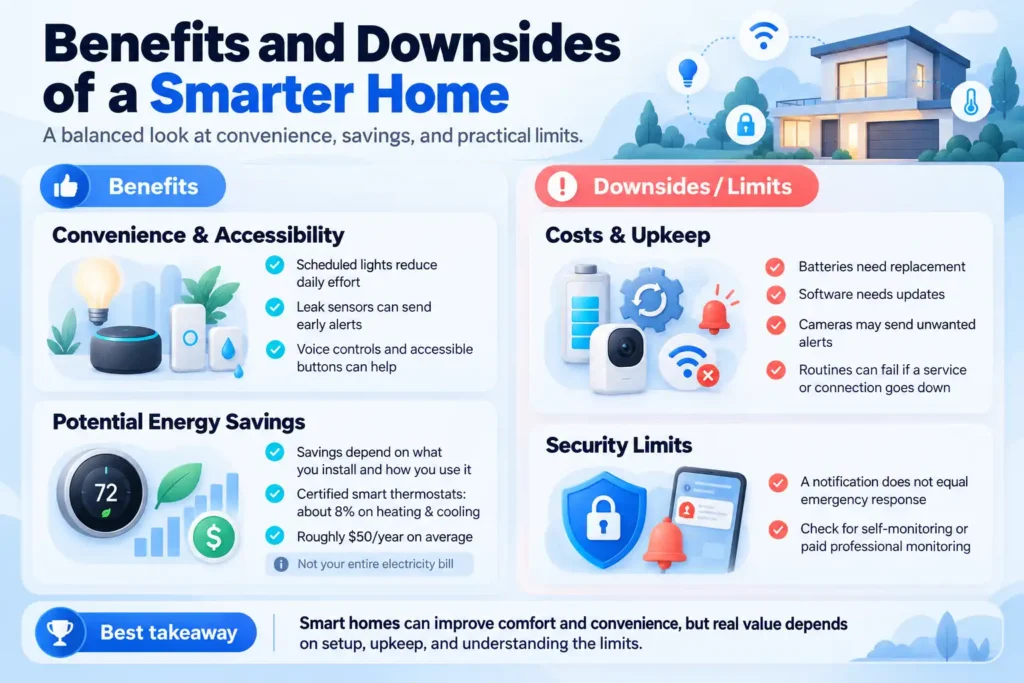
Benefits and Downsides of a Smarter Home
Convenience and Accessibility
The value comes from useful tasks. Scheduled lights can reduce daily effort. Leak sensors can send an early warning. Accessible buttons and voice controls can help people who find ordinary switches difficult to use.
Potential Energy Savings
Energy savings are possible, but they depend on what you install and how you use it. ENERGY STAR estimates that certified smart thermostats save about 8% on heating and cooling bills, or roughly $50 a year on average. This is not an estimate for your entire electricity bill.
Costs, Upkeep, and Security Limits
There are costs beyond the purchase price. Batteries need replacement. Software needs updates. Cameras may send unwanted alerts. A routine can stop working if a required service or connection fails.
Security equipment also has limits. A notification does not mean someone has called emergency services. Check whether a product offers self-monitoring, paid professional monitoring, or both.
What Equipment Do I Need for a Smart Home?
A basic setup needs a device, power, a supported control method, and the connection specified by its maker. Many WiFi bulbs and plugs work through their own apps without a separate hub.
A voice assistant is optional. A mesh WiFi system is optional too. Check coverage where the device will sit before buying network upgrades.
Hub, Matter Controller, and Thread Border Router
Smart home equipment and its role
| Equipment | What it does | When you may need it |
| Smart home hub | Connects and manages supported devices | When the device or platform requires a hub |
| Matter controller | Adds and controls Matter devices | When using Matter through a supported platform |
| Thread border router | Connects Thread to the wider home network | When Thread devices need that network connection |
One product can perform more than one job. Check its exact model because similar-looking speakers or displays can have different hardware. Google Home, for example, requires a supported hub to add Matter devices through its platform.
How to Choose a Smart Home Platform
A platform brings supported devices into a shared app and helps them work together. Start with the phones, controls, and equipment your household already uses.
Compare smart home platforms
| Platform | Reasons to consider it | What to verify |
| Apple Home | Household use of Apple devices and the Home app | Accessory support and any home hub requirements |
| Google Home | Existing Google Home or Nest equipment | Supported device types and Matter hub requirements |
| Amazon Alexa | Existing Echo devices and voice routines | Exact Echo model capabilities and device support |
| Samsung SmartThings | Mixed brands and supported device routines | Hub requirements for the connection you choose |
| Home Assistant | More local control and detailed custom rules | Hardware, supported integrations, and maintenance effort |
Matter, Thread, and Other Connections Explained
Matter is a shared standard managed by the Connectivity Standards Alliance. It gives supported devices a common way to communicate across participating platforms. It uses WiFi, Ethernet, or Thread for connections, with Bluetooth commonly used during setup.
Thread is a network technology. Matter is the standard used over that connection. A product supporting Thread does not automatically support Matter.
Compare smart home connection technologies
| Technology | Main role | Extra equipment to check |
| WiFi | Connects devices through your home router | Supported WiFi band and signal coverage |
| Thread | Provides a low-power mesh network | Thread border router for connection to the wider home network |
| Zigbee | Connects supported devices through a separate mesh | Compatible hub or coordinator |
| Z Wave | Connects supported devices through a separate mesh | Compatible hub and correct regional version |
| Matter | Provides common device communication | Supported controller, device category, and features |
Does Matter Guarantee Compatibility?
Matter helps, but you still need to check your chosen platform. Platforms can add support for device categories at different times. A product’s special features may remain available only through its brand app. Google explicitly notes that platform support can vary as Matter adds device types.
For US purchases, check electrical ratings and regional requirements. Do not assume an imported device will fit your outlets or work with a US hub.
Does a Smart Home Work Without Internet?
Local control keeps supported commands within your home network. Cloud control sends requests through an online service. A product can use both methods for different features.
Matter provides local communication. To control Matter devices while away, you generally need an internet-connected controller at home and a supported remote access service.
What happens during an internet outage
| Function | During an internet outage |
| Local device commands | May continue if the network and controller remain powered |
| Locally stored routines | May continue if all required parts operate locally |
| Cloud routines and remote access | Usually stop until internet service returns |
| Cloud video uploads | Stop; local recording depends on the camera |
| Voice services | Often lose features that rely on online processing |
Internet Outages vs. Power Outages
An internet outage differs from a power outage. Your router, hubs, and wired devices still need electricity. Battery-powered equipment may continue some functions, but that does not keep the whole system running.
How Much Does a Smart Home Cost?
These US starter budgets assume you already own suitable fixtures, a smartphone, and a router. The plug examples use Tapo P125M devices. The bulb option adds dimming and color control.
Example US starter budgets
| Setup | Equipment purchased | Device total |
| One existing lamp | One P125M smart plug | $11.99 |
| Two existing lamps | Two single P125M plugs at $11.99 each | $23.98 |
| Three existing lamps | One P125M three pack | $24.99 |
| Two color bulbs | One Wyze Bulb Color two-pack | $24.98 |
Prices were checked on October 3, 2026, at the manufacturers’ US stores. Tax and shipping are excluded. The two-plug total is calculated from the single price. Prices and stock can change.
Basic plug control and scheduling do not require a paid subscription. Adding voice control or another platform may require hardware you do not already own. Include any required hub, installation, replacement batteries, and recurring services in a larger budget.
ENERGY STAR lists smart thermostats at about $50 to $300. Installation or a power adapter may add to that cost. Camera recording and professional monitoring are separate expenses to check before buying.
The Wyze setup needs two suitable E26 sockets, 2.4 GHz WiFi, and the Wyze app; no separate hub is needed. Do not use these bulbs in fully enclosed fixtures. Choose a plug for simple power switching or bulbs for brightness and color control.
How to Make Your Home a Smart Home
1. Pick One Useful Goal
Write down a task: “Turn the living room lamp on before I arrive home.” This gives you a clear reason to buy equipment and a way to judge the result.
2. Check Your Home and Existing Devices
Check outlet space, signal coverage, and installation needs. Confirm the WiFi band required by your chosen device.
3. Confirm the Whole Setup Before Buying
Check the product page for platform support, required hardware, and available features. For a sensor routine, verify that your platform can use that sensor as a trigger.
4. Install and Secure the Device
Follow the maker’s instructions, apply updates, and give the device a clear name such as “Living room lamp.” Use household sharing tools instead of sharing your account password.
5. Test One Routine Before Expanding
Create a simple schedule. Test app control, physical control, and what happens when the internet disconnects. Confirm any power restoration setting. It may determine whether a light stays off or turns on after an outage.
Starter Example: Schedule One Living Room Lamp
This is a manufacturer-based walkthrough, not a hands-on test. Use a lamp with a mechanical switch that lights up when power returns.
Complete lamp setup
| Part | What to use or do |
| Required equipment | Existing lamp, Tapo P125M plug, smartphone with Tapo app, powered 2.4 GHz WiFi router, and internet for initial setup. |
| Connection | Plug the P125M into a wall outlet. Connect the lamp to it and leave the lamp switch on. Add the plug in the Tapo app and connect it to your WiFi. Name it “Living room lamp.” |
| Schedule | Set an ON schedule for 6:30 p.m. and an OFF schedule for 10:30 p.m. Choose the days you want. Check the device time zone. |
| Expected internet outage behavior | Stored schedules can continue while power remains available. Local app control is supported on the same home network. Remote control from outside the home needs internet. |
| Expected power outage behavior | The lamp cannot operate without electricity. After power returns, TP Link says devices need internet to resynchronize time before schedules resume reliably. Check the plug’s power restoration setting. |
The product supports local network control, and TP-Link documents the schedule limits above. [6, 12] Before relying on the setup, check one full evening schedule and the physical plug button. Disconnect only the router’s internet connection to test local behavior while keeping WiFi powered. Then reconnect it.
Smart Home Privacy and Security
Secure Your Accounts and Devices
The Federal Trade Commission recommends changing default credentials, using unique passwords, enabling supported two-factor authentication, and keeping device software updated.
Check Privacy and Software Support
Read the privacy policy before placing cameras or microphones inside your home. Check recording, retention, and sharing controls. Local control can reduce dependence on online services, but it does not eliminate every privacy or security risk.
Ask how long software support lasts and what happens if the company closes a service. Keep manual access where practical, especially for locks and lighting.
Common Smart Home Mistakes to Avoid
Avoid these common mistakes:
- Buying several products before checking how they connect.
- Assuming every smart plug can safely control every appliance. Follow both products’ ratings and instructions, especially for heaters.
- Expecting a switched outlet to operate a device that needs a separate start button.
- Putting devices on an isolated guest network when they need to communicate locally.
- Resetting everything before checking power, signal, account access, and controller status.
When moving or selling equipment, remove shared access and follow the maker’s reset process. The FTC also advises transferring connected home devices carefully when a property changes hands.
Frequently Asked Questions
Is There a Monthly Fee for Smart Homes?
Not necessarily. Basic lighting and plug control can work without a paid plan. Camera storage, professional monitoring, and some added features may cost extra. Check which functions remain available without a subscription.
What Are the Downsides of Smart Homes?
Costs, privacy concerns, updates, batteries, and compatibility problems can add work. Cloud features may stop during outages. Start with a small setup and keep useful manual controls.
Can a Smart Home Work Without Internet?
Yes, some supported local controls and routines can work if the home network and required equipment stay powered. Remote access and cloud features usually need internet. Test the specific functions you depend on.
Is the Smart Home App Free?
Many brand apps and major platform apps are free to download. Hardware, subscriptions, and optional services may still cost money. An app being free does not mean every feature is free.
What Is Required for a Smart Home?
At minimum, you need a compatible device, power, a supported connection, and a way to control it. Depending on the setup, you may also need a hub, controller, or border router.
Can I Watch Normal TV on Smart TV Without Internet?
Yes, many smart TVs can show broadcast channels through an antenna and built-in tuner, or receive a cable box through HDMI. Samsung provides instructions for antenna channel scanning. Streaming services need internet, and app-based TV services are different from antenna broadcasts. Check your TV’s inputs and tuner.
Start With a Setup You Can Use Every Day
Choose one task, confirm compatibility, and buy only the equipment that task requires. Test the controls before adding more. A useful smart home fits your budget and household habits while leaving you a clear way to operate things when a connection fails.
Research basis: This guide draws on manufacturer documentation and federal consumer guidance. The starter example describes expected behavior, not measured results. Prices and the setup guidance were checked on October 3, 2026.


