

Home Automation Benefits & Advantages
Home automation benefits and advantages include less daily effort, better energy management, remote access, improved comfort, and more accessible controls. Its value depends on the problems you want to solve, the devices you choose, and how well they work together.
A hallway light that turns on at night may be more useful than a costly device you rarely use. A leak sensor near a washing machine can alert you to a problem before you notice water on the floor.
This guide explains the main home automation benefits, the costs and drawbacks, and how to decide what belongs in your home.
What Is Home Automation?
Home automation uses connected devices to perform actions based on schedules, sensor readings, or other conditions. These devices may include lights, thermostats, locks, blinds, cameras, and appliances.
A smart home is the broader collection of connected products. Automation is what happens when those products follow rules without needing a separate command each time.
Understanding smart home benefits, features, and advantages helps you compare what a device can do with the difference it makes in daily life.
How Does Home Automation Work?
Most routines have three parts:
- Trigger: Something happens, such as a motion sensor detecting movement.
- Condition: A rule checks whether the action should run, such as whether it is dark.
- Action: A device responds, such as a hallway light turning on.
You might create a rule that turns on a dim light when someone enters the hallway after bedtime. A timer then switches it off.
Some routines run through internet services. Others run locally through a controller inside your home. That difference matters during an internet outage.
Home Automation Benefits at a Glance
| Benefit | Practical example | Main requirement or limitation |
| Less daily effort | A bedtime routine turns off selected lights | Everyone needs an easy override |
| Energy management | Heating or cooling follows your schedule | Savings depend on current habits |
| Remote access | Check whether the garage door is closed | Remote access usually needs internet |
| Earlier problem alerts | A sensor detects water near a washer | Phone alerts need connectivity; check local alarms |
| Comfort | Blinds and lighting follow daily routines | Devices must support the chosen controls |
| Accessibility | Control lights without reaching a switch | Controls must suit the individual |
| Household insights | Track electricity used by an appliance | Energy measurement needs supported hardware |
| Easier expansion | Add a sensor to an existing routine | Check compatibility before buying |
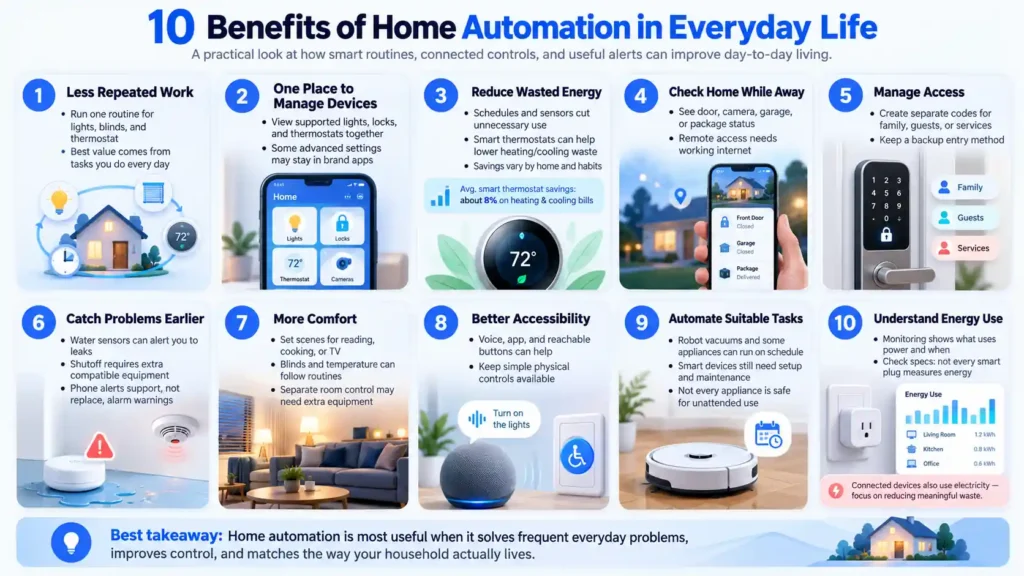
10 Benefits of Home Automation in Everyday Life
1. Spend Less Time on Repeated Tasks
A single routine can turn off selected lights, close compatible blinds, and adjust the thermostat.
This is useful when you repeat the same steps every morning or evening. Start with actions you already perform. A routine that saves effort each day is easier to justify than one built around a rare event.
2. Manage Devices from One Place
A shared app can bring supported lights, locks, thermostats, and other devices into one view.
This makes it easier to check device status and run routines. However, some advanced settings may remain in the manufacturer’s app.
Check the functions you need. A device appearing in your app does not mean every feature is available there.
3. Reduce Wasted Energy
Scheduled lighting and temperature control can reduce unnecessary use. A thermostat might adjust settings while the house is empty, while a sensor can switch off lighting in an unused space.
ENERGY STAR’s US guidance estimates average savings of about 8% on heating and cooling bills for certified smart thermostats. Actual results vary with climate, equipment, occupancy, and comfort preferences. This is not an estimate for your entire household energy bill. 1
Automation also uses electricity. Focus on reducing meaningful waste rather than expecting every connected device to save money.
4. Check Your Home While You Are Away
Compatible cameras, door sensors, and garage controls can show whether something needs attention.
You could check a door’s status after leaving or see when a package arrives. Remote access generally requires working internet connections at home and on your phone.
Decide what you need to check before buying cameras for every room. Door status or a water alert may solve your problem with less data collection.
5. Manage Access for Family and Visitors
Supported smart locks can provide separate access codes for family members, guests, or service providers.
Temporary codes can be useful when someone needs access while you are away. Remove them when they are no longer needed.
Keep a backup entry method. Check the lock’s battery warnings, physical controls, and behavior during a connection failure.
6. Notice Leaks and Other Problems Earlier
Water sensors can alert you when moisture appears near a sink, water heater, or washing machine.
Detection and response are different functions. A basic sensor reports water. An automatic shutoff system also needs a compatible valve and a tested rule.
Connected smoke and carbon monoxide alarms may offer additional notifications. Phone alerts should support the alarm’s normal warning functions, not replace them.
7. Make Lighting and Temperature More Comfortable
Lighting scenes can suit reading, cooking, or watching television. Compatible blinds can follow a schedule, while temperature controls can match household routines.
Avoid assuming that one thermostat provides separate temperatures in every room. That may require HVAC zoning, additional equipment, or a different system.
Choose settings that work for everyone sharing the space.
8. Make Everyday Controls More Accessible
Voice commands, large app buttons, and reachable physical controls can reduce the effort needed to manage a home.
Someone with limited mobility may find it easier to adjust lighting from bed. Another person may prefer a wall button over a voice assistant.
Ask the person using the system what works for them. Preserve simple controls when speech, hearing, vision, or internet access may affect use.
9. Automate Suitable Household Tasks
A robot vacuum can clean on a schedule. Supported appliances may send cycle alerts or offer selected remote functions.
Check exactly what the appliance supports. Some still need preparation or a physical button press.
Keep tasks realistic. A vacuum still needs an empty bin, clear floors, and maintenance. A smart plug does not make every appliance suitable for unattended operation.
10. Understand Your Household Energy Use
An energy monitoring device can show which appliances consume power and when. That information helps you choose useful changes.
Basic on and off plugs do not necessarily measure energy. Check the model’s specifications.
Practical Home Automation Examples
These examples show how a useful routine combines a trigger with a clear action.
| Situation | Suggested routine | What to check |
| Leaving home | Turn off selected lights and adjust temperature | Someone may still be home |
| Nighttime movement | Turn on low-brightness hallway lighting | Sensor coverage and timer |
| Returning after dark | Turn on entrance lighting | Supported arrival trigger |
| Water near a washer | Send an alert and run a supported shutoff action | Sensor placement and valve operation |
| Cleaning day | Start a robot vacuum | Clear floors and pet needs |
Test each routine under normal household conditions. Pets, visitors, and different work schedules can expose problems that a simple setup test misses.
Home Automation Costs and Disadvantages
Upfront and Ongoing Expenses
Total cost may include devices, a controller, installation, subscriptions, batteries, and replacement hardware.
A camera’s purchase price may not include the video history you want. Ask what works without a subscription and what happens if you cancel it.
For larger installations, get an itemized quote showing equipment, labor, support, and recurring fees.
Internet, Network, and Power Failures
An internet outage does not always stop local routines. A local controller may still communicate with supported devices inside your home.
Home Assistant documents that devices using supported local protocols can operate without internet. Cloud services and remote access have separate requirements. 2
A power failure is different. Powered routers, controllers, and devices may stop. Battery-powered sensors cannot complete an action if the equipment they depend on is unavailable.
Privacy and Account Security
Check what information the device collects, where it stores recordings, and who can access them.
Use separate household accounts where supported. Protect accounts with unique passwords and two-factor authentication when available. Update devices and router firmware, and remove access for people who no longer need it. The FTC recommends these basic protections for internet-connected home devices.
For cameras, consider recording areas and retention settings as carefully as image quality.
Setup and Maintenance
Devices need updates, batteries, cleaning, and occasional testing. Poor sensor placement can cause false triggers or missed events.
Keep a record of device models, important settings, and account ownership. Store pairing codes securely.
Choose a system that someone else in the household can use if its main administrator is unavailable.
Is Home Automation Worth It?
Home automation is worth considering when it solves a frequent problem at a cost you can afford.
It may offer good value when you need easier controls, regularly waste energy, manage access for others, or want alerts about specific household problems.
A smaller setup may be enough if you only need one scheduled lamp or a water sensor. More devices also mean more upkeep.
Compare Costs with Realistic Benefits
Separate money savings from convenience.
Suppose a device and installation cost $240, with no ongoing fees. If it saves an estimated $60 each year, the simple payback period is four years. That is an example calculation, not a savings prediction.
A $10 monthly subscription adds $120 a year. Include it before deciding whether a system reduces expenses.
Also consider benefits that are harder to price, such as easier access or less effort. Do not assume increased resale value or an insurance discount will cover the cost. Check any discount directly with your insurer.
Choose a Compatible and Reliable Setup
Understand Matter and Thread
Matter is a smart home standard developed through the Connectivity Standards Alliance. It gives supported products a shared way to communicate across compatible platforms.
Matter and Thread are different. Matter defines device communication. Thread is one network technology that can carry it, alongside WiFi or Ethernet. A Thread border router connects the Thread mesh to your Wi-Fi or Ethernet network. A Matter controller manages supported Matter devices; these are different roles, although one product may perform both.
Check the exact device type, platform support, and required controller. A Matter label does not promise identical features in every app.
Expand Your Setup Gradually
After your first routine works reliably, add devices that address another need. Build around supported connections rather than buying a large collection first and trying to link it later.
Check Installation Requirements
Before buying, confirm:
- Platform and device compatibility.
- Required hubs, bridges, or border routers.
- Electrical load and wiring requirements.
- HVAC compatibility for thermostats.
- Local and cloud functions.
- Subscription and support terms.
Use a qualified installer when work requires electrical, HVAC, or plumbing skills. Renters should check permission before changing locks, wiring, or fixed equipment.
How to Test Your First Home Automation Routine
- Choose one task, such as hallway lighting after dark.
- Confirm that the sensor, light, and controller support the same routine.
- Set the trigger, time condition, brightness, and switch-off delay.
- Test normal use, false triggers, and the physical override.
- Disconnect internet temporarily to check the promised local behavior. Keep power and the home network running during this test.
- Explain the controls to the household before adding more devices.
Record whether the routine solves the original problem. Frequent missed triggers or confusing overrides are reasons to adjust the setup before expanding.
Common Mistakes to Avoid
Buying devices before choosing a platform creates avoidable compatibility problems.
Automating too much at once makes faults harder to trace. Add one routine, test it, and adjust it before expanding.
Do not depend only on voice or app control. Guests and family members need clear physical controls too.
Finally, avoid using a smart plug for an appliance unless its instructions and electrical rating allow that use. Being able to switch power remotely does not make unattended operation appropriate.
Frequently Asked Questions
What Are the Advantages and Disadvantages of Home Automation?
The main advantages of home automation are less daily effort, better control, useful alerts, improved accessibility, and potential energy savings.
Disadvantages include costs, privacy concerns, compatibility limits, connection failures, and maintenance. Their impact depends on your devices and setup.
What Are 10 Advantages of Home Automation?
For home use, ten advantages are simpler routines, shared controls, energy management, remote monitoring, access management, earlier hazard alerts, comfort, accessibility, automated chores, and usage insights.
These benefits require suitable equipment. Buying connected devices alone does not create useful automation.
What Are 10 Disadvantages of Home Automation?
For a home, ten possible drawbacks are:
- Initial equipment costs.
- Installation expenses.
- Subscription fees.
- Device compatibility limits.
- Internet dependence for some functions.
- Power failure interruptions.
- Privacy concerns.
- Account security risks.
- Updates and battery maintenance.
- Incorrect triggers or difficult controls.
They do not affect every system equally. Local operation and physical controls can reduce some problems.
Which Brand Is Considered the Best for Home Automation?
No brand is best for every home.
Compare product support, required features, installation needs, and long-term costs. A household may use one platform with products from several manufacturers.
For example, Lutron Caséta provides lighting controls and documented integrations with supported shades and other products through its Smart Hub. That makes it a lighting option to assess, rather than proof that it is best for every task.
Does Home Automation Improve Home Security?
Connected locks, door sensors, and cameras can improve awareness and access management. They do not guarantee that a burglary will be prevented. Choose clear alerts, maintain secure accounts, and keep backup entry methods. A home automation routine is also different from a professionally monitored security service.
Does Home Automation Work Without Internet?
Some functions do. Supported local routines may continue while your home network and controller remain powered.
Remote access, cloud recordings, and some voice functions may stop. Check each important function rather than judging the whole system by one label.
Start with a Problem You Want to Solve
Choose one task that causes regular effort or concern. Check the required equipment, total cost, and backup controls. Install it, test it, and involve everyone who will use it.
A useful system should fit your household’s routines and remain manageable over time.


