

Smart Home Appliances & Connected Devices
Smart home appliances and connected devices let you control household products through an app, voice assistant, schedule, or automation. They can help you check whether the washer finished, turn down the thermostat while you are away, or get an alert when a leak sensor detects water. The right setup depends on your home, budget, internet connection, and the devices you already own.
A smart home does not require a full renovation or a room full of gadgets. Start with one task you want to make easier. Then choose a product that works with your preferred app or voice assistant.
What Are Smart Home Appliances and Connected Devices?
A smart appliance is a household appliance with connected features. Depending on the model, you may be able to control it from an app, check its status, receive alerts, or use automatic settings.
A connected device is a broader term. It includes appliances, but also smart speakers, cameras, lights, locks, sensors, plugs, and thermostats. These products may connect to the internet directly or communicate with a hub on your home network.
People also use terms such as smart household appliances, connected appliances, and IoT home appliances. IoT means “Internet of Things.” It describes physical products that use software and network connections to send or receive information.
The phrase electronic home appliances can include both standard and connected products. A connected model has features such as app control, status alerts, or integration with other smart home devices. Some shoppers use broad searches for connected home appliances when they mean household products with these features.
Types of Smart Home Appliances
Smart features vary by product and model. Read the product specifications before buying, since two appliances in the same category may offer different app controls or platform support.
Kitchen appliances
Connected refrigerators may send door or temperature alerts, while some models offer inventory tools or maintenance reminders. Smart ovens and microwaves may support remote status checks, cooking notifications, or settings through a phone app. Coffee makers may let you schedule a brew or start a cycle remotely.
Remote control is not always available for every function. For safety, some cooking appliances may require a person to be present before they start or change a setting.
Laundry appliances
Smart washers and dryers can report when a cycle ends, send error alerts, and let you check cycle progress in an app. Some models let you download additional wash cycles or receive maintenance reminders.
Check whether the app offers a useful feature for your household. If you only need a cycle complete alert, you may not need a premium model with many extra functions.
Climate and energy products
Smart thermostats connect to heating and cooling systems. Many let you set schedules, adjust temperatures remotely, and review energy reports. Smart plugs and energy monitors can show or control the power use of certain compatible devices.
A connected device does not automatically reduce your energy bill. Savings depend on how you use it, your home, and local utility rates. McKinsey’s survey of major appliance buyers found that durability, efficiency, and price remain key purchase considerations, while the value of connectivity features varies across age groups and products.
Cleaning, security, and home sensors
Robot vacuums, cameras, video doorbells, smart locks, motion sensors, and leak detectors are connected devices rather than major appliances. They can send alerts, support remote checks, or start an action when a sensor detects a change.
Some products can connect directly to Wi Fi. Others need a compatible hub or controller. Check this before you buy, especially if you already use a particular smart home platform.
How Connected Appliances Work
A smart appliance usually includes a network connection, a control app, and software that lets it send or receive commands. Some products connect directly to your router. Others communicate through a hub, which links compatible devices to an app or platform.
Common connection types include Wi Fi, Bluetooth, Thread, Zigbee, and Z-Wave. They do different jobs and are not interchangeable. A product’s packaging or specification page should name the connection it uses and any hub it needs.
What Matter does
Matter is a smart home connectivity standard supported by major platform and device makers. It is designed to help compatible products from different brands work with multiple smart home platforms. Matter uses existing network technologies such as Wi Fi, Thread, and Ethernet, with Bluetooth Low Energy used during setup.
Matter support does not mean every product feature will work in every app. Platform support can vary by device type and may be added at different times. Google’s setup guidance, for example, says users should check which Matter device types Google Home currently supports and notes that Thread products need a Thread Border Router.
The Connectivity Standards Alliance has added support for major appliance types such as ovens, cooktops, microwaves, and laundry dryers in Matter specifications. This gives manufacturers a common framework, but each product still needs to implement and certify the features it offers.
Do you need a hub?
You may not need a separate hub if your devices connect to Wi Fi and work with the same app. A hub can be useful when devices use Thread, Zigbee, or Z-Wave, or when you want one controller to manage several device types.
A smart speaker or display can also act as a controller for compatible devices. Before buying, check the product’s requirements and whether your existing router, phone, and smart home platform support them.
Benefits and Tradeoffs
Connected appliances can make household tasks easier to monitor. You may get a message when laundry ends, check whether the oven is preheated, or change the thermostat while away. Sensors can send alerts about leaks, open doors, or unusual activity.
There are trade-offs. Connected models may cost more, require an app account, or depend on a manufacturer’s cloud service. Some features may require a subscription. If the internet goes out, local buttons may still work, while remote control and cloud features may stop.
Privacy deserves attention too. A camera, speaker, or appliance app may collect information about device use, voice commands, or household routines. NIST surveyed 401 U.S. smart home users and found that privacy and security concerns differed by device category. The study reported greater concern around voice assistants than some other categories. [5]
Before buying, review the privacy settings, account requirements, update policy, and support period. Use a unique password for each account and enable two-factor authentication when available.
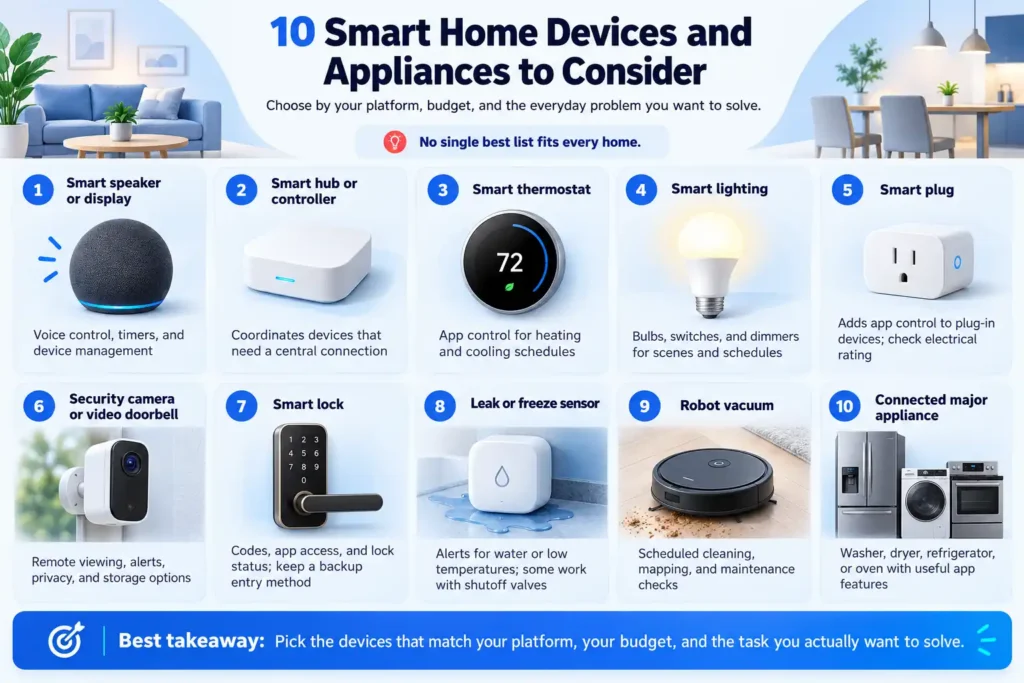
10 Smart Home Devices and Appliances to Consider
There is no single best list for every home. These ten categories cover common needs. The best choice depends on the platform you use, your budget, and the task you want to solve.
1. Smart speaker or display
Useful for voice control, timers, and managing compatible devices. The current Security.org platform guide names Google Nest Hub Max for voice AI and Amazon Echo Show 8 for broad compatibility.
2. Smart home hub or controller
Helps coordinate devices that need a central connection. Check whether your speaker or display already includes the controller you need.
3. Smart thermostat
Lets you adjust heating and cooling schedules through an app. Confirm that it works with your HVAC system before purchase.
4. Smart lighting
Bulbs, switches, and dimmers can support schedules and scenes. Choose bulbs or switches based on your fixtures and wiring.
5. Smart plug
Adds app control to some plug-in devices. For example, PCMag’s 2026 roundup lists the TP-Link Tapo P110M for power monitoring and smart home integration. Check its electrical rating and use the appliance maker’s instructions before connecting a device.
6. Security camera or video doorbell
Offers remote viewing and motion alerts. Compare storage options, privacy controls, and whether a subscription is required.
7. Smart lock
Can support app access, codes, or lock status alerts. Keep a backup entry method and check the lock’s fit with your door.
8. Leak or freeze sensor
Sends an alert when it detects water or low temperatures. Some systems can also work with a shutoff valve.
9. Robot vacuum
Can clean on a schedule and report its status. Check floor mapping, maintenance needs, and platform compatibility.
10. Connected major appliance
A washer, dryer, refrigerator, or oven can provide status updates and selected app controls. Choose the connected functions you expect to use.
This list is a category-based guide, not a hands-on product test. Product models, prices, and platform support change, so confirm current specifications with the manufacturer before ordering.
How to Choose the Right Smart Appliances
Start with a problem you want to solve. If you often forget laundry, cycle alerts may matter more than voice control. If you want to manage heating and cooling, thermostat compatibility with your HVAC system is a key check.
Then review these details:
- Platform: Does the product work with Google Home, Amazon Alexa, Apple Home, Samsung SmartThings, or your current system?
- Connection: Does it need Wi Fi, Thread, Bluetooth, or a separate hub?
- Features: Which functions work in the app you plan to use?
- Cost: Include the purchase price, subscription fees, installation, and replacement parts.
- Support: Check software updates, warranty terms, and manufacturer support.
- Privacy: Review what data the device collects and how to manage account permissions.
A broader look at Smart Home Devices & Technology can help explain how hubs, networks, and automations connect appliances to the rest of the home. Smaller Smart Home Gadgets & Accessories, such as sensors and plugs, can add specific controls or alerts after you choose your main appliances.
Common Smart Home Mistakes
Buying before checking compatibility
A product may work with one app but not another. Check the exact model number and supported features before checkout.
Assuming Matter means every feature works everywhere
Matter can improve device interoperability, but app and platform support can differ. Check the manufacturer’s compatibility list and the platform’s supported device types.
Adding too many devices at once
Start with one or two products. Learn how their apps, alerts, and routines work before expanding the system.
Using a smart plug with an unsuitable appliance
A smart plug is not right for every high-power or safety-sensitive device. Check the plug’s rating and the appliance maker’s instructions. Do not use remote power control where the manufacturer warns against it.
Ignoring privacy and software support
Set strong passwords, enable account security features, and install updates. Before buying, check whether the maker explains how long it supports the product.
Frequently Asked Questions
Which smart home appliances and connected devices are common?
A useful list can include smart refrigerators, washers, dryers, ovens, thermostats, lights, plugs, cameras, locks, sensors, speakers, hubs, and robot vacuums. Some are appliances; others are connected devices that help control or monitor the home.
What are the best smart home appliances and connected devices?
The best options depend on your needs. A thermostat may help manage heating and cooling, a leak sensor can provide water alerts, and a connected washer can report when laundry is done. Check compatibility, cost, and privacy before choosing a model.
What is the list of smart devices for home?
Common smart devices for home use include smart speakers, displays, bulbs, switches, plugs, thermostats, cameras, doorbells, locks, motion sensors, leak detectors, and robot vacuums. A hub may be needed for some device types.
What are the best smart home devices in 2026?
For 2026, start by choosing categories that solve real household needs rather than buying a large bundle. Current buying guides highlight smart speakers and displays, thermostats, lighting, locks, cameras, plugs, sensors, and robot vacuums. Check current model availability and compatibility because product lineups change.
What are the best smart home assistant devices?
A smart display or speaker can serve as a voice assistant and controller. Security.org’s 2026 guide lists Google Nest Hub Max for voice AI, Amazon Echo Show 8 for compatibility, Apple HomePod for Apple users, and Home Assistant Green for people who want more local control and are comfortable with setup. These are different platforms, so choose based on the devices and phones your household already uses. [7]
What do people mean by “Google appliances”?
People searching “Google appliances” may mean appliances that work with Google Home or Google Assistant. Google Home can set up and control compatible devices, but the appliance maker and exact model determine which features are available. [2]
What smart home gadgets count as appliances or connected devices?
People use this phrase for connected household products, from major appliances to small devices such as plugs, speakers, and sensors. Check each product’s features and app requirements because the phrase does not identify one product category.
Are smart appliances worth it?
They can be worth it when a connected feature solves a task you have. Status alerts, remote checks, or schedules may be useful. If you will not use the app features, a standard appliance may offer better value.
Conclusion
Smart appliances and connected devices can make a home easier to manage, but the useful setup is different for each household. Begin with one clear need, check the device’s app and network requirements, and review privacy, cost, and support before buying. Build gradually so each new product fits the system you already use.


