

Accounting & Business Automation Technology 2026
Accounting teams once spent much of their day entering transactions, matching invoices, checking bank records, moving numbers between systems, and preparing reports by hand. Software now handles a growing share of that routine work.
Accounting & Business Automation Technology combines accounting software, artificial intelligence, machine learning, robotic process automation, document recognition, connected business systems, and automated workflows to process financial and operational tasks with less manual handling.
The goal is not to remove accountants from financial decisions. It is to let software handle predictable work while people review exceptions, apply judgment, maintain controls, and advise the business.
That distinction matters in 2026. The U.S. Bureau of Labor Statistics expects some routine accounting work to become automated, but it still projects employment of accountants and auditors to grow 5% from 2025 through 2035. BLS expects automation to make analytical and advisory duties more prominent rather than eliminate the profession.
What Is Accounting and Business Automation?
Accounting automation uses software to complete financial tasks that previously required repeated manual action.
Common examples include:
- Importing bank transactions
- Categorizing routine transactions
- Reading invoice data
- Routing bills for approval
- Matching payments to invoices
- Reconciling accounts
- Processing employee expenses
- Preparing recurring reports
- Monitoring overdue receivables
- Flagging unusual transactions
Business automation applies the same idea outside the finance department. A company may connect its sales, purchasing, inventory, payroll, customer service, ecommerce, and accounting systems so information moves between them without repeated data entry.
This means accounting automation is one part of a wider business process.
For example, an ecommerce order can trigger several actions. The order enters the sales system, inventory changes, payment data is recorded, tax information is captured, and the accounting platform receives the transaction. An employee may only need to review exceptions.
How Accounting Technology Has Changed
Modern accounting technology developed in stages.
Early accounting software mainly replaced paper ledgers and calculators. Desktop programs later added reporting, invoicing, and digital bookkeeping.
Cloud platforms changed the model again. Businesses could connect bank accounts, accept online payments, share records with accountants, and access financial data from different locations.
Automation then added rules.
A business could tell its accounting software to categorize recurring transactions from the same vendor or send a reminder when an invoice became overdue.
The current stage uses AI alongside those rules.
QuickBooks, for example, now offers AI functions that use accounting, payment, and payroll data to answer questions and carry out multi-step tasks. Intuit says its Accounting AI can request missing transaction information, work through bookkeeping questions, and update transactions while keeping the user involved.
The change is significant because software is moving from simply recording actions toward helping decide what action should happen next.
How Accounting Automation Works
Most accounting automation follows a simple flow.
Data enters the system
Financial information may come from bank feeds, invoices, receipts, payroll systems, ecommerce platforms, expense apps, customer systems, or uploaded documents.
Software reads the information
Structured data may move directly through an integration or API.
Documents such as invoices and receipts may require optical character recognition, often called OCR, or intelligent document processing.
These systems identify fields such as:
- Vendor name
- Invoice number
- Invoice date
- Amount
- Tax
- Purchase order number
- Payment terms
Rules or AI process the data
A fixed rule can handle predictable transactions.
AI may be used where a task requires classification, pattern recognition, or additional context.
The system checks the transaction
Software can test the information against rules such as approval limits, purchase orders, vendor records, or accounting policies.
Routine items move forward
A low-risk transaction that meets every condition may continue automatically.
Exceptions go to a person
Missing information, unusual values, duplicate invoices, conflicting records, or high-value payments should normally receive human review.
This exception based model is often more sensible than trying to automate every financial decision.
Core Technologies Used in Accounting Automation
Accounting automation is not one technology. Several systems often work together.
Cloud Accounting Software
Cloud accounting platforms store financial records online and support functions such as invoicing, expense tracking, bank feeds, reporting, and reconciliation.
Examples include QuickBooks Online, Xero, Zoho Books, FreshBooks, Sage products, and larger platforms such as Oracle NetSuite and Microsoft Dynamics 365.
A cloud ledger often becomes the main financial record while specialist tools connect around it.
Robotic Process Automation
Robotic process automation, or RPA, follows programmed steps to complete repetitive computer tasks.
An RPA bot might:
- Copy information between systems
- Download reports
- Rename and save files
- Enter data into a legacy application
- Compare fields between records
RPA works well when the process is predictable.
It becomes less useful when the task requires judgment or when the software interface changes often.
Optical Character Recognition
- OCR converts printed or image-based text into machine readable information.
- In accounting, it helps software read receipts, invoices, statements, and tax documents.
- OCR alone identifies text. It does not necessarily understand what the text means.
Intelligent Document Processing
Intelligent document processing adds classification and interpretation to document capture.
For example, it may recognize that one number on an invoice is the invoice number while another is the amount due.
This reduces manual invoice entry and makes document based workflows easier to automate.
Machine Learning
Machine learning systems identify patterns in historical data.
Accounting uses can include:
- Transaction classification
- Duplicate detection
- Cash flow prediction
- Expense review
- Anomaly detection
- Matching transactions
A model can suggest an action, but businesses still need clear rules for when a person must review the result.
Generative AI
Generative AI works with language and other content.
Possible accounting uses include:
- Summarizing financial information
- Explaining account movements
- Drafting client messages
- Supporting tax research
- Reviewing documents
- Answering questions about financial data
Thomson Reuters surveyed more than 1,500 professionals for its 2026 AI in Professional Services Report. It found that 40% said their organizations were using generative AI, compared with 22% the previous year. Among tax and accounting users, reported uses included tax research, document review, bookkeeping, advisory work, and tax return preparation.
AI Agents
AI agents are designed to complete a sequence of actions toward a goal rather than perform one isolated task.
An accounting agent might review an uncategorized bank transaction, determine that more information is needed, ask the business owner for context, receive the answer, and update the transaction.
This area is still developing.
The same Thomson Reuters research found that 15% of surveyed organizations were already using agentic AI, while another 53% were planning or considering it.
That data suggests adoption is growing, but agentic finance is not yet the normal operating model for every company.
Rules, RPA, AI, and AI Agents Compared
| Approach | Main Strength | Learns Patterns | Handles Context | Multi Step Work |
| Fixed rules | Predictable tasks | No | Very little | Limited |
| RPA | Repetitive screen tasks | No | Very little | Yes, if scripted |
| Machine learning | Pattern recognition | Yes | Some | Usually limited |
| Generative AI | Language and analysis | Yes | More | Some |
| AI agents | Goal based workflows | Yes | More | Yes |
No option removes the need for financial controls.
The right choice depends on the process.
A fixed recurring journal rule may be safer than an AI agent. An AI system may be more useful when a transaction cannot be classified from a simple rule.
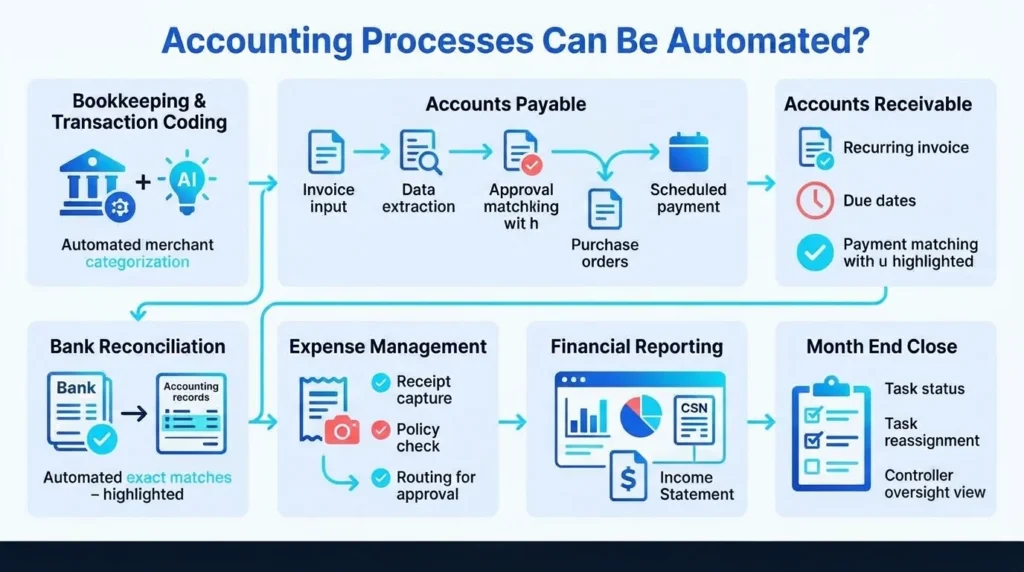
What Accounting Processes Can Be Automated?
Some accounting processes are much easier to automate than others.
Bookkeeping and Transaction Coding
Bookkeeping contains many repetitive steps, which makes it a common starting point.
Bank feeds can import transactions directly into accounting software. Rules can categorize familiar merchants. AI can suggest categories when more context is needed.
A bookkeeper then spends less time typing transactions and more time reviewing exceptions, correcting classifications, and checking whether the books make sense.
This does not mean bookkeeping becomes fully hands-free. Good bookkeeping still requires accurate source records and review.
Accounts Payable
Accounts payable automation can manage much of the bill process.
A typical workflow may:
- Receive an invoice.
- Extract invoice data.
- Check for duplicates.
- Match the invoice with a purchase order.
- Route it to the correct approver.
- Record the approved bill.
- Schedule payment based on policy.
Human approval remains sensible for large payments, new vendors, unusual bank details, or policy exceptions.
Accounts Receivable
Accounts receivable automation can:
- Create recurring invoices
- Send invoices
- Track due dates
- Send reminders
- Record online payments
- Match receipts
- Flag overdue balances
The finance team can then focus on disputed invoices and customers that require direct contact.
Bank Reconciliation
- Reconciliation compares records in the accounting system with bank activity.
- Software can match transactions using amounts, dates, references, and other data.
- Exact matches may require little attention.
- Unmatched transactions, duplicate entries, unusual transfers, or timing differences still need investigation.
Expense Management
Expense systems can capture receipt information, apply company policy, route expenses for approval, and send approved data to the accounting system.
The best control design does not simply approve everything automatically. It separates routine compliant expenses from cases that need review.
Financial Reporting
Automation can update dashboards and recurring reports as new data enters the system.
Examples include:
- Income statements
- Balance sheets
- Cash flow reports
- Department reports
- Budget comparisons
- Accounts receivable aging
Automating report production is different from automating interpretation.
Managers still need to ask why revenue changed, whether an expense is unusual, and whether forecasts are realistic.
Month End Close
The financial close often includes recurring reconciliations, account checks, journal entries, document requests, and reviews.
Close management software can assign tasks, show status, collect support, track reconciliations, and flag missing work.
This gives controllers a clearer view of what remains unfinished.
Invoice Technology and Invoice Automation
Invoice technology combines digital invoicing, document capture, approval workflows, accounting integrations, and payment tools.
The process starts before payment.
An automated invoice workflow can receive a bill by email or upload, read its contents, identify the supplier, test it against purchasing records, send it to the right person, and post the approved amount to the accounting system.
Invoice Capture
OCR and document processing remove much of the need to type invoice data manually.
The system may capture:
- Supplier
- Invoice date
- Due date
- Invoice number
- Line items
- Tax
- Total amount
Invoice Matching
A business with purchase orders may use two-way or three-way matching.
The system can compare an invoice with an approved purchase order and, where relevant, goods received information.
Differences can be routed for review.
Approval Workflows
Approval rules may depend on:
- Dollar value
- Department
- Vendor
- Expense type
- Project
- Location
A $300 routine office purchase may follow a different route from a $100,000 equipment invoice.
Payroll Technology and Payroll Automation
Payroll technology handles calculations and records that affect employee pay.
Automation can calculate regular wages, approved hours, deductions, benefits, and payroll taxes based on configured data.
Connections with time tracking and HR systems can reduce repeated entry.
Payroll still requires careful controls because errors directly affect employees and tax reporting.
Businesses should review:
- Employee setup
- Pay rates
- Bank information changes
- Tax settings
- Unusual overtime
- Bonuses
- Terminations
- Manual adjustments
The IRS maintains electronic filing systems and approved provider requirements for employment tax filings. For tax year 2026, its Modernized e File provider system includes software that has passed IRS assurance testing for supported employment tax returns. The IRS also makes clear that approval does not mean a product is suitable for every filer.
Tax Technology and Tax Automation
Tax technology connects financial data, tax rules, document workflows, research tools, and electronic filing systems.
Businesses and tax professionals may use automation for data gathering, calculations, document preparation, review workflows, and filing.
Common Tax Technology Tools
Different tax technology tools serve different jobs.
Some focus on:
- Income tax preparation
- Sales and use tax
- Payroll tax
- Information returns
- Tax research
- Document management
- Fixed assets
- Provision calculations
- Electronic filing
For U.S. information returns, the IRS Information Returns Intake System, known as IRIS, supports both a taxpayer portal and Application to Application filing. The API route allows approved software or services to transmit large volumes of information returns.
The IRS announced in August 2026 that its older FIRE system will stop accepting information returns in November 2026, with filers moving to IRIS for tax year 2026 filings during the 2027 filing season.
That transition shows why tax automation must account for changing government systems as well as internal software.
Tax calculations should not be treated as a fully unsupervised process. Complex positions, unusual transactions, filing elections, and uncertain tax treatment need qualified review.
Business Processes Beyond Accounting
Finance rarely operates by itself.
The value of automation grows when accounting connects with other parts of the company.
Procurement
A purchase request can move through approval before an order is placed.
Later, the purchase order, receiving record, invoice, and payment can remain connected.
That creates a clearer record of who requested, approved, received, and paid for a purchase.
Sales and CRM
A customer relationship management system can send sales information to billing or accounting software after a deal closes.
This may create:
- Customer records
- Contracts
- Invoices
- Payment schedules
- Revenue related data
Integration reduces the need for sales and finance teams to maintain separate versions of the same information.
Inventory
Connected inventory and accounting systems can record purchases, sales, inventory movement, and cost information.
Businesses with complex inventory still need careful configuration. Poor product data can create accounting errors even when every transfer is automatic.
Ecommerce
An ecommerce business may connect its store, payment processor, inventory system, sales tax tools, and accounting software.
The main challenge is not moving data. It is ensuring that fees, refunds, taxes, discounts, chargebacks, and deposits are recorded correctly.
Human Resources
HR and payroll systems may share employee data, benefits, time information, and compensation changes.
Access controls are especially relevant because these systems hold sensitive employee information.
Benefits of Accounting and Business Automation
Automation works best when it solves a defined operational problem.
Less Manual Entry
Repeatedly entering the same information costs time and creates opportunities for mistakes.
Connected systems let approved data move directly between processes.
Faster Processing
Invoices, expense reports, reconciliations, and approvals can move without waiting for someone to re enter data.
Exceptions still take time, but routine work does not need the same level of attention.
More Consistent Processes
Automation applies configured rules the same way each time.
That can help a company enforce approval limits, documentation requirements, and routing rules.
Earlier Financial Visibility
When transactions enter accounting systems sooner, managers can work with more current information.
This may help them spot overdue receivables, unexpected expenses, or cash pressure earlier.
Better Audit Trails
A properly configured workflow can record who submitted, changed, approved, and paid an item.
That record can support internal review and audit work.
Technology does not remove audit evidence requirements. PCAOB standards covering technology assisted analysis emphasize the reliability and relevance of electronic information used in audits. Those amendments apply to fiscal years beginning on or after December 15, 2025.
Risks and Common Automation Mistakes
Poor automation can process bad information faster.
That is why process design matters as much as software selection.
Automating a Broken Process
A confusing approval process does not become better just because software runs it.
Map the current process first.
Remove unnecessary steps, clarify ownership, and then decide what should be automated.
Trusting Every AI Output
AI can make incorrect classifications or produce answers that sound reasonable but are wrong.
Financial teams should define when AI can act and when a person must approve the result.
Ignoring Data Quality
Duplicate vendors, inconsistent account names, missing tax data, and poor customer records can weaken automation.
Clean source data gives the system better inputs.
Giving Too Much Access
Automation tools may connect with bank accounts, payroll data, invoices, and customer information.
Use access based on job responsibility.
Employees should not receive broad financial permissions simply because a new tool makes them convenient.
Removing Segregation of Duties
The person who creates a vendor should not automatically gain unrestricted control over approving and paying that vendor.
Automation should preserve controls, not bypass them.
Measuring Activity Instead of Results
Processing 10,000 automated transactions sounds impressive, but volume alone does not prove value.
Track outcomes such as:
- Hours saved
- Error rates
- Close time
- Invoice processing time
- Exception rates
- Overdue receivables
- Cost per transaction
- Rework
Thomson Reuters found that only 18% of surveyed professional organizations said they tracked AI return on investment. Another 40% did not know whether their organization measured it.
That is a useful warning for finance teams. Adoption should have a measurable purpose.
What Should Not Be Fully Automated?
Some tasks contain too much judgment, risk, or uncertainty for unattended processing.
Examples include:
- Complex accounting estimates
- Unusual journal entries
- Large or unusual payments
- New vendor bank changes
- Difficult tax positions
- Fraud investigations
- Audit conclusions
- Material financial statement judgments
- Forecast assumptions
- Policy exceptions
Software can collect data and suggest actions in these areas.
A qualified person should remain accountable for the decision.
Human Review in Automated Accounting
A practical model separates work into three groups.
Work the System Can Perform
Examples include:
- Importing bank data
- Sending routine invoice reminders
- Capturing receipts
- Matching clear transactions
- Routing approvals
Work AI Can Recommend
Examples include:
- Suggested transaction categories
- Possible duplicate invoices
- Anomaly flags
- Draft explanations
- Forecast suggestions
Work People Should Approve
Examples include:
- Material journal entries
- Large payments
- Tax judgments
- Exceptions
- Accounting estimates
- Policy changes
This approach keeps the speed of automation without transferring financial responsibility to software.
Automation for Small Businesses
Small businesses do not need an enterprise system to begin.
A sensible starting point is usually the process that consumes time every week.
That may be:
- Bank transaction entry
- Customer invoicing
- Payment reminders
- Receipt capture
- Payroll
- Bill approval
- Expense reports
A small business should avoid buying several tools before understanding the problem.
One accounting platform with the right integrations may solve more than a collection of disconnected apps.
Automation for Accounting Firms
Accounting firms face a different problem because they repeat similar work across many clients.
Useful areas include:
- Client document collection
- Transaction review
- Bookkeeping workflows
- Tax document handling
- Engagement tasks
- Deadline tracking
- Invoice collection
- Client communication
Technology is also changing what firms expect from staff.
In June 2026, an AICPA survey identified managing change from technology and AI as the leading long term issue that CPA firms of every size expected to face over the following five years.
Automation for Larger Organizations
Larger companies may require multi entity consolidation, stronger role controls, larger transaction volumes, procurement systems, global payments, and an enterprise resource planning system.
The accounting platform may connect with:
- ERP software
- Treasury systems
- Procurement
- CRM
- Payroll
- Inventory
- Tax systems
- Data warehouses
- Business intelligence tools
For organizations that manage investments, treasury functions, or client assets, finance data may also connect with wealth management and enterprise technology systems.
The central question is not how many systems can be connected. It is which system owns each record and how changes are controlled.
Accounting Software and Automation Platforms
No single product is the best fit for every business.
Software categories include:
- General accounting platforms
- Accounts payable systems
- Expense platforms
- Payroll systems
- Tax platforms
- Close management software
- ERP systems
- Integration platforms
- Reporting tools
- AI accounting tools
For U.S. small businesses, commonly evaluated platforms include QuickBooks Online, Xero, Zoho Books, FreshBooks, and Wave.
For businesses with more complex finance needs, Sage Intacct, Oracle NetSuite, Microsoft Dynamics 365, and other ERP platforms may enter the evaluation.
Specialist systems such as BILL, Tipalti, BlackLine, FloQast, Numeric, and spend management platforms may handle a narrower finance process.
How to Choose Accounting Automation Software
Start with the process, not the product.
Ask these questions before buying.
What Problem Are We Solving?
Write down the current process.
Measure how much time it takes and where errors occur.
A clear problem might be:
“We process 900 invoices each month and two employees manually enter most of them.”
That is easier to evaluate than:
“We need more AI.”
Does It Connect With Existing Systems?
Check the accounting platform, payroll system, bank connections, payment tools, CRM, ecommerce platform, and ERP.
A tool that cannot exchange reliable data with the existing stack can create more manual work.
How Are Controls Managed?
Check:
- User roles
- Approval permissions
- Audit logs
- Vendor changes
- Payment limits
- Authentication
- Data export
- Backup options
Can People Review Exceptions?
Good automation should make unusual items easy to find.
A system that hides exceptions can be more dangerous than a manual process.
Can It Scale?
A five-person company and a multi entity company have different needs.
Consider transaction volume, number of users, locations, currencies, legal entities, reporting requirements, and expected growth.
What Is the Full Cost?
Subscription price is only one part.
Other costs may include:
- Setup
- Data migration
- Integrations
- Consulting
- Training
- Support
- Custom configuration
- Additional users
How Much Does Accounting Automation Cost?
There is no useful single price because the term covers products ranging from simple bookkeeping software to enterprise ERP projects.
A small company may pay for one accounting subscription and a few connected services.
A growing business may add payroll, bill processing, expense software, reporting, and integration tools.
An enterprise may have implementation, consulting, security, data migration, training, and custom integration costs in addition to software licenses.
Use total cost of ownership rather than the advertised monthly subscription.
How to Measure Accounting Automation ROI
A basic ROI calculation can use:
ROI = Annual financial benefit minus annual automation cost, divided by annual automation cost, multiplied by 100
Suppose automation costs $20,000 per year.
If it saves $28,000 in staff time and $7,000 in rework and outside processing costs, total measured benefit is $35,000.
The net benefit is $15,000.
That gives an annual ROI of 75%.
The calculation should not count savings that the company cannot reasonably measure.
Other measures may matter too.
A controller may value reducing the close from ten business days to six even if the company does not cut staff.
How to Implement Accounting Automation
A good implementation usually starts small.
1. Map the Current Process
Write down every step, system, person, input, approval, and exception.
2. Find Repetitive Work
Look for tasks with:
- High volume
- Repeated data entry
- Clear rules
- Frequent matching
- Predictable approvals
3. Fix the Process First
Remove duplicate approvals and unclear ownership before adding software.
4. Select One Workflow
Do not automate the whole finance department at once.
Choose a process where results can be measured.
5. Set Controls
Decide what the system can do automatically and what requires human approval.
6. Test Real Exceptions
Do not test only perfect transactions.
Use duplicates, missing documents, incorrect amounts, changed bank details, and unusual vendors.
7. Train the People Using It
Employees need to know how normal items move and how to handle exceptions.
8. Measure Results
Compare processing time, errors, cost, and exception rates before and after implementation.
9. Expand Carefully
Move to another process once the first automation is stable.
An Accounting Automation Maturity Model
Businesses can think about automation in five stages.
Level 1: Manual Work
Transactions depend heavily on spreadsheets, email, paper, and repeated entry.
Level 2: Digital Accounting
Financial records move into accounting software, but many steps remain manual.
Level 3: Rules Based Automation
Bank feeds, recurring transactions, reminders, and approval rules handle predictable work.
Level 4: Intelligent Automation
OCR, machine learning, document processing, and anomaly detection reduce manual review.
Level 5: Agentic Workflows
AI systems can coordinate several steps and request human approval when needed.
Level 5 is not automatically better than Level 3.
A company should use the lowest level of complexity that solves the process safely.
Will Accounting Automation Replace Accountants?
Current U.S. labor data does not support the claim that accounting is disappearing.
BLS projects 115,300 openings for accountants and auditors per year on average between 2025 and 2035 and expects total employment to grow 5%. It also says technology is likely to automate routine work while making advisory and analytical duties more prominent.
AICPA and CIMA are also treating AI as a change in professional skills and finance work rather than the end of the profession. Their Rise2040 initiative gathered input from more than 6,000 finance and accounting professionals across more than 25 countries to examine how technology, data, and other pressures are changing the profession.
The likely shift is from entering and moving data toward reviewing systems, interpreting results, managing controls, investigating exceptions, and advising decision makers.
Skills Accountants Need as Automation Grows
Technical accounting knowledge still matters.
Automation can produce an answer. A professional must know whether the answer is reasonable.
Useful skills include:
- Accounting principles
- Financial analysis
- Data literacy
- Process design
- Internal controls
- Technology evaluation
- AI output review
- Communication
- Tax and regulatory knowledge
- Business judgment
The accountant who understands both finance and systems is well placed to manage automated workflows.
The Future of Accounting Automation
The next phase is likely to involve more connected financial workflows rather than one piece of software performing every task.
Several trends are already visible.
More AI Inside Accounting Platforms
AI is moving into the accounting software itself rather than remaining a separate chatbot.
That gives the model access to structured business data and specific workflows.
More Agentic Workflows
AI agents can coordinate actions across a process.
Use should still depend on permission levels, auditability, and review.
More Continuous Accounting
Instead of waiting until month end to discover every problem, systems can process and flag transactions during the month.
That can reduce the amount of cleanup left for the close.
Natural Language Financial Analysis
Users can increasingly ask financial questions in plain English rather than building every report manually.
The quality of the answer still depends on the underlying accounting records.
Greater Focus on Governance
As AI gains access to financial systems, companies need clearer rules covering data access, approval authority, output review, and accountability.
The technology can change quickly. Financial responsibility does not.
Is Accounting Automation Worth It?
Accounting automation usually makes the most sense when work is repetitive, high volume, rule driven, and based on reliable data.
A company that processes hundreds of similar invoices may have a clear automation case.
A business that handles a small number of highly unusual transactions may gain less.
The best approach is not to automate everything.
Automate predictable work. Send exceptions to qualified people. Measure the result. Keep controls visible.
That model gives businesses the practical value of Accounting & Business Automation Technology without treating financial judgment as a software task.
Frequently Asked Questions
What is accounting automation and how does it work?
Accounting automation uses software to complete repetitive financial work with less manual input. Data enters from sources such as banks, invoices, payroll systems, and expense platforms. Rules or AI then classify, match, route, or process the information. Routine items may continue automatically, while exceptions go to a person for review.
Will CPAs Be Replaced by AI?
AI is unlikely to eliminate the CPA profession. It can take over parts of data entry, research, reconciliation, document review, and reporting. CPAs are still needed for judgment, audit work, tax decisions, controls, interpretation, and advisory services. BLS projects U.S. accountant and auditor employment to grow 5% from 2025 through 2035.
What’s the best accounting automation software?
There is no single best product for every company. QuickBooks Online and Xero cover broad small business accounting. BILL and Tipalti focus heavily on bill and payment workflows. BlackLine and FloQast address parts of the financial close. Larger organizations may consider Sage Intacct, Microsoft Dynamics 365, or Oracle NetSuite. Choose based on the process you need to automate.
Is AI replacing bookkeeping?
AI is replacing parts of routine bookkeeping, not every bookkeeping responsibility. Transaction suggestions, document capture, bank matching, and recurring classifications can be automated. Bookkeepers are still needed to review exceptions, correct records, investigate inconsistencies, and make sure the books reflect the actual business. BLS data also shows greater pressure on clerical bookkeeping roles than on professional accountant roles.
Will AI replace accountants in 2026?
No evidence shows accountants being broadly replaced in 2026. AI use is growing quickly, but human review remains necessary in financial reporting, tax, audit, controls, and judgment-based work. U.S. employment projections still show positive growth for accountants and auditors.
Can you make $500,000 a year as an accountant?
It is possible, but it is far from typical employee pay. The BLS reports a median annual wage of $83,680 for U.S. accountants and auditors in May 2025, while the highest 10% earned more than $144,090. Income near $500,000 is more likely at senior partner, executive, firm owner, or other high responsibility levels than in a typical accounting position.
What are people replacing QuickBooks with?
Common QuickBooks alternatives include Xero, Zoho Books, FreshBooks, Wave, Sage products, and larger systems such as NetSuite or Microsoft Dynamics 365. The right replacement depends on why a business is leaving. Xero is often considered for general small business accounting, while larger companies may move toward an ERP or mid-market financial platform. Current 2026 accounting software reviews continue to list Xero, Zoho Books, FreshBooks, and Wave among the main small business alternatives.
Can I use AI to do my accounting?
Yes, AI can assist with transaction classification, document review, reconciliation, summaries, research, forecasts, and other accounting work. It should not be given unsupervised authority over material financial decisions. Keep a qualified person responsible for exceptions, tax judgments, unusual transactions, controls, and final financial review.
Is accounting automation safe?
It can be safe when the business uses appropriate access controls, approval limits, authentication, audit logs, vendor controls, and regular review. Automation becomes risky when too many permissions are granted, source data is poor, or software is allowed to approve material transactions without proper oversight.
How much does accounting automation cost?
Costs range from ordinary small business software subscriptions to large enterprise implementations. Calculate subscription fees, setup, integrations, data migration, training, consulting, support, and ongoing maintenance. The cheapest product may cost more in practice if it creates extra manual work.


