

IoT Smart Home Technology Explained
IoT smart home technology connects household devices so they can share information, accept commands, and respond to rules. A sensor detects movement, a controller checks the time, and a light switches on. You can also control supported devices through an app, a button, or a voice assistant.
The Internet of Things, or IoT, includes physical objects with software and network connections. A smart home applies that idea to lighting, heating, security, appliances, and other household tasks.
You do not need to automate your entire house. One useful routine can be enough to start. The challenge is choosing devices that work together and understanding which functions depend on your network, a controller, or an online service.
This guide explains those connections, the costs to consider, and how to build a practical setup for a US home.
Research reviewed: October 7, 2026. This is a research based guide using standards organizations, official product documentation, and US consumer guidance. Examples are illustrative, rather than results from hands on device testing.
What Is an IoT Smart Home?
An IoT smart home uses connected devices to monitor conditions or control household functions. Some devices report information. Others perform actions. Many do both.
For example, a thermostat measures temperature and controls heating. A door sensor reports whether a door is open. A smart plug controls power to an attached appliance.
IBM describes IoT through connected physical objects that collect and exchange data. Home technology is one application alongside healthcare, transportation, and industrial systems.
IoT and Smart Home Automation Are Related
IoT describes the connected technology. Home automation describes tasks that happen according to schedules, sensor readings, or other rules.
Opening an app to switch on a lamp is remote control. Having that lamp turn on at sunset is automation.
IoT for home automation can support both. However, a connected device does not automatically offer useful automation, and an automated system does not always need internet access.
Does Every Device Need Its Own Internet Connection?
No. A Zigbee sensor may communicate with a hub rather than connect directly to your router. A Thread device can exchange information through a local mesh network.
The hub or another network device may provide access to other systems. Whether an individual feature needs the internet depends on how that feature operates.
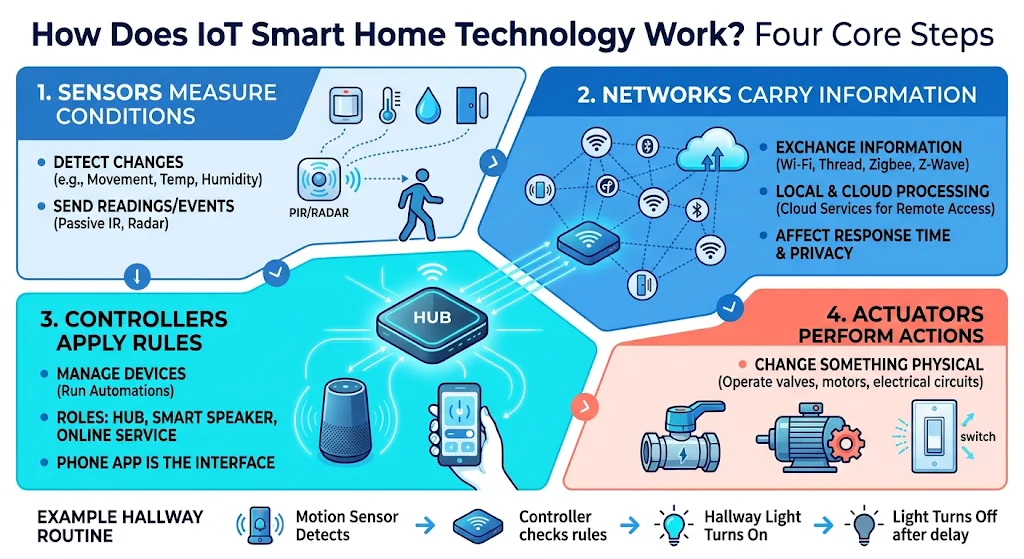
How Does IoT Smart Home Technology Work?
Most routines involve sensing, communication, decision making, and action.
Sensors Measure Conditions
Sensors detect changes such as movement, temperature, humidity, water, or door position.
A sensor sends a reading or event. It does not necessarily decide what happens next.
Placement matters. Passive infrared, or PIR, sensors detect changes in infrared energy as a person moves across their view. They may miss someone sitting still. Presence sensors using radar can detect smaller movements, but sensitivity and placement still matter. Follow the sensor instructions and keep a water sensor in the likely leak path.
Networks Carry Information
Devices exchange information through technologies such as Wi-Fi, Thread, Zigbee, Z-Wave, Bluetooth, or Ethernet.
Some messages stay inside the home. Others travel to a manufacturer’s cloud service for processing, storage, or remote access.
These paths affect response time, privacy, and outage behavior.
Controllers Apply Rules
A controller manages devices and may run automations. Depending on the setup, this role belongs to a hub, a computer, a smart speaker, or an online service.
The phone app is the interface you see. It may send commands to another device that does the actual work.
A phone app cannot replace a missing Zigbee radio or Thread border router.
Actuators Perform Actions
An actuator changes something physical. It might operate a valve, control a motor, or switch an electrical circuit.
Consider a hallway routine:
- A motion sensor detects movement.
- The controller checks whether it is nighttime.
- The controller turns on the hallway light.
- After a suitable period without movement, the light turns off.
This is a practical IoT smart home example. It needs compatible hardware and a rule, rather than artificial intelligence.
Common IoT Smart Home Devices
Choose devices by the problem they solve, then check their connection requirements.
| Device category | Practical use | Important purchase check |
| Lights and switches | Control brightness or schedules | Bulb type, dimmer support, wiring |
| Smart plugs | Switch an attached load | Electrical rating and appliance suitability |
| Thermostats | Manage heating and cooling | HVAC compatibility and power requirements |
| Locks and door sensors | Monitor or control access | Door fit, battery access, manual entry |
| Cameras and doorbells | View activity and receive alerts | Storage, subscription, power, coverage |
| Water sensors and valves | Detect leaks or stop water | Placement, valve fit, installation |
| Blinds and appliances | Schedule supported actions | Motor, product, and platform compatibility |
Smart home IoT devices differ within each category. A plug may offer switching without energy monitoring. A camera may provide live viewing while charging separately for recordings.
Some IoT smart home devices use a bridge to reach your chosen platform. Check whether that bridge is included.
US Installation Requirements Matter
For electrical products, check compatibility with US voltage and the connected load. A smart switch may need a neutral wire or support only certain lighting loads.
A thermostat must match your heating and cooling equipment. A smart lock must fit the door.
Renters should check lease conditions before changing wiring, locks, or plumbing. Plug in products often provide a simpler starting point.
How Smart Home Devices Connect
Connection technologies have different purposes. The right choice depends on power use, data needs, and compatible hardware.
| Technology | Typical household role | Main consideration |
| Wi-Fi | Plugs, appliances, cameras | Coverage and device requirements |
| Ethernet | Controllers and supported cameras | Requires a wired connection |
| Thread | Small devices and sensors | Requires suitable network support |
| Zigbee | Sensors, lights, switches | Usually needs a compatible coordinator |
| Z-Wave | Locks, sensors, switches | Requires a compatible controller and regional version |
| Bluetooth | Setup or supported nearby control | Remote access may require a gateway |
A mesh network allows suitable devices to relay messages. However, not every device acts as a relay. Battery sensors often conserve power by sleeping between reports.
Local radio range does not determine whether you can control the home from another city. Remote access depends on the controller and its connection method.
Matter and Thread Are Different
Matter is a common communication standard managed by the Connectivity Standards Alliance. Thread is a network technology.
Matter can operate over Wi-Fi, Ethernet, or Thread. Bluetooth Low Energy is commonly involved in setup.
A Matter badge does not mean every feature appears in every app. Check support for the device category and the functions you need. Existing Zigbee devices do not become Matter devices simply because both standards involve the same organization. A supported bridge may connect selected products.
Do You Need a Hub or Thread Border Router?
Several terms describe different jobs.
A hub is a broad name for hardware that connects or manages devices. Its capabilities depend on the model.
A Matter controller manages Matter devices.
A Thread border router connects a Thread network to other IP networks, such as your home Wi-Fi or Ethernet network.
A bridge exposes supported devices from another system to a platform.
One product can perform several roles. Others perform only one. Check the exact model rather than assuming every smart speaker or display includes the same radios.
Platform Hardware and Ownership Costs
Choose by the devices you own and the control you need. Matter is a standard, not a radio. The examples below identify actual hardware rather than assuming every product in a brand has the same capabilities.
| Platform and controller | Connections and extra hardware | Fees for basic control | Local operation and limitation |
| Apple Home with HomePod mini | Wi-Fi, Thread, Bluetooth; Matter controller and Thread border router. Zigbee products need a supported bridge. | $0 required subscription for basic control and sensor automations. Camera recording may need iCloud+. | Supported accessory routines run through the home hub. No direct Zigbee or Z-Wave radio. |
| Google Home with Nest Hub second generation | Wi-Fi, Thread, Bluetooth; Matter controller and Thread border router. Other radio systems need a supported bridge. | $0 required subscription for basic device control. Google Home Premium is optional for paid features. | Matter commands use a local path. Do not assume every voice request or automation runs offline. |
| Alexa with Echo Hub | Wi-Fi, Bluetooth, Zigbee, Thread and Sidewalk; supports Matter. Z-Wave devices need another compatible hub. | $0 required subscription for basic device control. Camera services and premium features can cost extra. | Supported devices have local connections. Local radios do not make every Alexa routine or voice command independent of internet access. |
| SmartThings with Aeotec Smart Home Hub 2 | Zigbee 3.0, Thread, Wi-Fi, Ethernet and Bluetooth for setup. Supports Matter; older hub models differ. | $0 required subscription for basic SmartThings routines. Linked services may charge separately. | Eligible device routines run locally. Hub 2 does not list a Z-Wave radio; do not confuse it with the older Aeotec hub. |
| Home Assistant with Green | Ethernet to router; no built in wireless radios. Add a Zigbee adapter, separate Z-Wave adapter, or suitable Thread border router as needed. | Core software is free. Home Assistant Cloud is an optional paid service. | Local integrations can run without internet. Cloud integrations still need their provider; setup and updates require more attention. |
For an Apple household, HomePod mini combines the two roles needed by the Thread example below. For existing Zigbee devices, Echo Hub or a suitable SmartThings hub can reduce extra hardware. Home Assistant offers detailed rules if you are comfortable maintaining the system.
A Home Assistant Connect radio must be configured for its supported role. Do not assume one adapter runs Zigbee and Thread together. An existing compatible Thread border router can serve Matter over Thread devices.
Useful IoT Smart Home Applications
Useful routines match a household need and include sensible conditions.
Lighting That Responds to Movement
A hallway light can turn on after motion is detected at night.
Add a time or brightness condition so it does not run unnecessarily. Avoid short shutoff periods in rooms where people sit still. Motion detection does not always prove that a room is empty.
Heating and Cooling Schedules
A compatible thermostat can adjust temperatures around household schedules.
ENERGY STAR reports average savings of about 8 percent on heating and cooling bills for certified smart thermostats. Actual results vary with climate, equipment, occupancy, and temperature preferences. That figure does not apply to the entire electricity bill.
Leak Detection
A sensor near a washing machine can sound an alarm or send a notification when water reaches it.
A compatible system may also close a water valve. Automatic shutoff requires suitable hardware and installation. A notification alone cannot stop the leak.
Energy Monitoring
Supported devices can show electricity use. That information may reveal an appliance running longer than expected.
Monitoring does not reduce consumption by itself. Savings require a useful change in behavior or control.
Only shift appliance use when the appliance supports safe scheduling and your utility’s rate plan makes it worthwhile.
Local vs Cloud Control
A local routine runs within your home. A cloud routine depends on an external service.
Both can be useful. What matters is knowing where each function runs.
| Failure | Potential effect | What may remain available |
| Internet outage | Online services and remote access stop | Supported local routines |
| Router failure | Wi-Fi and network paths are disrupted | Some independent radio systems |
| Controller failure | Rules on that controller stop | Device controls and manual operation |
| Power outage | Powered devices lose operation | Battery functions, subject to dependencies |
| Cloud service closure | Online integrations may stop | Supported independent local functions |
A local light routine may work during an internet outage while remote notifications fail. Voice requests may have different dependencies again.
Test these situations before relying on an automation. Manual switches, physical keys, and device controls remain useful.
Smart Home Security and Privacy
Connected products can collect information about your home and daily routines.
The Federal Trade Commission recommends using device security features, installing updates, and securing the home network. It also advises checking privacy settings for connected products.
Protect Accounts and Devices
Use unique passwords and enable multifactor authentication where available. Keep router software, apps, and device firmware updated.
Check how long the manufacturer supports the product. Ask whether it still works if its online service closes.
Remove access for people who no longer need it. Before selling a device, follow the reset process and remove it from your account.
Check Data and Recording Settings
For cameras and microphones, review who can access recordings, where files are stored, and how long they remain available.
Local control does not automatically mean no data leaves the home. A manufacturer app may still use online services.
A guest network can help separate some devices. However, network isolation can also prevent local discovery. Confirm how your controller communicates before moving products onto separate networks.
Benefits and Limitations of IoT Home Automation
IoT home automation can reduce repeated actions, provide alerts, and make controls easier to reach. The value depends on the household.
Voice control may help someone with limited mobility. Scheduled lighting may remove a daily task. Temperature alerts may reveal a problem while you are away.
There are costs beyond the purchase price. Devices need updates, batteries, troubleshooting, and eventual replacement. Camera storage or professional monitoring may involve subscriptions.
More devices also create more points to maintain. A small reliable setup can be more useful than a large collection of poorly connected products.
A Compatible Apple Home Lighting Setup
Consider a US renter who already owns a supported iPhone, a working Wi-Fi router, and two compatible E26 lamp fixtures. The goal is hallway lighting after sunset without changing wiring. This IoT based home automation example uses Apple Home and Matter over Thread.
Selected Products and Verified US Prices
Prices below were observed on Apple’s US online store on October 7, 2026. They exclude tax, shipping, existing equipment, and future battery replacements. Stock and prices can change. This is a documented compatibility example, not a hands on test.
| Product | Role and quantity | Listed US price |
| Apple HomePod mini | One home hub, Matter controller and Thread border router | $129.00 |
| Eve Motion Matter sensor | One motion sensor; two AAA batteries included | $49.95 |
| Nanoleaf Essentials Matter A19 Thread bulbs | One three bulb pack; use two and keep one spare | $49.95 |
| Total purchase cost | Controller, sensor and full bulb pack | $228.90 |
| Required routine subscription | Basic Apple Home sensor automation | $0 |
If the household already has a suitable HomePod mini, the additional device cost is $99.90. Buy the Matter over Thread bulb version named here; Nanoleaf also sells products with different connections. Confirm fixture size and electrical requirements before ordering.
Connections and Automation Rule
Add HomePod mini to the home, then pair the Eve sensor and Nanoleaf bulbs using their Matter setup codes. Both accessory types communicate over Thread. HomePod mini supplies the controller and border router roles. The phone uses the Home app to configure the routine.
In the Home app, select Add Automation, then A Sensor Detects Something. Choose Eve Motion, select motion detected, and limit operation to nighttime. Select the two hallway bulbs, set brightness to 30 percent, and choose a five minute Turn Off interval. Test the rule before relying on it.
The intended rule is simple: motion after sunset turns on both bulbs. The timer switches them off. A timed shutoff is not proof that the hallway is empty; check repeat triggers and increase the interval if needed.
Working Diagram of the Local and Online Paths
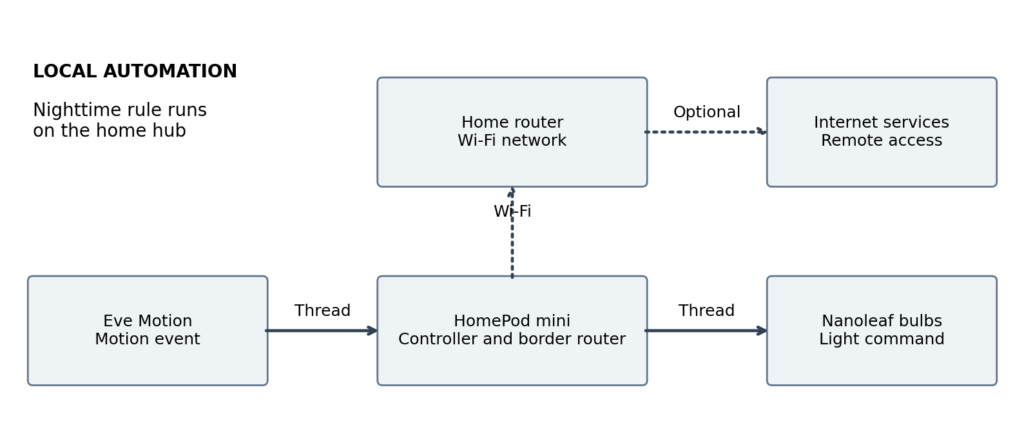
The solid arrows show the sensor event and light command. The dotted branch shows an optional internet path for access from outside the home. It is not part of the local motion rule.
Keep the lamps powered so the bulbs remain reachable. With internet disconnected, test the local rule while HomePod mini and the Thread devices still have power. Remote access and online voice features may be unavailable. A power cut can stop this lighting setup.
How to Build and Test Your First Routine
Start With One Task
Choose a problem you encounter often. Good first tasks include controlling a lamp or detecting water near an appliance.
Define the desired behavior before shopping.
Confirm Compatibility
Check the exact product model, connection technology, controller requirements, and available features.
Save setup codes somewhere secure. Give devices clear names such as “Hallway Light” rather than several similar names.
Test Normal and Failure Conditions
Confirm that the rule triggers correctly and does not interrupt normal household use.
Test what happens when internet access is unavailable. Check battery alerts and manual controls.
For a new house or major renovation, home and building automation planning can include wiring routes, equipment locations, and controls before walls are finished. That planning helps avoid difficult changes later.
Common Mistakes and Troubleshooting
| Problem | First checks |
| Device will not pair | Setup mode, code, permissions, required controller |
| Device goes offline | Power, battery, coverage, interference |
| Routine does not run | Enabled rule, trigger, conditions, device availability |
| Feature missing in an app | Platform support and manufacturer app |
| Remote access fails | Internet, account settings, controller connection |
Avoid buying every product before testing the first routine.
Do not assume all smart home IoT hardware shares every feature. A compatibility badge may cover basic control while advanced settings remain in another app.
Keep a short record of device models, battery types, subscriptions, and reset instructions. It makes future maintenance easier.
Frequently Asked Questions
What Is a Smart Home?
A smart home uses connected technology to monitor or control household functions. It may include one smart lamp or a wider system for lighting, temperature, access, and appliances. Features depend on the selected devices.
What Is IoT? What Are Some Examples?
IoT means the Internet of Things. It connects physical objects so they can exchange information with devices or services. Examples include connected thermostats, water sensors, wearable trackers, and industrial monitoring equipment.
What Are IoT Devices?
IoT devices are physical products with software and communication capabilities. Some collect data, some perform actions, and some do both. Common home IoT devices include plugs, locks, cameras, thermostats, and sensors.
What Are Some IoT Smart Home Examples?
Examples include a light responding to motion, a thermostat following a schedule, a door sensor sending an alert, and a water sensor triggering a compatible shutoff valve. Each needs the correct connections and supported rules.
What Does IoT Enabled Mean?
IoT enabled means a product can participate in a connected system. It does not specify whether the product needs a hub, works locally, supports Matter, or charges for certain features. Check those details separately.
What Are IoT Sensors?
IoT sensors measure conditions and communicate readings. They can detect temperature, movement, light, humidity, water, or door position. A controller or another device can use those readings to trigger an action.
What Are Smart Home Advantages and Disadvantages?
Advantages include convenient controls, useful alerts, accessibility, and possible energy savings. Disadvantages include purchase costs, maintenance, subscriptions, privacy concerns, and compatibility problems. Choose features that solve an actual household need.
What Is the Role of a Smart Home in IoT?
A smart home is a residential use of IoT. Connected household products exchange information to support monitoring, control, and automation. IoT also applies outside homes, including agriculture, transport, and manufacturing.
Can IoT Home Automation Work Without Internet?
Yes, supported local routines can work without internet access. The required devices, controller, and local network must still operate. Remote control, online notifications, and cloud features may stop.
Does a Smart Home Need AI?
No. A schedule or sensor rule can automate a task without AI. Some products use AI for features such as image recognition, but it is not required for a useful IoT home setup.
Start With a Useful, Compatible Setup
Choose one task, verify the required connections, and test the routine before adding more devices.
A good setup should fit your household, budget, and tolerance for maintenance. Know where each rule runs, which features need internet access, and how to use the devices manually.
That understanding makes future purchases easier and helps your home work predictably.


