

Instagram Restrict Feature: Explained
Instagram Restrict lets you limit someone’s comments and messages without blocking their account. Their new comments stay hidden from other people unless you approve them. Their chat moves to Message Requests, and they cannot see your online status or whether you have read their messages.
If you are wondering what happens if you restrict someone on Instagram, the main change is how their interactions reach you. Restrict does not make your profile disappear or turn your account private. You can also undo it later.
That makes it useful when you want some distance from a coworker, classmate, or follower while keeping access to the conversation. Meta’s safety guidance explains the main comment and activity controls.
What Does Restrict Mean on Instagram?
Restrict is an account setting for managing unwanted contact. You apply it to a specific Instagram account and decide whether to review its comments or messages.
For example, imagine a coworker keeps leaving personal remarks under your photos. You want to stop those remarks from becoming a public conversation. Restrict gives you a way to review new comments before other readers see them.
This is separate from Instagram restricting your own account for a rules violation. If Instagram stops you from commenting, following, or using a feature, check your account status and the notice shown in the app. Restricting another person will not fix that problem.
What Happens When You Restrict Someone on Instagram?
The effects depend on the type of interaction. Use this table to see what changes and which settings still need your attention.
| Interaction | Effect of Restrict |
| New comments on your posts | Hidden from others unless you approve them |
| Direct messages | The conversation moves to Message Requests |
| Read receipts | The restricted sender cannot see when you read their messages |
| Activity status | Your online status is hidden from that account |
| Posts and Stories | Existing audience settings still determine access |
| Following | Restrict does not act as a follower removal tool |
| Tags and mentions | Review Tags and mentions settings for control over who can tag or mention you |
| Notification to the person | Instagram does not announce that you restricted them |
Instagram’s guide to Restrict, Mute, Block, and Report describes the current interaction controls. Avoid treating older tutorials as a complete description of today’s feature.
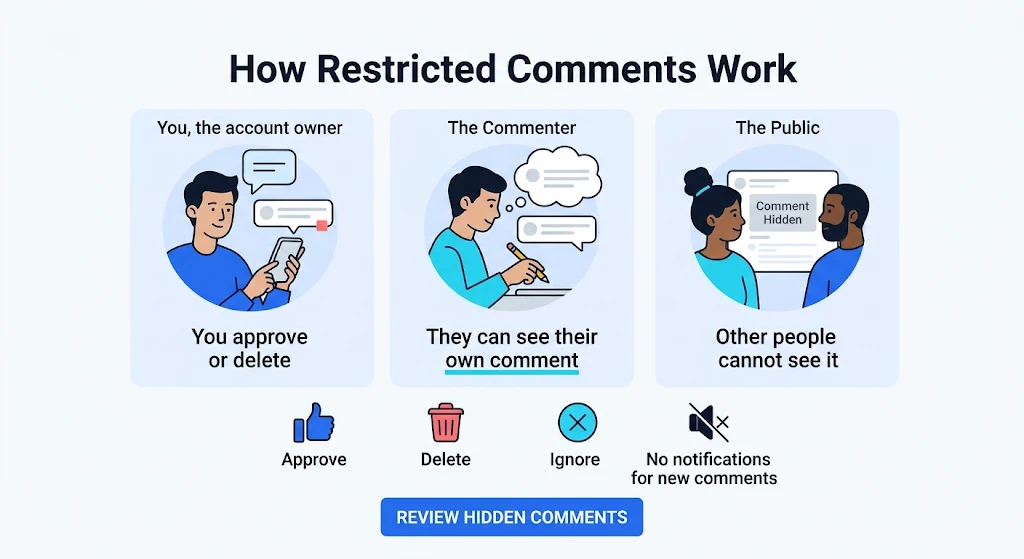
Who Can See Their Comments?
There are three different views of a restricted comment:
- The person who wrote it can see it.
- You can choose to reveal and review it.
- Other people cannot see it unless you approve it.
You can approve, delete, or ignore the comment. You will not receive notifications for new comments from the restricted account. You can still open your post and choose to review a hidden comment.
Restrict applies to new comments. Do not use it as a cleanup tool for remarks already posted. Review older comments separately if you want them removed.
These controls are described in Meta’s explanation of Restrict.
What Happens to Messages and Existing Chats?
Your conversation with the restricted account moves out of the usual inbox and into Message Requests. You will not receive notifications for their direct messages. Restrict does not erase the conversation, so check Requests when you want to review it.
To look for it, open Instagram messages and check Requests. You can review incoming messages without showing that sender a read receipt. If you decide to reply, follow the app’s prompt to unrestrict the account.
This distinction matters when you need to keep a record. Moving a chat, deleting a chat, and unsending a message are separate actions. Do not delete a conversation just because it no longer appears where you expect it.
Instagram’s Restrict help page covers message handling and the available restriction methods. Meta also confirms the notification changes in its explanation of Restrict.
Can They See Your Posts, Reels, and Stories?
Restrict is not a way to hide your content from someone who already has permission to view it.
On a private account, approved followers can still access the content your audience settings allow. Someone who was never approved does not gain access because you restrict them. Public content remains subject to your public account settings.
If a specific Story is the concern, review your Story audience or Close Friends list. If an approved follower should no longer see private posts, review follower removal or blocking.
Instagram explains the underlying visibility rules in its public and private account guidance.
What About Tags, Mentions, and Group Chats?
If unwanted tags or mentions are your concern, review your Tags and mentions settings as well. You can choose whether everyone, only people you follow, or no one can tag or mention you. This gives you a clear audience rule beyond the controls on one restricted account. Meta’s safety guidance explains these choices.
Shared group conversations need separate attention. Restricting a person does not remove either of you from a group. Instagram warns you when a group includes a restricted account; staying in that conversation means you may still see their messages.
If that defeats your reason for restricting them, consider leaving the group. A private chat setting should not be treated as a complete filter for every shared space.
How to Restrict Someone on Instagram
You can start from a profile, comment, message, or your settings. Instagram changes menu labels over time, so use the route that is visible in your app. Read the confirmation screen before applying the change.
From Their Profile
- Open the person’s Instagram profile.
- Tap the three dots near the top of the screen.
- Choose Restrict.
- Confirm if Instagram asks.
Check the username first, especially if the person has several accounts. The setting applies to the account you select.
From a Comment
Open the comments under your post and select the person’s comment. On iPhone, this commonly involves swiping left. On Android, you may need to press and hold.
Open the comment’s action menu and choose Restrict or Restrict account. If you cannot find that option, tap the username and use the profile route.
From a Message
Open the conversation and tap the person’s name at the top. Look for Options or the three dots, then choose Restrict and confirm.
The menu may look different from an older guide. Returning to the person’s profile is a useful alternative when chat controls have moved.
From Settings
Open your Instagram profile and tap the menu in the top right. Look for the Restricted list in settings. If your settings screen has a search box, type “restricted” and open the matching result. Menu labels can vary by app version.
In the Restricted list, use the account search to find the exact username, then tap Restrict beside it. Tap Next first if an introduction appears. To check an existing restriction, find that username in the list; an Unrestrict option lets you reverse it. If the settings route is unavailable, use the profile steps above.
How to Unrestrict Someone on Instagram
Open the person’s profile, tap the three dots, and choose Unrestrict. You can also remove the restriction from your Restricted accounts list.
Before doing so, decide what you want to change. Are you ready to receive their messages normally again? Do you want their future comments to appear without your review?
What Changes After You Unrestrict Them?
The restrictions on future interactions end, subject to your other settings. Meta says future messages return to your inbox. Your separate choices about activity status, read receipts, Story audiences, and blocking still matter.
Unrestricting does not restore content you deleted. If an older comment is hidden, open that comment and check its available controls rather than assuming it has become public. Review old comments separately from your decision about future contact.
For example, if you want to keep one old comment hidden but allow future messages, check the comment and the account restriction separately.
Restrict vs Block vs Mute: Which Should You Use?
Start with your goal. Do you want fewer posts in your feed, more control over comments, or to stop an account from contacting you?
| Your goal | Setting to consider | What to remember |
| Review someone’s comments and separate their messages | Restrict | It does not hide all your content |
| Stop an account from accessing and contacting your profile | Block | Shared spaces can have exceptions |
| Stop seeing someone’s posts or Stories | Mute | It does not stop their interactions with you |
| Hide your Stories from a specific account | Hide Story | Feed posts have separate visibility rules |
| Remove someone from your followers | Remove follower | Public content can still be viewed |
| Ask Instagram to review abuse or spam | Report | Reporting is separate from blocking |
For the effects of blocking, refer to Instagram’s blocking guidance.
Match the Setting to the Situation
A friend posts constantly, but their messages do not bother you. Muting their posts may fit your goal.
A classmate leaves repeated remarks that derail your comments. Restrict may give you the review controls you need.
Someone sends threats or keeps contacting you after you ask them to stop. Consider blocking and reporting the account. You do not need to try Restrict first.
For business accounts, separate abuse from a genuine customer complaint. Hiding a delivery question does not resolve the order. A clear reply or customer support conversation may be more useful than restricting that customer.
When Other Privacy Controls Help
For a flood of unwanted contact, review Limits and Hidden Words. These address broader patterns, such as unwanted messages or offensive terms, while Restrict targets an account. Meta explains these tools here.
Teen Accounts can also have stricter messaging defaults. A message that cannot be delivered does not automatically mean someone restricted the sender. Meta’s teen messaging guidance describes these separate protections.
Can Someone Tell You Restricted Them?
Instagram does not send a restriction alert. That does not guarantee the person will never suspect a change.
They might notice missing activity information, unanswered messages, or little response to their comments. None of those observations is conclusive proof.
For example, Instagram lets people turn read receipts off for all chats or selected conversations. A missing “Seen” label can therefore have an explanation unrelated to Restrict. Meta documents read receipt controls.
If you think someone restricted you, do not treat silence as confirmation. Their settings, schedule, or decision not to reply may explain what you see. Sending repeated test messages is unlikely to resolve that uncertainty.
Common Problems and Mistakes
Before changing more settings, identify exactly what looks wrong. A visible comment, missing conversation, and disappearing message are different problems.
| What you notice | What to check |
| You can still see their comment | Your view differs from other viewers’ access |
| An older comment remains public | Check when it was posted and whether it was approved |
| The conversation left your inbox | Look in Message Requests |
| Their group messages still appear | Review the shared group separately |
| They still view your content | Check your account and Story audience settings |
| A different account contacts you | Confirm the username and review that account separately |
The Restrict Option Is Missing
Update Instagram through the App Store or Google Play, close and reopen the app, then try the profile route.
If the problem continues, use Instagram’s Report a problem option. Include the route you tried and a screenshot with private information covered. Instagram’s troubleshooting help provides a starting point for app problems.
Messages Are Disappearing
A conversation moving to Requests is different from messages disappearing inside it. Check whether the chat uses a disappearing message setting before changing restrictions.
If that is the issue, learning how to turn off disappearing messages on Instagram is the relevant next step. Unrestricting someone should not be treated as a way to recover expired content.
You Want to Confirm Your Own Restriction
Check your Restricted accounts list. That is more reliable than guessing from whether a comment or message appears.
If you manage several Instagram profiles, confirm which one is active. A restriction on your personal account should not be assumed to manage interactions on a separate business profile.
Frequently Asked Questions
What does someone see when you restrict them on Instagram?
They can still see content their account is allowed to access. Their own new comments can look posted, even though others cannot see them without approval. They do not receive a restriction alert, and your online and message read status are hidden from them.
Can a restricted person see that I viewed their story?
Yes, with normal Story viewing, you should expect your account to appear in their viewer list. Restrict itself does not provide anonymous Story viewing. Its message read controls do not mean that opening someone’s Story becomes invisible.
What is soft blocking on Instagram?
“Soft blocking” is an informal term, usually meaning blocking someone and then unblocking them to break the follow connection. It is not the name of Instagram’s Restrict feature.
If your goal is simply to remove a follower, use the Remove option in your followers list. Instagram says people are not notified when you remove them as a follower. On a public account, removal alone does not prevent them from viewing public content.
Is it better to restrict or block?
Restrict fits when you want to review comments and move messages aside while keeping the account connection. Block fits when you want to prevent that account from accessing or contacting your profile. Choose based on the access you want to allow, not whether blocking might seem impolite.
Can you restrict someone temporarily?
You can restrict an account and manually unrestrict it later. If you intend to review the decision after a few days, set your own reminder rather than assuming the setting expires.
Does Restrict delete old messages?
No. Restrict changes where the conversation is handled. It is not a command to delete the chat history. If messages are missing, check Requests and any separate message settings or actions.
Choose the Access You Want to Allow
Use Restrict when comment review and quieter message handling solve your problem. Check Story audiences or follower access if content visibility is the concern. Use blocking and reporting when you need stronger limits on unwanted contact. You can choose each control according to the situation and review it later.
Publishing notes for the site editor. The article ends above. Put the following description in the CMS meta description field and keep the internal link table out of the published article.
Documentation review: October 8, 2026. Comment and message notification behavior and separate tag and mention controls were checked against Meta documentation. This revision does not claim testing on a device. Add the actual author byline and relevant bio through the website template. Original screenshots and app testing details are not included.


