

Instagram Disappearing Messages: How to Turn Off
If messages disappear from an Instagram chat, check whether disappearing messages or Vanish Mode is enabled. If only a photo or video disappears, its viewing option may be responsible instead.
To turn off disappearing messages on Instagram, open the affected chat and swipe up. Instagram’s Help Center documents this gesture. Check that the temporary-message mode has switched off before continuing the conversation.
This guide covers the main method, iPhone and Android troubleshooting, and the difference between temporary chats and disappearing media.
What Are Disappearing Messages on Instagram?
Disappearing messages are temporary chat messages. Their visibility depends on the active mode or timer, so check the notice in the conversation rather than assuming all missing content behaves the same way.
Vanish Mode refers to a temporary-chat experience. A photo or video sent with View Once or Allow Replay is a separate type of disappearing content; changing the chat mode does not turn an already-expired photo into a saved message.
For records you need later, use regular messaging and keep important details somewhere reliable. A normal chat is not a guaranteed backup: messages can still be unsent or conversations deleted.
For media, check the sending option before sharing. Instagram lists View Once, Allow Replay and Keep in Chat. These controls apply to the photo or video being sent, rather than serving as an off switch for the whole conversation.
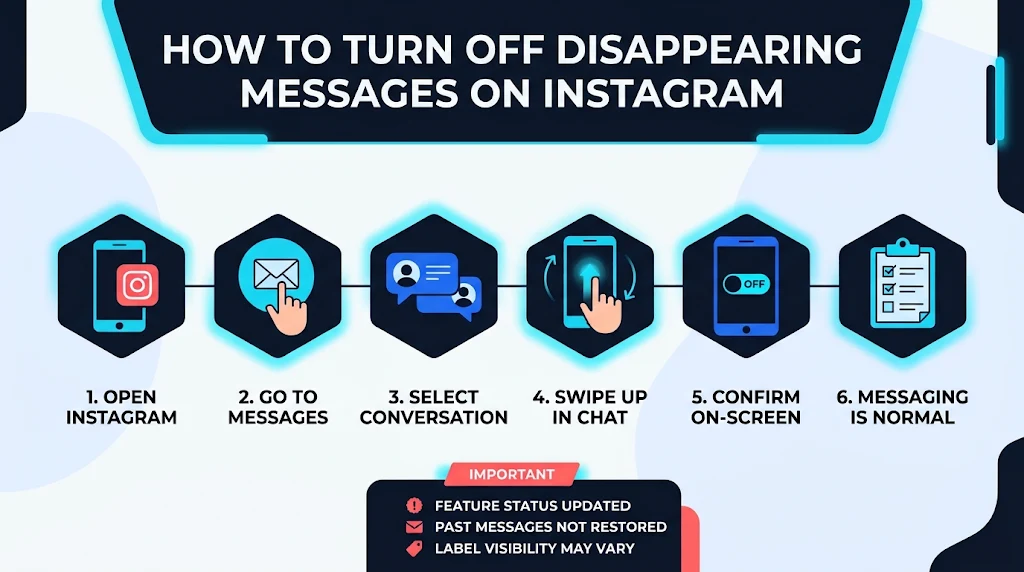
How to Turn Off Disappearing Messages on Instagram
Use the swipe gesture described in Instagram’s Help Center:
- Open the Instagram app on your phone.
- Open Messages in the Instagram app.
- Select the conversation where messages are disappearing.
- Swipe up within the conversation.
- Check the on-screen mode indicator or confirmation.
- Make sure temporary messaging is off before sending your next message.
Turning the feature off changes the chat setting; it does not bring back messages that have already disappeared.
If your screen does not match these instructions, use the options actually shown in your app. Labels and feature availability can differ; do not rely on a background-colour change alone.
How to Disable Instagram Disappearing Messages Through Chat Settings
If your chat offers a Disappearing messages control, you can use that control instead. Treat the following as a conditional route, not a menu available on every account:
- Open the Instagram conversation.
- Tap the person’s name at the top of the chat.
- If Disappearing messages is listed, open it. If it is absent, return to the chat and use the documented swipe method above.
- If an Off option is available, select it.
- Return to the conversation and check that temporary messaging is disabled.
Do not change read receipts or other privacy controls to solve this issue: they are different settings. If neither route works, update the app and consult Instagram Help from the app.
How to Turn Off Disappearing Messages on Instagram iPhone
Use the main procedure above on iPhone. If the gesture does not work, first check whether the chat exposes a disappearing-message control.
For an unresponsive or outdated app:
- Check the App Store for an Instagram update.
- Close and reopen Instagram, then check the same chat.
- Restart your iPhone if the app remains unresponsive.
Retest in the affected conversation; checking a different chat does not confirm that the original one has changed.
How to Turn Off Disappearing Messages on Instagram Android
Use the main procedure above on Android. Update Instagram through Google Play and reopen it before trying again.
If the app is still glitching, you can try clearing its cache. Android menu names vary by manufacturer:
- Open your phone settings.
- Go to Apps.
- Select Instagram.
- Open Storage or Storage & cache, depending on your phone.
- Tap Clear cache, not Clear storage or Clear data.
Clearing cache removes temporary app files. It is a troubleshooting step, not a way to recover vanished messages or switch off the chat setting.
Why Are My Instagram Messages Still Disappearing?
First identify what is missing: new text messages, a one-time photo or video, or an older conversation. Each points to a different issue.
Vanish Mode Is Still Active
Recheck the affected chat’s mode indicator. Switching one conversation back to normal does not establish the setting in another conversation.
Instagram App Needs an Update
If the interface differs from this guide, check your app store for an update. Updating may resolve an app issue, but does not restore expired content.
Temporary App Problems
Close and reopen the app and check your connection if messages are failing to load. Distinguish a loading problem from messages disappearing under an active temporary-chat setting.
You Are Confusing Disappearing Messages With Deleted Messages
An unsent message and a deleted conversation are different from an expiring message. Check which action occurred before looking for a fix; disabling temporary messaging is not a general recovery tool.
If unwanted contact is the issue, learn what happens if you restrict someone on Instagram before choosing how to manage that person’s messages.
Instagram Disappearing Messages vs Normal Messages
| Feature | Disappearing Messages | Normal Instagram Messages |
| Message visibility | Expires under the active setting | No disappearing-message timer |
| Main purpose | Temporary conversations | Regular communication |
| Chat history | Temporary visibility | Can be deleted or unsent |
| Good for business chats | Not recommended | Better option |
| Recovery options | Disabling does not restore expired content | Recovery is not guaranteed |
For details you need to refer to later, choose regular messaging and maintain a separate record. Neither column should be treated as a promise of permanent storage or recovery.
Can You Recover Disappeared Instagram Messages?
Turning off disappearing messages does not restore content that has already expired. Do not assume an app reinstall or cache reset will recover it.
A missing regular message needs a different diagnosis: it may have been unsent, deleted from your view or temporarily failed to load. The fact that it was sent in a normal chat does not guarantee recovery.
If the information matters, ask the sender to resend it as a regular message, if they still have it. Avoid giving your Instagram password to services promising guaranteed message recovery.
Does Instagram Notify Screenshots in Disappearing Messages?
Yes. Instagram’s guidance says you receive a notification if it detects a screenshot or screen recording of a disappearing message. This statement concerns disappearing chat messages, not every Instagram screen.
Disappearing photos and videos have separate viewing controls. Check the guidance for that content type instead of assuming all screenshot behaviour is identical. A notification is also not a guarantee that every external capture can be detected.
For sensitive information, consider whether you want to send it at all; temporary visibility should not be treated as a guarantee that the recipient cannot keep a copy.
Common Mistakes When Using Instagram Disappearing Messages
These habits reduce confusion and help protect information you need later:
Accidentally Activating Vanish Mode
Before continuing a conversation after an upward swipe, check whether its message mode changed. Use the setting indicator rather than assuming the gesture simply scrolled the chat.
Using Disappearing Messages for Important Information
Avoid using temporary chats for:
- Work details
- Customer conversations
- Payment information
- Important personal messages
Assuming It Applies to Every Chat
Check each affected conversation separately. A successful change in one chat does not confirm the setting elsewhere.
Frequently Asked Questions
What does it mean if someone turns off disappearing messages on Instagram?
It means the temporary-chat setting was switched off. It does not mean that earlier expired content has been restored.
How do I know if someone turned on disappearing messages on Instagram?
Check the chat’s mode label, timer or system notice, where shown. A changed background alone is not a reliable explanation for every missing message.
Does it notify when you turn off disappearing messages?
Do not assume the change is invisible. An in-chat notice and a push notification are different: the conversation may show its changed setting even when no phone alert appears. This guide does not confirm a universal push-notification rule across Instagram versions.
How do I turn off disappearing messages?
Use the main method above in the affected conversation, then verify the setting. If only a photo or video disappears, check its viewing option instead.
Can I permanently disable Instagram disappearing messages?
The instructions here apply to individual chats. They do not establish a permanent account-wide block on temporary messaging; check the setting in each affected conversation.
Why can’t I turn off Vanish Mode on Instagram?
Check for an app update, restart Instagram and confirm you are changing the correct chat. If controls remain unavailable or unresponsive, use the app’s Help or Report a problem option and describe what appears on your screen.
Final Thoughts
To stop temporary chat messages, use Instagram’s documented swipe-up method and confirm the mode has switched off. If your account displays a dedicated disappearing-message control, use the available Off option instead.


