

WhatsApp Screenshot Notifications: Explained
Does WhatsApp notify screenshots? No. WhatsApp does not tell the other person when you screenshot a normal chat, group, or Status. The exceptions are View Once media and profile photos, where WhatsApp blocks the capture instead of sending an alert.
Many WhatsApp users wonder if the other person can know when they take a screenshot of a chat, photo, or Status. The confusion is understandable, because some apps, such as Snapchat, do send alerts when someone captures a screen.
WhatsApp handles this differently. Instead of alerting people after a screenshot, it blocks the capture in a few protected areas. Understanding the difference between a screenshot notification and screenshot blocking helps you use WhatsApp more safely and avoid common privacy mistakes.
This guide explains how WhatsApp screenshot notifications work across chats, groups, Status, profile photos, View Once media, disappearing messages, video calls, Channels, Android, iPhone, and WhatsApp Web.
Does WhatsApp Notify Screenshots?
No. WhatsApp does not notify anyone when you take a screenshot of a normal conversation.
You can screenshot the following without any alert being sent:
- Individual chats
- Group chats
- Shared images and videos
- Documents
- Text messages
Unlike Snapchat, which sends screenshot alerts in many situations, WhatsApp has no general screenshot notification system for regular messages. If someone screenshots your normal WhatsApp conversation, you will not see an alert or warning, and you will have no way to tell.
A few features are treated differently, as the table below shows.
WhatsApp Screenshot Rules at a Glance
Different WhatsApp features follow different privacy rules. Here is a quick overview:
| WhatsApp Feature | Notification Sent? | Can You Screenshot It? |
| Normal chat messages | No | Yes |
| Group conversations | No | Yes |
| WhatsApp Status | No | Yes |
| Video calls | No | Yes, with no alert |
| Disappearing messages | No | Yes, normally |
| Profile picture (full screen) | No | Usually blocked |
| View Once photos and videos | No | Usually blocked |
The key point is that WhatsApp mostly limits access to certain private content instead of reporting every screenshot.
Does WhatsApp Notify Screenshots of Chats and Group Chats?
No. WhatsApp does not notify anyone when you screenshot a private chat, a business chat, or a group conversation. For example, if a friend sends you an address and you capture it for reference, they will not receive an alert.
Group Chats and Admins
Group conversations work the same way as personal chats. Other members will not know that you saved a screenshot. Many users believe group admins can see screenshot activity, but this is not true. WhatsApp does not give admins any screenshot tracking tool.
Because nobody is alerted, group privacy depends on how members handle shared information. A screenshot can still be passed on to others even when WhatsApp shows no notification.
Does Advanced Chat Privacy Stop Screenshots?
Advanced Chat Privacy is an optional WhatsApp setting for chats and groups. When it is turned on, it stops others from exporting the chat, auto-downloading media, and using the messages for Meta AI features. It is not a screenshot blocker. When it launched, reports confirmed that people could still take individual screenshots in these chats.
Does WhatsApp Notify Screenshots of Status Updates?
No. WhatsApp does not notify someone when you screenshot their Status.
Status works much like Instagram Stories. People can see who viewed their Status if read receipts are enabled, but the viewer list shows views only, not screenshots.
For example, if you view a friend’s Status and take a screenshot, they may see that you viewed it. They will not see that you saved a copy.
Status views and screenshot alerts are two separate features.
Does WhatsApp Notify Screenshots of Profile Pictures?
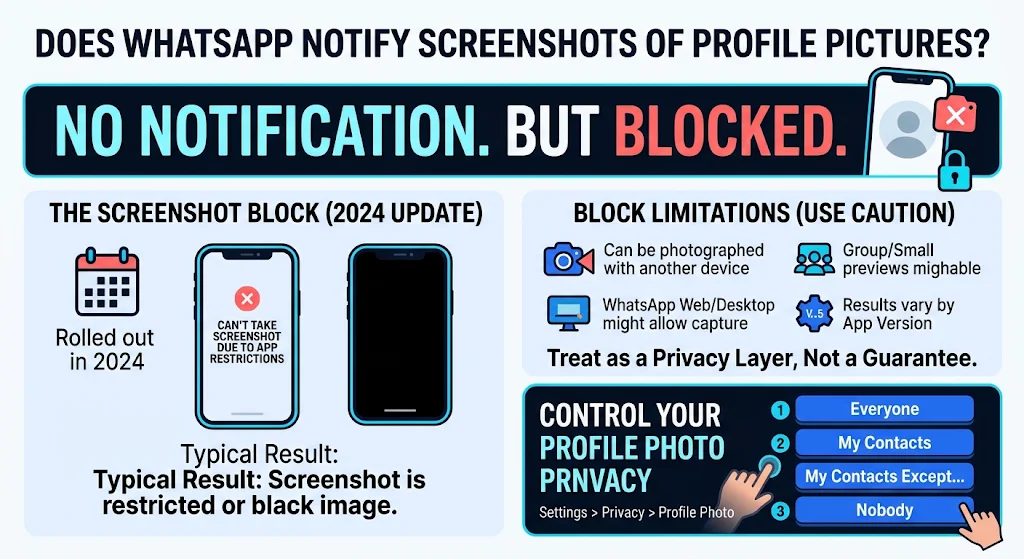
WhatsApp does not notify the profile owner when someone tries to screenshot a profile photo. This is, however, one of the areas where WhatsApp blocks the capture instead. WhatsApp’s Help Center states that it blocks users from taking screenshots of profile photos.
The restriction began rolling out in 2024, as reported by Android Police. When you try to capture a full-screen profile photo, you will typically see a black image or a message saying the screenshot cannot be taken because of app restrictions.
The block has limits. Reports say people can still photograph the screen with another device, and some users found that small previews, group-chat photos, or WhatsApp Web and Desktop could still be captured. Behavior can vary by app version, so treat it as a privacy layer rather than a guarantee.
To control who can see your profile photo, open Settings, tap Privacy, then choose Profile photo. You can pick:
- Everyone
- My Contacts
- My Contacts Except
- Nobody
Does WhatsApp Notify Screenshots of View Once Photos and Videos?
View Once media is the biggest exception in WhatsApp screenshot behavior. WhatsApp created View Once for content that people want to share only temporarily, such as:
- Private images
- Personal documents
- Sensitive information
WhatsApp does not alert the sender about a screenshot attempt. Instead, it tries to stop the capture altogether. This is different from apps that tell you after a screenshot has already happened.
View Once Screenshots on Android
On Android, WhatsApp typically prevents the screenshot or screen recording completely while the media is open.
View Once Screenshots on iPhone
On iPhone, the capture is also usually blocked, but reports say the protection can be less consistent. Results may depend on your iOS version and the WhatsApp version on both phones.
Limits of View Once Protection
- If the recipient uses an older version of WhatsApp, the screenshot block may not apply.
- Another phone or camera can always photograph the screen.
- View Once media cannot be forwarded or saved from within WhatsApp.
Does WhatsApp Notify Screenshots of Disappearing Messages?
No. WhatsApp does not send any alert when someone screenshots a disappearing message, and it does not block the capture either. The timer only removes the message from the chat later. It does not stop anyone from saving it while it is on the screen.
How Disappearing Messages Work
You can set disappearing messages to 24 hours, 7 days, or 90 days, for a single chat or as the default for new chats. When the time runs out, the message is removed from the chat. Until then, it behaves like any other message, so a screenshot goes unnoticed.
Kept Messages Are Different From Screenshots
WhatsApp also lets people keep a disappearing message so it stays in the chat. Unlike a screenshot, keeping a message is visible, because the chat shows that someone kept it. A screenshot leaves no such trace.
Screenshot Notification vs Screenshot Blocking
Many people confuse these two concepts, but they are not the same.
| Feature | Meaning |
| Screenshot notification | The app tells another person that a screenshot was taken |
| Screenshot blocking | The app prevents someone from capturing the content |
WhatsApp mainly uses blocking for certain private media instead of sending screenshot alerts. For normal chats, it allows screenshots without notification. For protected content such as View Once media and profile photos, it may prevent the capture depending on the platform.
Does WhatsApp Notify Screenshots During Video Calls?
No. WhatsApp does not notify anyone when a participant takes a screenshot during a video call. You also cannot stop someone from doing it, so avoid showing sensitive documents or information on a call unless you trust everyone on it.
Does WhatsApp Detect Screen Recording?
WhatsApp does not send a general alert when someone records their screen during normal conversations. Recording a chat, a regular photo, or a conversation will not notify the other user.
Protected View Once content may have extra restrictions. Even so, no messaging app can guarantee complete protection once information appears on someone’s screen, because another device can always capture it.
Can You Tell If Someone Screenshots Your WhatsApp?
No. WhatsApp has no built-in way to show who screenshotted your chats, Status, or profile. Apps that claim to detect WhatsApp screenshots cannot do this reliably, and some may put your account or data at risk, so it is best to avoid them.
A safer approach is to control what you share and who can see it.
WhatsApp Screenshot Notifications on Android vs iPhone
The basic behavior is mostly the same on both platforms. The main difference is how strongly View Once media is protected.
| Situation | Android | iPhone |
| Normal chats and groups | Allowed, no alert | Allowed, no alert |
| Status updates | Allowed, no alert | Allowed, no alert |
| Profile photo (full screen) | Usually blocked | Usually blocked |
| View Once photos and videos | Usually blocked completely | Blocked, but can be less consistent |
Does WhatsApp Notify Screenshots on Android?
No. Android users can screenshot normal chats, groups, Status updates, and shared media without sending an alert. Some Android phones have their own privacy features, but WhatsApp itself does not notify the sender.
Does WhatsApp Notify Screenshots on iPhone?
No. iPhone users also do not trigger alerts when capturing normal WhatsApp conversations. The iOS screenshot function works normally in regular chats, while protected features such as View Once may restrict it.
Does WhatsApp Notify Screenshots on WhatsApp Web or Desktop?
No. Taking a screenshot on WhatsApp Web or the desktop app does not send an alert either. Behavior around protected content can differ from the phone app, so do not assume a privacy feature on your phone works the same way on a computer.
Does WhatsApp Notify Screenshots in Channels, Communities, and Business Chats?
No. WhatsApp has no screenshot alert for Channels, Communities, or WhatsApp Business chats. Channel updates, Community announcements, and business conversations can be captured like normal messages, and neither the admins nor the business are told.
Voice Messages and Location Shares
A screenshot of a voice message only captures the waveform and the time, not the audio. Shared locations and Live Location maps can be captured like any other message. In both cases the sender gets no notification, and View Once voice messages follow the same no-alert rule.
WhatsApp vs Other Apps: Screenshot Alerts
Many users compare WhatsApp with Snapchat because Snapchat is famous for screenshot alerts. Other apps sit somewhere in between.
| App | Screenshot Alerts? | Details |
| No, for normal chats | Blocks View Once media and profile photos instead of alerting | |
| Snapchat | Yes | Notifies people about screenshots in chats and snaps |
| Only for disappearing content | Alerts for disappearing photos, videos, and Vanish Mode in DMs. It no longer alerts for Stories. | |
| Telegram | Secret Chats only | Regular chats send no alert. In Secret Chats, iPhone screenshots alert the other person, and Android blocks them |
WhatsApp focuses on encryption, privacy settings, and blocking, while some social platforms use screenshot alerts as part of their privacy approach.
Instagram also has its own disappearing-message controls, so it helps to know how to turn off disappearing messages on Instagram if you prefer normal chats. Its Restrict feature is another privacy tool, and you can compare it with blocking by seeing what happens if you restrict someone on Instagram.
4 Common Mistakes About WhatsApp Screenshots
1. Thinking WhatsApp Always Sends Screenshot Alerts
A common belief is that every messaging app tells users when screenshots are taken. This is incorrect. WhatsApp does not send alerts for normal conversations.
2. Assuming Disappearing Messages Cannot Be Saved
Disappearing messages delete automatically after a selected time, but they do not guarantee that information cannot be saved. Someone may still remember, copy, or capture it before it disappears.
3. Believing Privacy Settings Stop Screenshots Completely
WhatsApp privacy settings help control who can access your information, but they cannot control what another person does after viewing it. Good privacy habits are still important.
4. Treating View Once as Completely Safe
View Once makes casual saving much harder, but it is not perfect. Another phone can photograph the screen, and protection can vary by device and app version. Only send View Once content you would be comfortable having captured.
How to Improve Your WhatsApp Privacy
Although WhatsApp does not notify users about screenshots, you can improve your privacy by adjusting your settings.
Review Privacy Controls
Check these options:
- Profile photo visibility
- Last seen settings
- Online status
- Status audience
- Blocked contacts
These options help control who can view your information.
Avoid Sharing Sensitive Information
Before sending private content, consider whether you would be comfortable if it was saved or shared. Screenshots are only one way information can be copied.
Your phone number is also part of your WhatsApp privacy. If you are not sure which number your account uses, read our guide on what is my WhatsApp number before you change your settings.
Can You Stop Someone From Taking Screenshots on WhatsApp?
For normal WhatsApp chats, there is no option to completely stop someone from taking screenshots. You cannot prevent another person from capturing text messages, normal photos, or chat conversations. Advanced Chat Privacy limits exports and auto-downloads, but it does not block screenshots.
The exceptions are protected media such as View Once content and profile photos, where WhatsApp may restrict the capture. The best approach is to control what you share and use WhatsApp privacy settings carefully.
Frequently Asked Questions
Does the other person get notified if you screenshot WhatsApp?
No. WhatsApp does not send any alert when you screenshot a normal chat, group, Status, or shared media. The only places where WhatsApp steps in are View Once media and full-screen profile photos, and there it blocks the capture instead of notifying anyone.
Can I screenshot a WhatsApp message without them knowing?
Yes. Nothing is sent to the other person and nothing changes in the chat. The only way they can find out is if you share the screenshot yourself.
Does WhatsApp notify someone if I screenshot their disappearing messages?
No, and WhatsApp does not block it either. The timer (24 hours, 7 days, or 90 days) only removes the message from the chat later, so it can still be captured while it is visible.
Does WhatsApp notify screenshots of profile pictures?
No alert is sent, because WhatsApp blocks most full-screen profile photo captures instead. Small previews and group-chat photos may still be capturable, depending on your app version.
Can WhatsApp detect or block screenshots?
WhatsApp does not report screenshots of normal chats. It only blocks capture in protected areas such as View Once media and profile photos, and it does not tell the other person about the attempt.
Is it different on iPhone and Android?
For normal chats, no: neither platform sends an alert. The difference is View Once, which is usually blocked completely on Android and can be less consistent on iPhone.
Does Advanced Chat Privacy stop screenshots?
No. It limits chat exports, media auto-downloads, and Meta AI use, but people can still take screenshots in those chats.
Does WhatsApp notify screenshots of chat in 2026?
No. WhatsApp still does not notify users when someone screenshots normal chats in 2026. WhatsApp updates its privacy features often, so check the “Last updated” date at the top of this guide.
Conclusion
WhatsApp does not currently send screenshot notifications for normal chats, group conversations, Status updates, video calls, or profile pictures. The person you are chatting with will not know if you capture a screenshot of regular content.
The main exceptions are View Once photos and videos and full-screen profile photos, where WhatsApp focuses on preventing capture rather than notifying users.
Knowing how WhatsApp handles screenshots helps you make better privacy decisions. WhatsApp offers several privacy features, but you should always think carefully before sharing sensitive information, because screenshots and photos of a screen can still be created in different ways.


